

WhatsApp price list and reorder for dealers works when you stop forwarding PDFs into groups and start sending each dealer an approved message with a versioned rate list, then let a chatbot answer the “bhai, rate kya hai?” questions that follow. This guide shows how to set it up on the WhatsApp Business API, what Meta requires, what it costs, and where a chatbot should hand over to your team.
Quick answer: collect opt-in from each dealer, tag dealers by tier or city, send the new price list as an approved template with the PDF attached, and load the same file into an AI chatbot so dealers can ask for a rate and get an answer from your list. For reorders, a keyword flow or a WhatsApp Flow form collects the items and quantities and passes them to your team. The chatbot does not process orders or price per dealer, so your team still confirms and invoices.
Key takeaways
- Send every price list with a version number and an effective date, so only one list is ever “current”.
- Dealers must opt in first. Meta requires it, and a dealer who did not expect your message is the one who blocks you.
- Meta decides whether a template is utility or marketing. A rate list with offers or schemes will usually be treated as marketing, so budget for that.
- The DTB chatbot answers from the PDF or CSV you upload. It does not do dealer-specific pricing or take orders.
- Chatbots, flows and automations need DTB’s Pro plan (₹1,499 a month). Campaigns and templates work on Basic (₹500 a month).
Published 9 October 2026 by the Digital Toolbox team. Meta’s pricing, template and opt-in rules checked the same day.
In this guide
- Why price lists and reorders break in WhatsApp groups
- How the WhatsApp price list and reorder for dealers flow works
- How to send a dealer price list on WhatsApp
- How dealers check rates and reorder in the chat
- Follow up on dealers who have not read the new list
- Common mistakes
- What it costs
- How DTB helps
- FAQ
Why price lists and reorders break in WhatsApp groups
Price lists and reorders break in WhatsApp groups because a group has no version control and no record of who saw what. The new list lands between a “good morning” image and a dealer’s question, and three weeks later someone is still quoting the old rate.
Picture a Morbi tile maker with sixty dealers. A rate revision goes out as a PDF in a broadcast list. Some dealers save it, some never open it, and two reply with an order at last month’s price. Now your sales head has to decide whether to honour the old rate or lose the dealer’s goodwill. That is a rate dispute, and it costs margin every time.
Reorders have the mirror problem. A dealer sends “same as last time, 20 boxes” to a salesperson’s personal number. If that person is on leave, the order waits. If the dealer is annoyed, they message a competitor instead. Neither problem is about WhatsApp itself. Both come from using a personal chat as a business system.
The fix has three parts: a channel that is the same for every dealer, a message that proves which version went out, and a place where the reorder request lands for the whole team to see. That is what the WhatsApp Business API gives you, and it is also why a shared inbox matters more than a faster phone. If you are still deciding between the free app and the API, our guide to the WhatsApp Business app vs WhatsApp Business API explains where the line sits.
How the WhatsApp price list and reorder for dealers flow works
The flow has five stages: the dealer opts in, you send the new price list, the dealer asks about a rate, the chatbot answers from your list, and a reorder request reaches your team. Each stage maps to one feature, and none needs a developer.
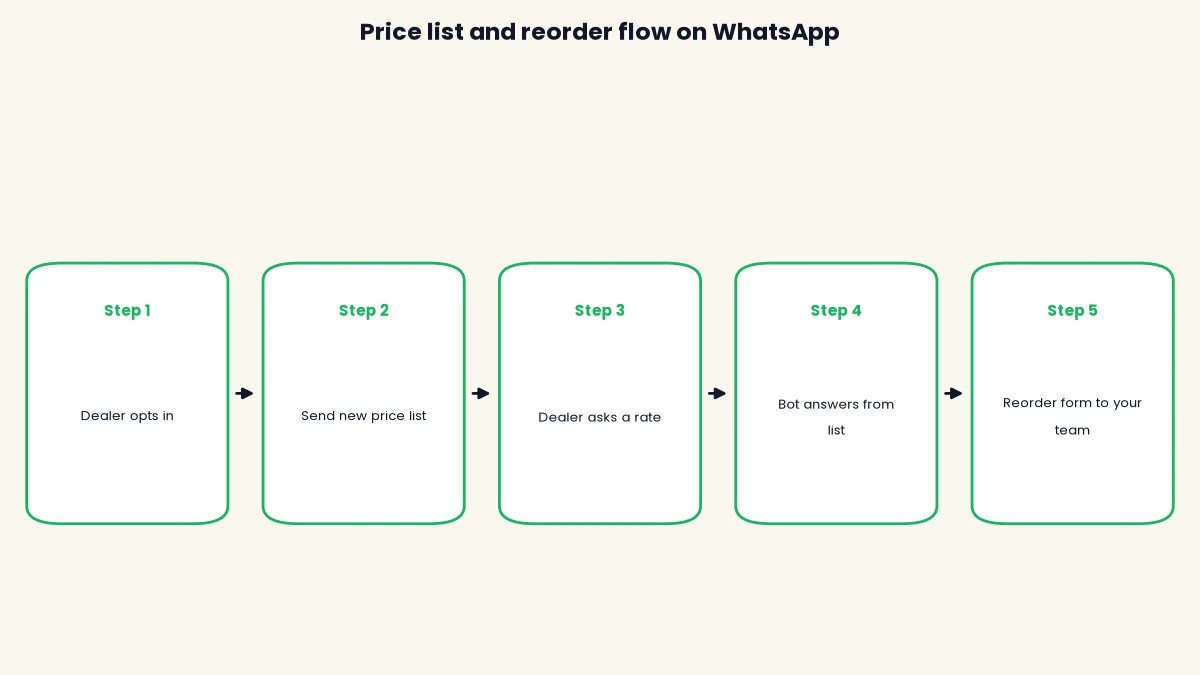
The first two stages are outbound. You choose the dealers, attach the file and send. The next three are inbound, which is where most manufacturers and distributors lose time today. A dealer who writes first opens a 24-hour customer service window, a period in which you can reply with free-form messages instead of a template. That window is what makes the chatbot useful for rate questions.
Here is the same flow as a quick reference.
| Stage | What happens | DTB feature used |
|---|---|---|
| 1. Opt-in | Dealer agrees to get WhatsApp messages from you | Contacts, tags, subscribe node |
| 2. Send list | Template with PDF goes to a chosen dealer group | Templates, campaigns, segments |
| 3. Dealer asks | Dealer writes “price of 25mm pipe?” | Team inbox, 24-hour window |
| 4. Bot answers | Chatbot replies from your uploaded list | AI chatbot knowledge base (Pro) |
| 5. Reorder | Items and quantity captured, team confirms | Chatbot flows, WhatsApp Flows, sales pipeline (Pro) |
How to send a dealer price list on WhatsApp
You send a dealer price list on WhatsApp by getting opt-in, grouping dealers with tags, writing an approved template that carries the PDF, and sending or scheduling it as a campaign. Allow a day for Meta’s template review before the date you want the new rates live.
Step 1: get opt-in from every dealer
Meta’s WhatsApp Business Messaging Policy says you may only contact people who gave you their number and opted in to hear from you on WhatsApp. For dealers you already deal with, a simple written tick on the dealer onboarding form, a signed agreement or a “yes” reply to your first message all work, as long as you keep the record.
Ask for opt-in by category where you can. A dealer may want rate lists and dispatch updates but not festival offers. Meta recommends separate opt-ins by message type, because it lowers the chance that someone blocks you. Never send to a bought or scraped dealer list. Blocks and spam reports pull down your number’s quality rating, and Meta can then limit how many people you can message.
Step 2: group dealers with tags and segments
Tags and segments let you send each dealer only the list that applies to them. DTB contacts hold a name, city, company and up to 50 custom fields, so you can store a dealer code or a product line on the record. Import dealers from a CSV, then add lowercase tags such as dealer-gold, distributor-west or pipes.
Segments update themselves as dealers match their rules, and the rule builder supports AND and OR logic with nested groups. A segment like “tag is distributor-west AND city is Surat” keeps a regional list from reaching the wrong group.
| Dealer group | Example tag | What to send | When |
|---|---|---|---|
| Top-tier distributors | distributor-gold | Full rate list with scheme sheet | On every revision |
| Regional dealers | dealer-west | Region-specific list | Monthly or on revision |
| Product-line buyers | pipes, fittings | Only the matching category list | On revision |
| New or inactive dealers | dealer-new | Intro message first, list after a reply | After opt-in |

Step 3: write the template
A price list template has a short body with variables for the version and the effective date, plus the PDF as a document header. DTB’s template builder accepts a body up to 1,024 characters with {{1}} style variables, an optional footer and up to three buttons, and shows a live preview. Templates for media-led messages accept an image, video or document.
Keep the wording factual. A sample body: “Hello {{1}}, our rate list version {{2}} is effective from {{3}}. The PDF is attached. Please reply YES to confirm you have received it.” The reply gives you a signal that the dealer saw the file, though it is a habit you build with dealers, not something WhatsApp enforces. Name the template in lowercase letters, numbers and underscores, such as rate_list_notice.
Step 4: choose the category and know Meta decides it
Meta assigns the template category, not you. Its template categorisation guide says utility templates must be non-promotional, and a template mixing utility and marketing content is treated as marketing. Meta’s page does not mention price lists by name, so treat the outcome as unconfirmed until your template is approved.
A plain notice of a rate revision with no offers has a better chance of being accepted as utility. A list that pushes a scheme, a discount or “order now” will usually be marketing. Rejections often come from the category not matching the content, so choose the category that honestly describes the message. Templates are submitted to Meta for review, which can take up to 24 hours, and rejected ones can be appealed.
Step 5: send now or schedule
Pick the audience by segment or tag (or upload a CSV in three steps: upload, map data, compose and send), choose the approved template, add the PDF and send immediately or use Send later. The message body is locked to the approved template, so nobody can edit the wording on the day and break compliance.
Test on two or three internal phones first. Check that the version number, the date and the file open correctly, then send to a small friendly group of dealers before the full list. Watch the campaign report for delivered, read and failed counts, and fix numbers that fail before the next revision.
Here are the five steps in one place.
- Get opt-in from every dealer and keep the record.
- Import dealers and group them with tags and segments.
- Write a template with version and date variables and the PDF as a document.
- Submit it to Meta and accept the category Meta assigns.
- Test on internal phones, then send or schedule the campaign.
How dealers check rates and reorder in the chat
Dealers check rates and reorder in the chat when a chatbot answers rate questions from your uploaded price list and a short form or keyword flow captures the reorder for your team. The chatbot answers questions. It does not accept or process orders.
Let the chatbot answer from your price list
DTB’s AI chatbot has a knowledge base that accepts uploaded PDFs and CSVs, typed notes and website URLs. Upload the current rate list, and the bot answers customer questions from that source. You can set an AI persona and instructions, such as a polite tone and a rule to point the dealer to your team for anything it cannot find.
Choose a trigger mode that fits the way dealers write. Outside Business Hours covers evening and Sunday questions when the team is offline. No Human Reply Yet answers only if nobody on your team has replied to that dealer. Keyword Match replies when a message contains words such as “rate” or “price”. When you upload a new version, replace the old file so the bot never quotes last month’s rates.
Keep Meta’s AI rule in mind. Meta has banned general-purpose AI chatbots on WhatsApp since 15 January 2026, while scoped support and sales assistants remain allowed. A bot answering from your own rate list is a scoped business assistant, which is the allowed kind. Set its instructions to stay on your products.
Capture the reorder with a keyword flow or a WhatsApp Flow
For reorders, build a chatbot flow triggered by a keyword such as “reorder” or “order”. The flow can send a message, show buttons or a list menu, and ask the dealer what they need. For a form that feels like an app, a WhatsApp Flow shows a multi-screen form inside the chat, with a product picker, text inputs, a date picker for the delivery date and a terminal screen. Fields map back to the contact record.
After the form, the flow can write the request to a Google Sheet, create a deal in the sales pipeline with a title, value and note, and assign the chat to a person or team. Your salesperson then sees a clear request in the shared inbox with the dealer’s history beside it. They confirm stock, quote the dealer’s price and send the invoice through their usual process.
What the chatbot does not do
The chatbot does not apply a different price to each dealer, check stock, check a credit limit or generate an invoice. Those decisions stay with your team. DTB’s product does not include per-dealer price rules, so if your rate depends on dealer, volume or contract, the bot should hand over rather than guess. Tell the dealer clearly in the bot’s instructions that “special rates are confirmed by our team”.
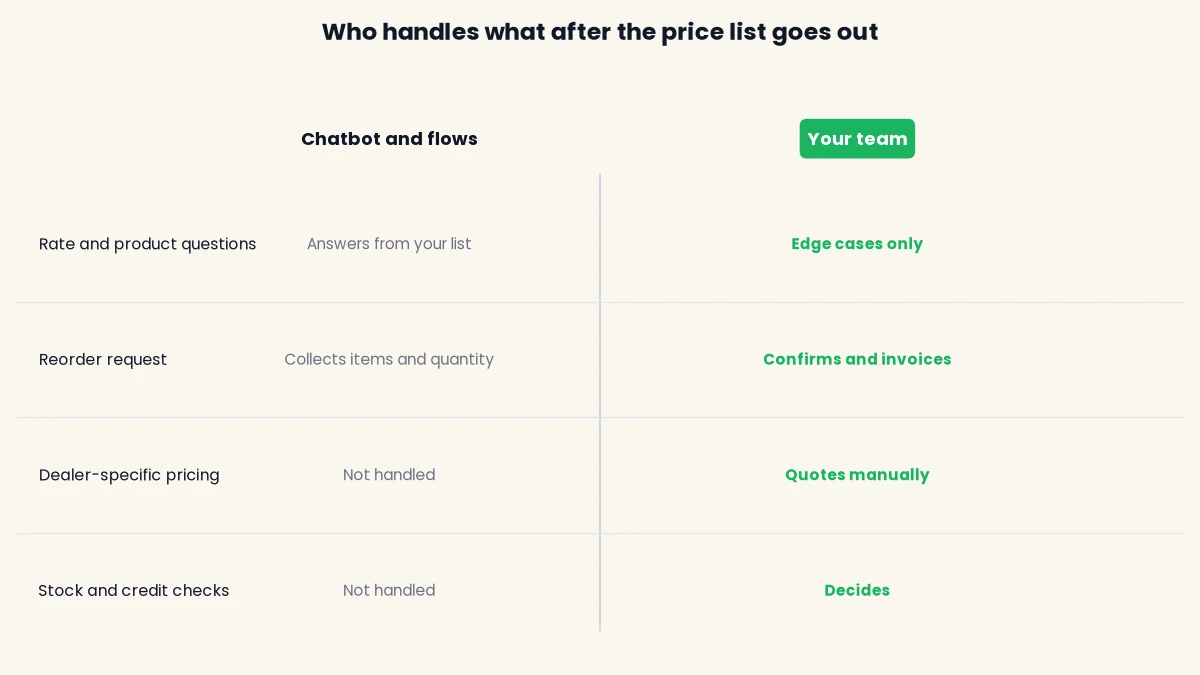
This split protects you. A reorder that carries the wrong price is worse than a reorder that waits ten minutes for a human. Where a payment is part of the reorder, a flow can send a Razorpay payment link and branch on whether it was paid or expired, but invoicing and GST stay in your own accounts software.
Follow up on dealers who have not read the new list
You can follow up on dealers who have not read a new list with an automation that sends the template, waits, checks whether the message was read and sends a reminder if it was not. This needs the Pro plan.
DTB automations start when a contact enters a segment. Create a segment for the dealers receiving the new list, then build the canvas: Send Template, Wait two days, a decision on whether the message was Read or Replied to, and a second Send Template reminder on the “not read” branch. Add a tag such as list-v3-seen on the “read” branch so you can see who is up to date.
Read receipts are a helpful signal and not a perfect one, because a dealer can turn them off in WhatsApp privacy settings. Treat a reply as the stronger sign. For dealers who stay silent, have a salesperson call. The aim is to reduce chasing, not to end it.
Limit reminders to one. A dealer who gets three nudges for a rate list is the dealer who blocks your number, and a block counts toward your quality rating. Our guide on how to avoid getting your WhatsApp number blocked covers the habits that keep quality high.
Common mistakes
- Sending without opt-in. Dealers you only met once at an expo may not expect WhatsApp messages. Get a clear yes first, and keep the record.
- Skipping the version and date. Without them, the old PDF stays in circulation. Put both in the template body and the file name.
- Leaving the old file in the chatbot. The bot answers from whatever you uploaded. Replace the file on the same day the new rates go live.
- Mixing offers into a rate notice. Meta can re-categorise the template as marketing, which costs more and sits under stricter limits. Send schemes as a separate message.
- Letting the bot promise a price. Without per-dealer pricing, a bot that quotes “your rate” is guessing. Point special rates to your team.
- Sending one list to every dealer. A Surat distributor does not need a Chennai list. Use tags and segments.
What it costs
The cost has two parts: DTB’s monthly platform fee and Meta’s per-message charge, which DTB passes through with no markup. Meta’s charge depends on the template category and the destination country, so a price list sent as a marketing template costs more per dealer than a utility notice.
| Cost item | Who charges it | How it is counted |
|---|---|---|
| DTB Basic: campaigns, templates, segments | DTB | ₹500 a month, or ₹5,000 a year |
| DTB Pro: adds chatbot, flows, automations, pipeline | DTB | ₹1,499 a month, or ₹14,999 a year |
| Price list template (marketing or utility) | Meta | Per delivered message, by category and country |
| Replies inside the 24-hour window | Meta | Free-form replies are not charged. From 1 October 2026 Meta charges utility templates sent in the window |
To budget, multiply your number of dealers by the number of lists per year and by Meta’s per-message rate for your category, then add the plan fee. Meta publishes the INR rate cards on its WhatsApp Business Platform pricing page, and it updates them quarterly. Check the current figure before you commit. Our WhatsApp Business API pricing guide for India has a full worksheet.
The numbers are small next to a rate dispute. Even a single order honoured at the wrong price can cost more than several months of messaging, which is why the version number and effective date matter more than the per-message fee.
Start with DTB at ₹1,499 a month. The Pro plan includes the AI chatbot, chatbot flows, WhatsApp Flows, automations and the sales pipeline, so the whole price list and reorder setup runs in one place. Start with DTB and the team will help you connect your number.
How DTB helps
DTB is an official Meta Tech Provider, and it charges no markup on Meta’s per-message pricing. For a dealer network, these are the parts that matter:
- Campaigns with a template and a document: send the PDF to a segment or tag, now or scheduled, with delivered, read and failed counts in the report.
- Contacts, tags and nested segments: up to 50 custom fields for dealer code, region or product line, and tags that apply themselves by rule.
- AI chatbot knowledge base: upload your price list as a PDF or CSV, choose a trigger mode and set the bot’s persona.
- Chatbot flows and WhatsApp Flows: keyword-triggered reorder requests, a product picker, Google Sheets, Create Deal and Razorpay payment links.
- Automations: send, wait, check read status and send a reminder.
- Shared team inbox: chats assigned to a person or a team, so a reorder does not depend on one salesperson’s phone.
- Coexistence: keep using the WhatsApp Business app on the same number while the API runs.
Typical time from signup to first message is about 15 minutes, and DTB’s team shows you how to send it. Chat and call support runs 10:00 to 19:00 IST, Monday to Friday. If you run a factory or a stockist business, our guide to the WhatsApp Business API for manufacturers covers the wider setup, and the best WhatsApp Business API provider in India comparison shows how providers differ.
Frequently asked questions
Can I send a price list to dealers on WhatsApp?
Yes, through the WhatsApp Business API, to dealers who have opted in. You send an approved template with the PDF attached, and you can schedule it. The free WhatsApp Business app limits how many people you can reach in one go and has no shared inbox.
Is a price list a utility or a marketing template?
Meta decides, and its documentation does not name price lists. Utility templates must be non-promotional, and mixed content is treated as marketing. A plain rate-revision notice may be accepted as utility, while a list with offers will likely be marketing.
Do dealers need to opt in before I send a price list?
Yes. Meta’s policy says you may only message people who gave you their number and opted in. Existing dealers can opt in through an onboarding form, a signed agreement or a reply to your first message. Keep a record of when and how they agreed.
Can a WhatsApp chatbot take dealer orders?
Not on its own. DTB’s chatbot answers questions from your uploaded price list, and a flow can collect the items and quantity as a reorder request. Your team then confirms stock, price and the invoice.
Can I send different prices to different dealers?
You can send different lists to different dealer groups by using tags and segments, such as one PDF for gold distributors and another for regional dealers. DTB’s chatbot does not apply a separate price to each dealer, so special rates need your team.
Can I handle RFQ and quotation requests on WhatsApp?
You can receive them. A flow can collect the product, quantity and delivery date and create a deal in the sales pipeline with a note. DTB does not generate quotations, so your team prepares and sends the quote.
Can I keep using my current WhatsApp number?
Yes, with DTB’s Coexistence option you connect an existing WhatsApp Business app number and keep using the mobile app on it. Coexistence has limits, which our coexistence guide explains. A dedicated Cloud API number is the other option.
Conclusion
A WhatsApp price list and reorder for dealers setup replaces forwarded PDFs with a versioned message, a chatbot that answers from your own list and a reorder request that lands in a shared inbox. Start small: opt in a few dealers, tag them, send one list and watch the read counts. Then add the chatbot and the reorder form. Keep the master rule in mind: only message dealers who opted in, and send only what you would want to receive.
Book a free demo. See the campaign, chatbot and reorder flow on your own price list, and we will show you how to send your first message. Book a free demo with DTB.