Picking the right WhatsApp Business API provider in India means comparing five things most roundups blur together: Meta’s own per-message rate, your provider’s markup (or lack of it) on that rate, the flat platform fee, Coexistence support, and how fast you can actually get approved and live.
Quick answer: If zero markup on Meta’s rate and compliance-first onboarding matter most to you, DTB is built for that, from a flat ₹1,499 a month. If you need a mature no-code chatbot builder, WATI is worth a look. Shopify- and Instagram-heavy D2C brands often prefer Interakt. AiSensy bundles AI agent features with a free entry tier. Gupshup fits high-volume enterprises that need custom infrastructure and don’t mind a sales-led, wallet-based setup. The sections below cover pricing, Meta markup, Coexistence, onboarding and support for each, with sources and dates so you can check everything yourself.
On this page:
- What is a BSP?
- How WhatsApp Business API pricing works in India
- DTB vs other providers at a glance
- Full comparison table
- How DTB helps
- Provider profiles
- Common mistakes when comparing providers
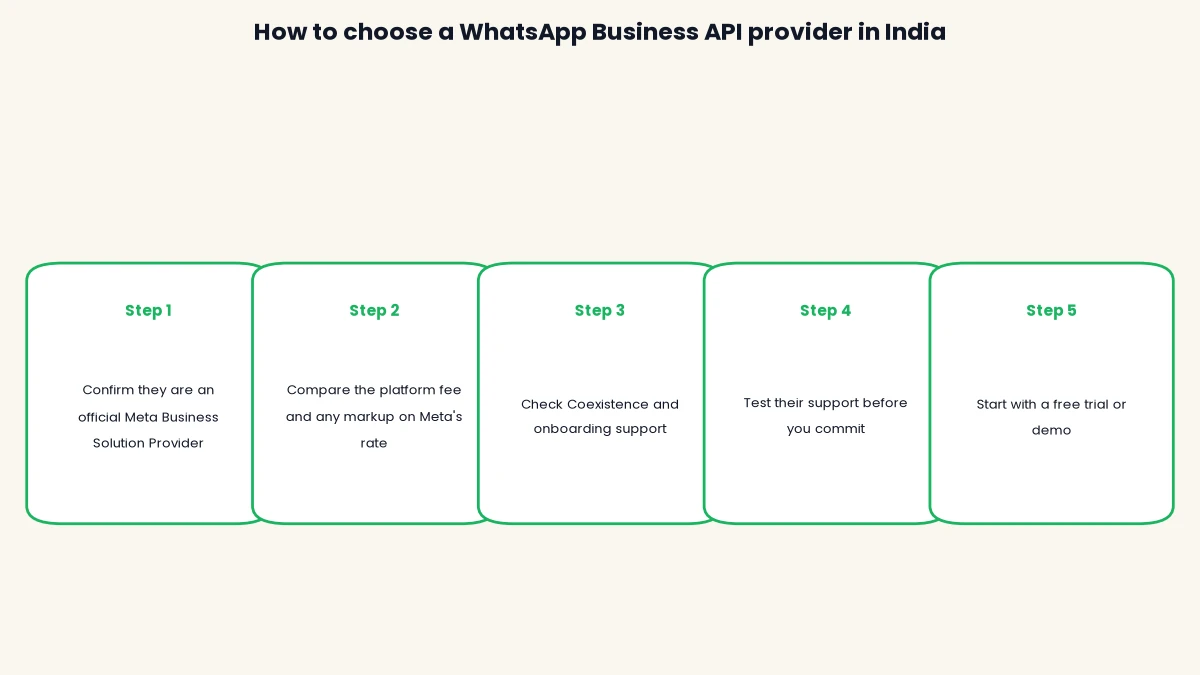
- How to choose a provider: a 5-step checklist
- Frequently asked questions
Ready to skip the research? Start with DTB at ₹1,499/month, zero markup on Meta’s rate, live in under 24 hours.
What is a WhatsApp Business API provider (BSP explained)
A Business Solution Provider, or BSP, is a company Meta has approved to give businesses access to the WhatsApp Business Platform: the metered, automation-ready version of WhatsApp built for teams, not a single phone.
Meta does not onboard most small and mid-sized Indian businesses directly. Instead, you sign up through a BSP, which gives you the underlying Cloud API connection, a dashboard or shared inbox, template creation and submission to Meta for approval, and (for most BSPs) tools like broadcast messaging, chatbots and CRM integrations layered on top. This is different from the free WhatsApp Business app: the app is one number on one phone with replies typed by hand, while the API supports unlimited team members on the same number, automated flows, bulk campaigns and connections to your store or CRM, which is why it needs a BSP and a metered billing relationship with Meta in between.
Every outbound template a BSP submits on your behalf falls into one of three categories Meta reviews before approval: marketing (offers, catalogue updates), utility (order and appointment updates) or authentication (OTPs). Approval status and your account’s quality rating (the green, yellow or red flag Meta assigns based on block and complaint rates) both sit with Meta, not your BSP, but a good BSP actively helps you keep that rating healthy, since a red rating can pause your ability to send messages entirely. The official green tick verification badge is a separate, optional step tied to your Meta Business Account, not something any BSP can grant on its own.

A Surat saree seller sending dispatch updates and an Ahmedabad cafe running a festive offer both need a BSP for the same underlying reason: Meta’s own onboarding path is built for large enterprises, not a single-location retailer, so a BSP is the practical entry point. Every option you consider should be listed in Meta’s own Business Solution Provider directory; using one that isn’t puts your number at risk of a permanent ban, since it means you’re routing messages through an unofficial or unverified integration.
How WhatsApp Business API pricing works in India
Your monthly bill has two separate layers, and conflating them is the single biggest source of confusion when comparing a WhatsApp Business API provider against another. Layer one is Meta’s own per-message charge, which every BSP passes on because Meta bills it directly. Layer two is the BSP’s own fee for the dashboard, support and tooling, either as a flat platform fee, a markup added to every message, or a prepaid wallet.
| Category | Rate (excl. GST) | Rate (incl. 18% GST) |
|---|---|---|
| Marketing | ₹0.8631 | ₹1.02 |
| Utility | ₹0.115 | ₹0.14 |
| Authentication (domestic) | ₹0.115 | ₹0.14 |
| Authentication (international) | ₹2.4971 | ₹2.95 |
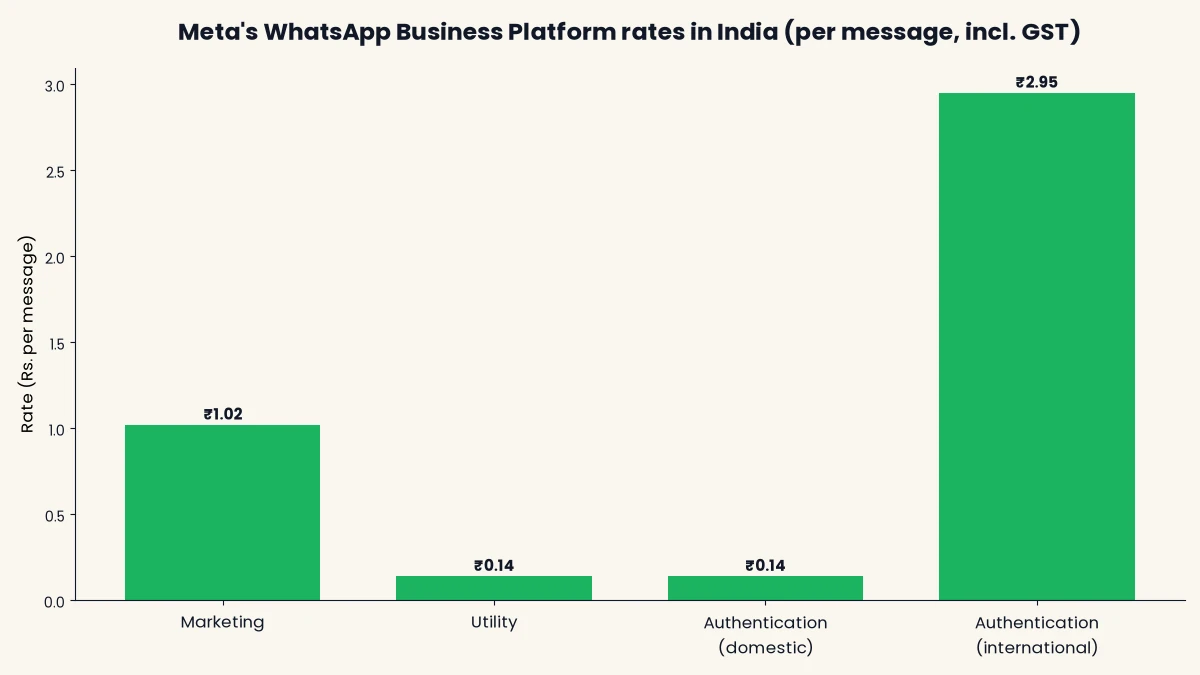
These are Meta’s published India rates (checked September 2026), confirmed against Meta’s official pricing documentation. Since July 2025, Meta bills per delivered template message instead of per 24-hour conversation, and from 1 October 2026, service messages beyond a free monthly quota and utility messages sent inside an open conversation window also become chargeable. For the full breakdown by business size, see our WhatsApp Business API pricing in India guide.
“Zero markup” pricing means a provider charges you Meta’s rate exactly, rupee for rupee, and earns its revenue from the platform fee alone. A markup model instead adds a percentage, commonly 10 to 30 percent, on top of every message Meta charges you for. Neither model is inherently dishonest, but a flat fee is far easier to budget against than a percentage that scales with your message volume, which is why it matters as a comparison column below.
Meta also offers volume tier discounts on utility and authentication messages once a business crosses certain monthly thresholds, so a high-volume sender’s effective per-message rate can drop below the headline figures in the table above. GST at 18% applies to Meta’s own charge because it’s treated as an imported digital service under India’s GST law, and it applies separately to your BSP’s platform fee. For a single-location business sending 500 to 2,000 utility and authentication messages a month, Meta’s own charges alone typically run ₹70 to ₹280, before the BSP’s platform fee is added; a growing D2C brand sending 5,000 to 15,000 messages a month sees Meta’s own charges land somewhere between ₹700 and ₹2,100. These are Meta’s charges only, not your total bill, which is why the platform fee column in the comparison table below matters just as much as the per-message rate.
DTB vs other providers at a glance
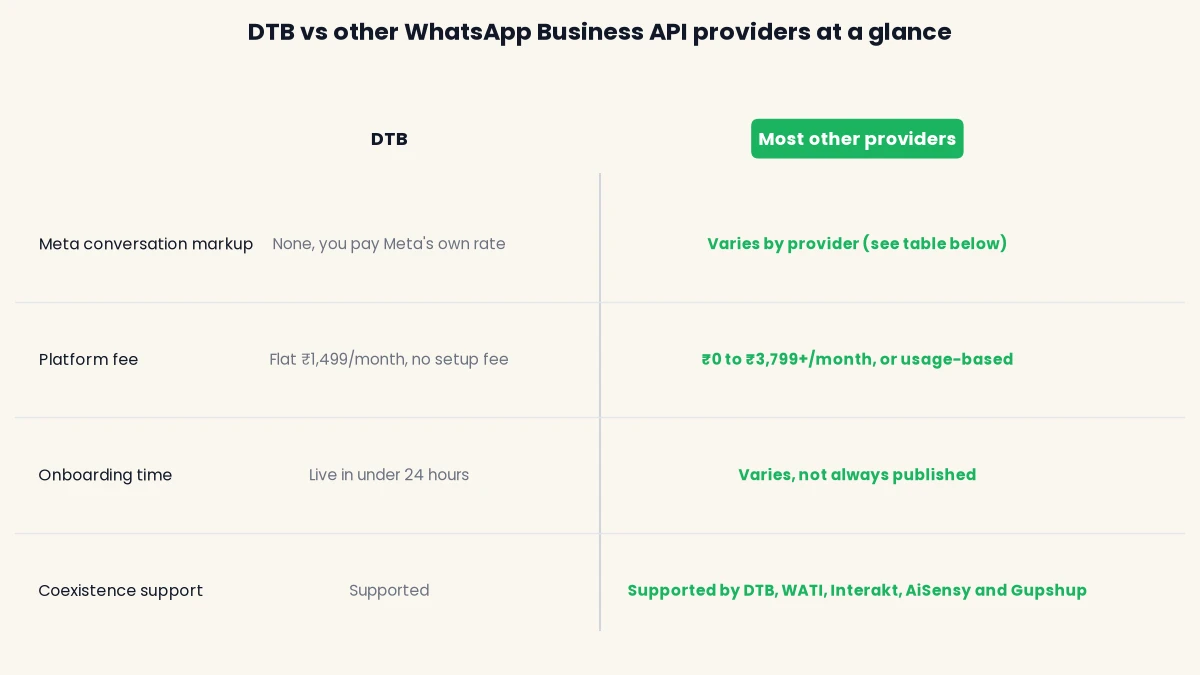
Choose DTB if predictable, zero-markup pricing and compliance-first onboarding (opt-ins, template approval, quality rating monitoring) matter more than a single specific feature. Choose one of the other four if a particular capability, such as WATI’s chatbot builder or Interakt’s Shopify and Instagram integration, is the deciding factor for your business.
Full comparison: pricing, Meta markup and support
The table below is the fastest way to compare each whatsapp business api provider on the things that actually change your monthly bill and your setup experience. Every competitor figure is sourced to that provider’s own public pricing page and checked in September 2026; where a provider doesn’t publish a figure, the table says so rather than guessing.
We built this comparison by reading each provider’s current public pricing page directly rather than relying on third-party roundups, which is why some cells say “Not listed publicly” instead of a number: DTB’s policy is to never state a competitor’s price, feature or policy unless it’s published on that company’s own site. Where a provider’s pricing page didn’t specify something, like whether a per-message markup is included, we say so rather than guess, and note it as a question worth asking their sales team directly before you sign up.
| Provider | Platform fee | Meta conversation markup | Free tier / trial | Coexistence | Onboarding help | Support channels | Best for |
|---|---|---|---|---|---|---|---|
| DTB | Flat ₹1,499/month (plans from ₹500/month), no setup fee | None, you pay Meta’s rate | Free demo; live in under 24 hours | Supported | Guided, compliance-first setup (opt-ins, templates, quality rating) | Priority support | SMBs that want predictable, zero-markup billing |
| WATI | $29 to $249/month (Growth, Pro, Business) | Not listed publicly | 7-day free trial, no card required | Supported | Not listed publicly | Not listed publicly | No-code chatbot builders and shared-inbox support teams |
| Interakt | Free Starter plan; ₹2,799 to ₹3,799/month (Growth, Advanced); custom Enterprise | Not stated for Growth/Advanced; Enterprise tier is explicitly marketed as “no markup charges” | Free Starter plan plus trials on paid tiers | Supported | Not listed publicly | Not listed publicly | Shopify and Instagram-heavy D2C sellers |
| AiSensy | “Free Forever” plan; ₹1,350 to ₹2,500/month for chatbot and AI agent add-ons | Lists marketing conversations at ₹1.09 and utility/authentication at ₹0.145 per message, both above Meta’s own published India rate | Free Forever plan | Supported | Not listed publicly | Not listed publicly | Businesses wanting AI chatbot features bundled with a free entry tier |
| Gupshup | Not listed publicly (prepaid wallet, no published flat subscription) | Not listed publicly | Not listed publicly | Supported | Requires a sales conversation | Not listed publicly | High-volume enterprises needing custom infrastructure |
Prices checked on September 2026. WATI’s plans are published in USD; convert at the day’s rate before comparing to the INR figures here. Coexistence, the Meta feature that lets a business run the free app and the paid API on the same number at once, is documented as supported by all five providers in this table, sourced to each provider’s own help centre or documentation pages.
Want the exact numbers for your own volume? Book a free demo and we’ll estimate your monthly bill against your actual message mix.
How DTB helps
DTB is an Official Meta Tech Provider built around zero markup on Meta’s own WhatsApp Business API rate: you pay Meta’s rate directly, and DTB’s fee is a flat ₹1,499 a month regardless of how many messages you send, so your bill doesn’t grow with a hidden percentage the way a markup model does. Onboarding is compliance-first: we handle template submission, opt-in setup and ongoing quality rating monitoring so your number doesn’t get flagged as you scale. Coexistence means you keep using the free WhatsApp Business app on the same number alongside the API, so switching to the API doesn’t mean giving up the app your staff already know. On top of the core API connection, DTB includes broadcast messaging to opted-in lists, unlimited team logins on the same number, and connections to your store and CRM, all billed under the same flat monthly fee rather than as separate add-ons.
[ankit: add one real, specific observation DTB has seen across its customer base here, for example a common reason businesses switch from another BSP, or a common mistake new signups make. Do not publish this section without a true detail to replace this placeholder.]
Provider profiles: what each one is best at
DTB
DTB’s case for a cautious, compliance-focused SMB is straightforward: a flat ₹1,499 a month with no markup on Meta’s rate, guided setup for opt-ins and template approval, and Coexistence so you don’t lose the app you already run day to day. It’s the right fit if predictable billing and staying on the right side of Meta’s policies matter more to you than a specific automation feature one of the others offers. Because the platform fee doesn’t change with volume, a business that scales from a few hundred messages a month to a few thousand doesn’t see its DTB bill jump the way it would under a percentage-markup model, only Meta’s own metered charge grows.
WATI
WATI’s strongest public feature is its no-code chatbot builder and shared team inbox, aimed at support-heavy teams rather than pure broadcast marketing. Pricing runs from a $29/month Growth plan up to a $249/month Business plan, billed in USD, with a 7-day free trial and no setup fees. Additional users cost extra on every tier ($24/user/month on Growth and Pro, $69/user/month on Business), which is worth budgeting for if you run a multi-agent support desk rather than a single operator. WATI is a fair pick if a visual chatbot builder and multi-agent support workflows are your priority and you’re comfortable with USD billing; its published pricing page doesn’t state whether Meta’s per-message rate is passed through at cost or marked up, so confirm that directly with their sales team before committing.
Interakt
Interakt, owned by Jio Haptik, leans into Shopify and Instagram integration, which makes it a natural fit for D2C sellers already running their store and social presence through Meta’s ecosystem. Its free Starter plan (WhatsApp or Instagram only) is genuinely free, and paid tiers run ₹2,799 to ₹3,799 a month, with a separate Sales CRM add-on at ₹2,499 a month for pipeline tracking. Its pricing page markets “no markup charges” only on the custom Enterprise tier, which implies the lower tiers may include one, though Interakt doesn’t state this explicitly, so it’s worth asking before you sign up if you’re on Growth or Advanced.
AiSensy
AiSensy’s headline draw is a “Free Forever” plan alongside paid AI chatbot and agent-builder add-ons at ₹1,350 to ₹2,500 a month, which makes it accessible for a business that wants to start without committing to a subscription. Its own pricing page lists marketing conversations at ₹1.09 and utility/authentication conversations at ₹0.145 per message, both above Meta’s own published India rate (₹1.02 and ₹0.14 respectively, including GST), which is worth factoring in if you send a high volume of marketing messages rather than mostly utility or authentication traffic.
How the five compare on integrations
Beyond pricing, the practical day-to-day difference between these providers is often which store and payments stack they plug into cleanly. Interakt’s Shopify integration is the most publicly documented of the five for ecommerce order events. AiSensy and WATI both position their chatbot builders as store-agnostic, working through webhooks rather than a native Shopify or WooCommerce app. DTB’s API access is built to connect to a store or CRM the same way, through webhooks and standard integrations. None of the five publish a definitive list of every ecommerce or payments platform they support, so if a specific Shopify, WooCommerce or Razorpay integration is a hard requirement, confirm it directly with the provider before signing up rather than assuming from marketing copy.
Gupshup
Gupshup doesn’t publish a flat monthly subscription; it runs on a prepaid wallet, and getting a quote means going through a sales conversation rather than a self-serve signup. That’s a genuine tradeoff: it makes Gupshup harder to compare on paper, but it’s also the model that fits Gupshup’s usual audience of high-volume enterprises with custom infrastructure needs that a fixed-tier plan wouldn’t suit anyway. Volume-based discounts are real once you clear certain monthly message thresholds, but the entry point for those tiers tends to be far higher than what a single-location SMB sends. If you’re a small business, the lack of published self-serve pricing is a real reason to look at the other four first.
Common mistakes when comparing a WhatsApp Business API provider
Most roundups stop at listing providers and prices. These are the mistakes that actually cost businesses money or compliance headaches after they’ve signed up.
- Comparing the platform fee without checking the Meta markup. A provider with a low or free platform fee can still cost more overall if it marks up every message, especially once your volume grows. Always ask for the per-message rate you’ll actually be billed, not just the plan price.
- Assuming Coexistence is automatic. Coexistence has to be enabled during setup, and not every plan or tier includes it by default. Confirm it explicitly if keeping your existing WhatsApp Business app matters to you.
- Skipping the Meta BSP directory check. An unofficial integration that promises WhatsApp API access without going through Meta’s approval process is a permanent-ban risk, not a shortcut. Verify the company against Meta’s own directory before you hand over your number.
- Choosing on price alone without testing support. A cheap plan with slow or unhelpful support costs more in lost time than a slightly pricier plan with fast answers, especially during template approval delays or a quality rating drop.
- Not confirming who owns template approval turnaround. Template rejections and resubmissions are common in the first few months. Ask upfront how the provider helps you fix a rejected template, rather than leaving you to interpret Meta’s rejection reason alone.
- Signing an annual contract before testing the dashboard. A discounted yearly plan looks appealing until the interface doesn’t fit how your team actually works. Use the free trial or demo first, and only move to an annual commitment once you’ve sent real messages through the platform.
How to choose a provider in India: a 5-step checklist
Use this sequence before you sign up with any provider, whether or not it’s one of the five above.
- Confirm they’re an official Meta Business Solution Provider. Check the provider against Meta’s own BSP directory. An unofficial or unverified integration puts your number at risk of a permanent ban.
- Compare the platform fee and any markup on Meta’s rate. Ask directly whether the provider passes Meta’s per-message rate through at cost or adds a percentage, since this isn’t always stated on the pricing page, as the comparison table above shows.
- Check Coexistence and onboarding support. If you want to keep using the WhatsApp Business app on your current number, confirm Coexistence is supported and ask how long approval typically takes.
- Test their support before you commit. Message their sales or support team with a real question and see how fast and how useful the answer is. This tells you more than any pricing page about what happens after you sign up.
- Start with a free trial or demo. Most providers, including DTB, offer a no-obligation way to try the dashboard and confirm it fits your workflow before you commit to a monthly fee.
Learn more about what businesses actually use the API for on our use cases page, and if number safety is a concern as you evaluate providers, read how to avoid getting your WhatsApp number blocked before you migrate.
Frequently asked questions
What is a WhatsApp API provider (BSP)?
A WhatsApp API provider, or BSP, is a company Meta has approved to give businesses access to the WhatsApp Business Platform: the metered, multi-user, automation-ready version of WhatsApp, as opposed to the free single-phone app.
How much does a WhatsApp API provider charge in India?
You pay two layers: Meta’s own per-message rate (around ₹1.02 for marketing and ₹0.14 for utility or authentication messages, including GST) plus the provider’s own fee, which is either a flat monthly plan, a markup on Meta’s rate, or a prepaid wallet. Total costs for a small business commonly range from ₹1,500 to ₹8,000 a month.
Is WATI more expensive than DTB?
WATI’s plans run from $29 to $249 a month, billed in USD, compared to DTB’s flat ₹1,499 a month with zero markup on Meta’s rate. Which is cheaper for you depends on the exchange rate and whether WATI marks up your per-message cost, which isn’t stated on its pricing page.
Does Gupshup have a free trial?
Not listed publicly. Gupshup runs on a prepaid wallet and typically requires a sales conversation to get a quote, rather than a self-serve free trial like WATI, Interakt or AiSensy offer.
Can I switch WhatsApp API providers without losing my number or chat history?
Yes, in most cases. Migrating between official BSPs keeps your phone number and Meta verification status, since both are tied to your Meta Business Account, not to any single provider. Confirm the specifics with your new provider before you migrate.
Which WhatsApp API provider is best for a small business just starting out?
For a small business prioritising predictable costs and compliance help, DTB’s flat ₹1,499-a-month, zero-markup plan is built for that. If a free entry tier matters more than predictable pricing, AiSensy’s Free Forever plan or Interakt’s free Starter plan are worth comparing.
Do all these providers support Coexistence?
The five providers covered in this comparison (DTB, WATI, Interakt, AiSensy and Gupshup) all document Coexistence support on their own sites, letting you run the WhatsApp Business app and the API on the same number. Always confirm current support directly before migrating, since feature availability can change.
Why do some providers charge more than Meta’s own per-message rate?
Some BSPs add a markup, commonly 10 to 30 percent, on top of Meta’s rate as part of how they earn revenue, instead of charging a flat platform fee alone. AiSensy’s published rates, for example, sit above Meta’s own India rate for marketing messages. Always ask a provider directly whether their quoted per-message rate already includes a markup.
What’s the biggest mistake businesses make when choosing a provider?
Comparing only the platform fee and missing the Meta markup question. A provider with a low sticker price can still cost more overall once you factor in a percentage added to every message, so always ask for the exact per-message rate you’ll be billed before you compare plans.
Whichever whatsapp business api provider you choose, verify the numbers directly on their current pricing page before you commit, since rates and plans change. If predictable, zero-markup pricing and compliance-first setup are what you’re after, that’s exactly what DTB is built for.
Ready to get started? Book a free demo or start with DTB at ₹1,499/month, live in under 24 hours with zero markup on Meta’s rate.