
WhatsApp Business API for manufacturers lets a factory, a manufacturing unit or a B2B supplier send order updates, invoices and payment reminders from one shared team inbox, instead of from one person’s phone. This guide covers the jobs that work best for manufacturers, the message templates to start with, what Meta requires, and what DTB includes.
Quick answer: an owner with one phone and a handful of buyers can manage on the free WhatsApp Business app. Once dispatch, dealer enquiries and payment follow-ups are shared across a team, the API is the better fit. You connect through a provider such as DTB, send approved utility templates for updates, let an AI chatbot answer price-list questions from your own files, and track buyers in a sales pipeline. Basic starts at ₹500 a month and Pro at ₹1,499 a month. Meta’s per-message charges are billed separately. Start with DTB or keep reading for the details.
Key takeaways
- Use the API when a team, not one person, handles dispatch, dealer and payment messages.
- Send order and invoice updates as utility templates that Meta has approved, and only to customers who opted in.
- A dealer price list can come from a chatbot that answers from your uploaded PDF or CSV. That is on the Pro plan.
- Meta’s per-message charges are separate from the DTB fee, and DTB adds no markup on them.
- The rupee cost example is pending verified Meta rates, so this guide does not quote a per-message figure yet.
Last checked 5 October 2026. Meta’s pricing pages were checked the same day, but the India rate card could not be read, so no per-message rupee rate is quoted here yet.
In this guide
- Why manufacturing teams outgrow the Business app
- Five jobs manufacturers can run on the API
- Who WhatsApp Business API for manufacturers fits
- Sample message templates for manufacturers
- Opt-in and compliance for dealer and buyer lists
- Common mistakes to avoid
- What it costs
- Setup checklist for a manufacturing team
- How DTB helps, and where it does not
- Where to start
- Frequently asked questions
Why manufacturing teams outgrow the Business app
A small factory usually starts with the WhatsApp Business app on the owner’s phone. That works for quotes to a few regular buyers. It stops working once several people answer customers, dealers ask for price lists at odd hours, and dispatch updates go out late because they depend on who happens to be free.
The app is built for one device. Two people cannot share one conversation list, you cannot see who replied last, and there is no record of which dealer’s order is waiting for an invoice. The owner ends up scrolling through a single phone to work out what happened to an order.
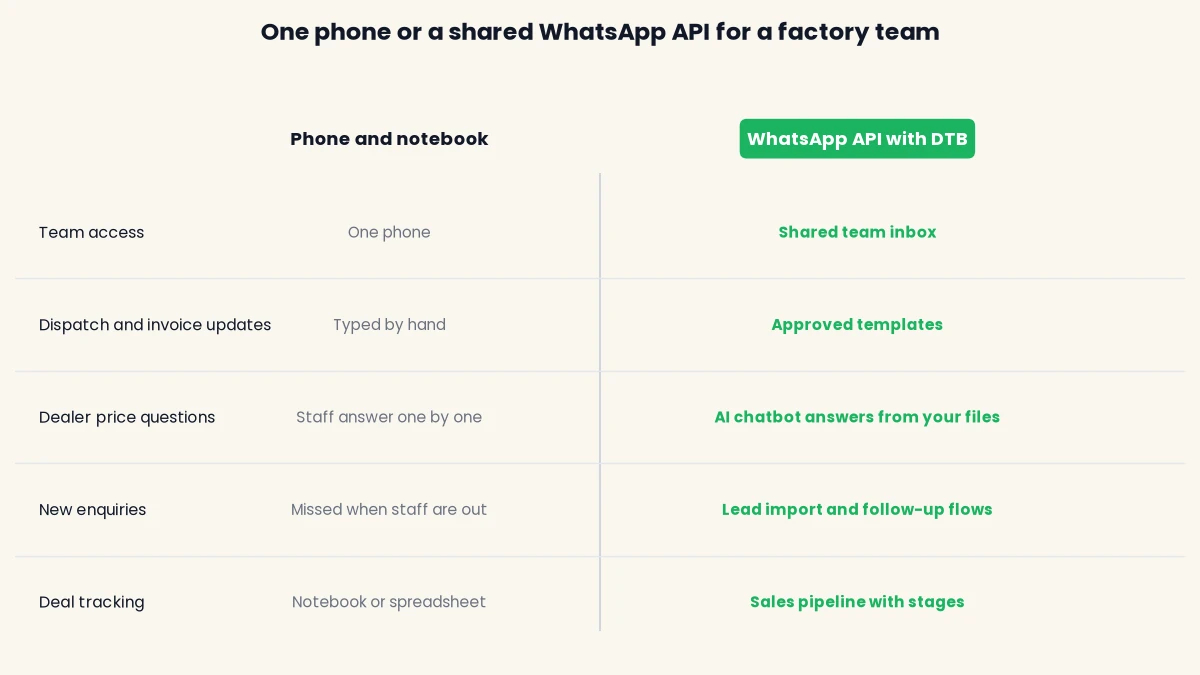
The API replaces the one-phone setup with a shared inbox. Chats can be assigned to a user or a team, and conversations are grouped as Open, Expired, Snoozed or Resolved, so the dispatch desk and the sales desk work from the same list. Routine messages can be sent from approved templates, so the wording stays the same whoever is on shift.
The table below compares the two setups across the tasks a factory cares about most.
Five jobs manufacturers can run on the API
Most factories start with a few routine messages and add more once the team trusts the setup. The table shows what each job does, the Meta category it usually falls under, and the DTB feature that supports it.
| Job | What the message does | Meta category | DTB feature |
|---|---|---|---|
| Dispatch and order updates | Confirms an order, then reports dispatch and expected delivery | Utility | Approved template, team inbox |
| Invoice and payment reminders | Shares an invoice and asks for payment when it falls due | Utility | Approved template, Razorpay payment link in a chatbot flow |
| Dealer price lists and reorders | Answers price and product questions from your own list | Depends on content | AI chatbot knowledge base (Pro) |
| Lead capture and follow-up | Replies to new enquiries and follows up after a set wait | Depends on content | Facebook Lead Ads import, automations with Wait steps (Pro) |
| Deal tracking | Moves each buyer or dealer through stages, for example Lead, Qualified, Won | Not a message | Sales pipeline (Pro) |
Start with one job. Dispatch updates are the usual first step because they are routine and easy to write as a template. Book a free demo to see these jobs set up in a workspace, or start on the Pro plan at ₹1,499 a month if you already know you need the chatbot and pipeline.
Dispatch and order updates
A dispatch update is the message a buyer wants most and the one a factory sends least consistently. The buyer wants to know the order is confirmed, when it left the gate, and when it should arrive. A template gives every update the same three facts, and it does not depend on whoever is at the packing desk remembering to send it.
Build one template for each stage that matters to your buyers, usually confirmation, dispatch and delivery. Keep the wording factual. Meta reviews the category, so a dispatch update that reads like a sales offer may be rejected. The team inbox then lets the dispatch desk pick up any reply, such as a question about a short delivery, without the owner’s phone being involved.
Invoice and payment reminders
Payment reminders are where a factory can lose the most time. A reminder sent a week late, or one that nobody sent at all, delays cash that the business has already earned. An approved template with the invoice number, amount and due date gets the same information to every buyer, and it does not depend on who remembers to chase.
DTB’s chatbot flows can also send a Razorpay payment link and branch on the result, so the flow can tell paid from expired. Keep reminders tied to a real invoice, because a reminder about an existing transaction is the kind of message Meta’s utility category covers. Anything that reads like a sales push should not go in that template, because Meta can reject the wording.
Dealer price lists and reorders
Dealers ask the same questions again and again: what is the current price, what is the minimum order, and is a product still available. Answering each one by hand takes staff time, and the answers can differ from one person to the next. A dealer price list is a file that changes often, which makes it a poor fit for a message that never changes.
On the Pro plan, DTB’s AI chatbot can take your price list as a knowledge base source. The knowledge base accepts uploaded PDFs and CSVs, typed notes and website URLs, and the bot answers customer questions from those sources. Give it a clear scope and a helpful persona, and keep the file current. The bot is a business assistant for questions about your list, not a general chatbot, which matters because Meta has banned general-purpose AI chatbots on WhatsApp since 15 January 2026.

A reorder is a different job from a price question. It needs a person to confirm stock and delivery, so the chatbot should collect the order details and hand the conversation to the sales desk. DTB’s Assign Team and Assign User nodes route a chat to the right people, and Create Deal can add the enquiry to the pipeline with a stage, title and value.
Lead capture and follow-up
Enquiries come from many places: a trade show, a website form, an ad, or a referral. Each one is worth more when it gets a fast reply. DTB can import Facebook Lead Ads submissions as contacts automatically, so a new ad lead lands in your contact list without copying it across by hand.
Automations on the Pro plan can then follow up on a set schedule. A segment-entry automation can send a message, wait, and send another if there is no reply, using the Wait and Send Template steps. Keep each follow-up short and tied to what the buyer asked for. Repeated messages that nobody asked for lead to blocks and spam reports, and those feed into your phone number’s quality rating.
Who WhatsApp Business API for manufacturers fits
The API fits a manufacturer when messages are part of how the business sells and ships. It is less useful for a one-person unit that sells to a few buyers a month and handles every message personally.
Use this as a quick check:
- Good fit: several people answer buyers or dealers, or dispatch and invoice messages go out every day.
- Good fit: you supply many dealers or distributors who ask for the same price list again and again.
- Not yet: one owner handles every buyer personally and messages are rare.
- Check first: you need an ERP, a quotation tool or an IndiaMART feed connected, because DTB’s current feature list does not include those.
Other sectors use the same workspace in different ways. The DTB use cases page shows how other teams set it up.
Sample message templates for manufacturers
Meta reviews every template before it can be sent, and the review can take up to 24 hours. A common reason for rejection is a category that does not match the content, such as a promotional offer written inside a utility template. Meta sets the category rules, so check its current definitions before you submit. The four templates below use {{1}}-style variables. Replace the example text with your own wording.
Dispatch update (utility)
“Hi {{1}}, your order {{2}} has been dispatched and is on its way. Expected delivery: {{3}}. Reply to this message if anything looks wrong.”
Invoice ready (utility)
“Hi {{1}}, invoice {{2}} for order {{3}} is ready. The total is ₹{{4}}. Reply here if you need a copy or a change.”
Payment reminder (utility)
“Hi {{1}}, invoice {{2}} for ₹{{3}} was due on {{4}}. You can pay here: {{5}}. If you have already paid, please ignore this message.”
Dealer price list update (marketing)
“Hi {{1}}, our revised price list for {{2}} is ready. Reply PRICE and we will send the file, or ask about any product in the list.”
This one is marketing, so only send it to dealers who opted in to marketing messages. A utility category would not cover a promotional price update, and a mismatch like that is a common cause of rejection.
Opt-in and compliance for dealer and buyer lists
Meta requires a business to have opt-in before it messages anyone on WhatsApp. A dealer who gave a number on a trade show form has not necessarily agreed to WhatsApp messages. Collect a clear opt-in, and give people a simple way to stop getting marketing messages. These are Meta’s rules, and they apply to every provider.
DTB supports opt-in with an opt-in checkbox component in WhatsApp Flows, and with subscribe and unsubscribe nodes in chatbot flows. Meta also limits businesses whose quality stays low over a sustained period. A list of numbers bought from a third party is one of the fastest ways to get a number restricted. For the checks to run before you send, read how to avoid getting your WhatsApp number blocked.
Meta’s rules change often, so check its current developer documentation before you launch.
Common mistakes to avoid
Most problems with a manufacturing setup come from a few avoidable choices. Each one below is easy to fix before the first send, and much harder to fix after a number has been restricted.
- Sending promotions as utility templates. A price offer written inside a dispatch or invoice template does not match the category, and Meta can reject it. Put offers in a marketing template, and send it only to contacts who opted in to marketing messages.
- Loading a bought or borrowed list. Numbers from a third party have not agreed to hear from you on WhatsApp. Import only contacts who opted in, and record where each contact came from.
- Leaving the shared inbox unassigned. Chats that nobody owns sit in Open until a buyer gives up. Assign each chat to a user or a team, and check the Expired view for conversations outside the 24 hour service window.
- Giving the chatbot no scope. A bot that answers anything will wander off your product range. Give it a clear persona and a knowledge base built from your own list, and let staff take orders and exceptions.
- Letting the price list go stale. The chatbot answers from the file you uploaded. Replace the PDF or CSV whenever prices change, or dealers will get last quarter’s rates.
- Leaving out an opt-out route. Meta requires clear instructions for opting out and that the business honours them. Use the unsubscribe node in chatbot flows, and tell recipients how to stop marketing messages.
What it costs
Your bill has two parts. The first is the DTB platform fee. The second is Meta’s per-message charge, which Meta bills separately from DTB. DTB adds no markup on Meta’s charges.
| DTB plan | Monthly | Yearly | What it includes |
|---|---|---|---|
| Basic | ₹500 | ₹5,000 (₹417 a month, saves 17%) | Contacts, tags and segments, team inbox, bulk campaigns, message templates, campaign reporting |
| Pro | ₹1,499 | ₹14,999 (₹1,250 a month, saves 17%) | Everything in Basic, plus AI chatbot and flows, automations, WhatsApp Flow builder, integrations, sales pipeline and priority support |
Basic covers dispatch updates and bulk messages to dealers. The AI chatbot for price-list questions, the automations for follow-up and the sales pipeline all need Pro.
[ankit] Rupee cost example pending. The worked example, with monthly message volumes and Meta’s charge for each message type, is not written yet. It needs India’s current per-message rates from Meta’s rate card, and the rate table on Meta’s site did not load when it was checked. Read how the charges work in Meta’s WhatsApp pricing documentation, then confirm the current rates and any changes on Meta’s pricing updates page before publishing. Remove this note once the example is in.
Setup checklist for a manufacturing team
Setup takes about 15 minutes from signup to your first message, once your Meta Business account and number are ready. DTB’s team helps you through it end to end and shows you how to send your first message. Check the WhatsApp Business API requirements for India before you start, then follow these five steps in order.
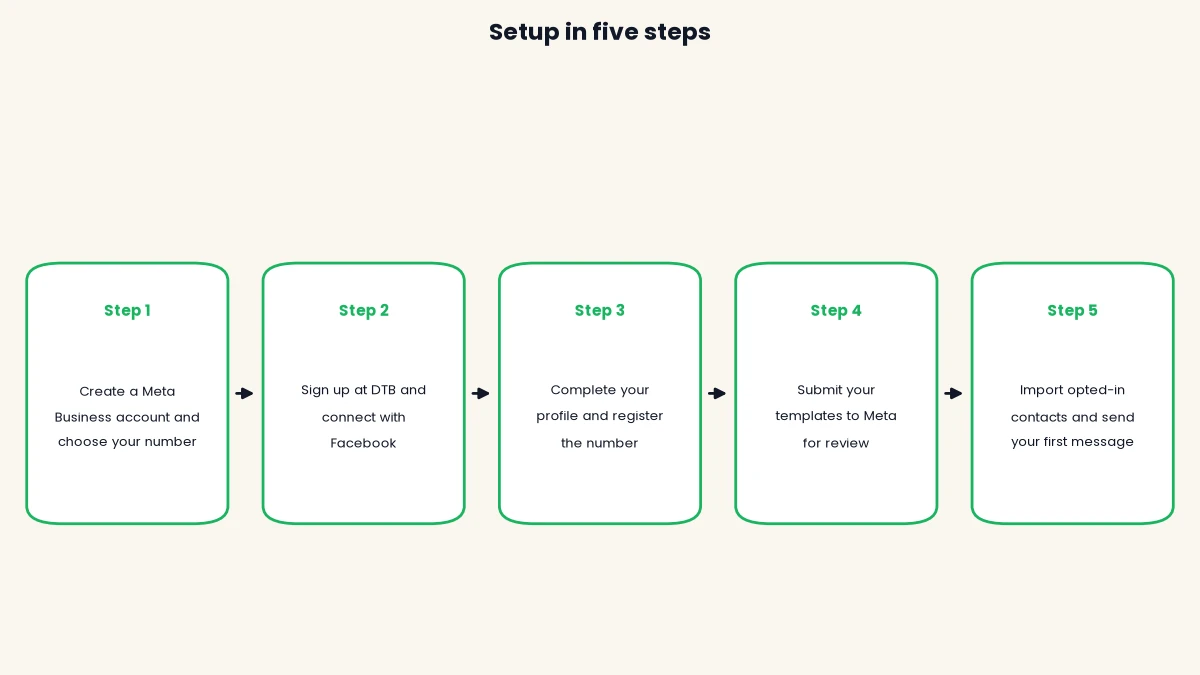
- Create a Meta Business account and choose your number. Use a number dedicated to the API, or keep your existing WhatsApp Business app number through Coexistence.
- Sign up at DTB and choose Connect with Facebook. The WhatsApp Business account connects automatically, with no copy-pasting.
- Complete your business profile and register the phone number with Meta. Add a two-step verification PIN if you want one.
- Create your dispatch, invoice and payment templates, pick the right category for each, and submit them to Meta for review.
- Import contacts who have opted in, tag them by buyer or dealer type, and send your first message.
How DTB helps, and where it does not
DTB is an official Meta Tech Provider, so the connection, the templates and the billing follow Meta’s process. DTB charges a platform fee and adds no markup on Meta’s per-message charges. For a factory, these features matter most:
- A shared team inbox, with chats assigned to a user or a team and grouped as Open, Snoozed and Resolved.
- Approved message templates, with a live preview and a status for each template, from draft to approved.
- An AI chatbot that answers from uploaded PDFs and CSVs, such as a dealer price list, with four trigger modes, including replies only outside business hours.
- Chatbot flows with Create Deal, Razorpay payment links and Google Sheets, so a dealer enquiry can become a deal or a payment request.
- A sales pipeline with custom stages for tracking each buyer or dealer.
- Coexistence, so you can keep using the WhatsApp Business app on the same number. Read the limits of Coexistence before you rely on it for high volume.
Some things are not in DTB’s current feature list, so check before you plan around them:
- Tally, ERP or accounting connections. DTB’s listed integrations are Zapier, n8n, Google Sheets, Razorpay, OpenAI and Facebook Lead Ads.
- IndiaMART lead sync, RFQ or quotation workflows, and e-way bill or document delivery.
Support runs from 10:00 to 19:00 IST, Monday to Friday, by chat and call. Reach it from the link in the app sidebar.
[ankit] Customer story: one manufacturing customer’s setup, with their permission. Not yet supplied, so this section has no customer example.
[ankit] Original insight: what DTB has seen across its manufacturing customers. Add it only if it is true, otherwise delete this line.
Where to start
Start with one job, usually dispatch updates, then add dealer price lists and payment reminders once the team is comfortable with the setup. Get the opt-in and template categories right from the first send, because those mistakes are the hardest to undo later. The WhatsApp Business API pricing in India guide explains how the platform fee and Meta’s charges add up.
Start with DTB at ₹1,499/month on Pro, or from ₹500/month on Basic. You can also book a free demo to see the dispatch and dealer setup on your own number.
Frequently asked questions
What does WhatsApp Business API for manufacturers cost in India?
DTB’s platform fee is ₹500 a month on Basic or ₹1,499 a month on Pro, and yearly plans save 17%. Meta’s per-message charges are billed separately, and DTB adds no markup on them. The rupee worked example is pending verified Meta rates, so check the cost section for current figures before you budget.
Can a manufacturer keep using the WhatsApp Business app on the same number?
Yes, with Coexistence. You connect your existing WhatsApp Business app number to DTB and keep using the mobile app on that same number. Check the coexistence limits before you rely on it for high message volumes.
Can an AI chatbot answer dealers from our price list?
Yes, on the Pro plan. The chatbot’s knowledge base accepts uploaded PDFs and CSVs, typed notes and website URLs, and it answers customer questions from those sources. Meta has banned general-purpose AI chatbots on WhatsApp since 15 January 2026, so the bot works as a business assistant with a defined scope.
How long does WhatsApp template approval take?
Meta reviews each template, and the review can take up to 24 hours. Templates are most often rejected when the category does not match the content, so pick the category carefully. Rejected templates can be appealed.
Can we message dealers who have not opted in?
No. Meta requires opt-in before a business messages a person on WhatsApp, and a number collected on a form does not count unless the person agreed to WhatsApp messages. Capture consent with the opt-in checkbox in WhatsApp Flows or a subscribe node in a chatbot flow.
Does DTB connect to Tally or our ERP?
Not according to DTB’s current feature list. The listed integrations are Zapier, n8n, Google Sheets, Razorpay, OpenAI and Facebook Lead Ads. Zapier and n8n can send contact data through webhooks, but confirm with the DTB team before you plan an ERP sync.