WhatsApp Business app vs WhatsApp Business API is the choice almost every growing Indian business hits, usually the week a second person starts answering customers from the same phone. Both are made by Meta and both use the same WhatsApp your customers already have, but they are built for very different jobs.
Quick answer: use the free Business app while one person handles a modest number of chats from one phone. Move to the API when you need a shared team inbox, campaigns to more than 256 people, chatbots, automation or a link to your CRM. You can also keep both on one number through coexistence.
Key takeaways
- The Business app is free and phone-based, with broadcast lists capped at 256 contacts.
- The API is paid per delivered template message, and a provider (BSP) gives you the dashboard on top.
- Coexistence lets you keep the app and the API on one number, with a few trade-offs.
- Meta will start charging per message for service replies from 1 October 2026, so budget for it.
Published 24 September 2026 by the Digital Toolbox team. Meta rules and rates checked on the same date.
In this guide
- What is the WhatsApp Business app?
- What is the WhatsApp Business API?
- Side-by-side comparison
- Rules that come with the API
- What each costs in India
- Which one fits your business
- Signs you have outgrown the app
- Can you use both on one number?
- How to move from the app to the API
- How DTB helps
- FAQ
What is the WhatsApp Business app?
The WhatsApp Business app is a free app you install on your phone, built for a business owner who answers customers by hand. It looks and feels like normal WhatsApp, with a business profile, a product catalogue and a few tools on top. Meta describes it on the WhatsApp Business app page as a way to build relationships and attract customers.
What you get for free
The app gives a small business the essentials without any setup fee or provider.
- Business profile: your address, hours, website and a short description.
- Catalogue: show products and prices inside the chat.
- Labels: tag chats as new customer, paid or follow-up.
- Quick replies and away messages: saved answers and an automatic greeting.
- Broadcast lists: one message to a saved list of up to 256 contacts.
For a home baker in Surat or a two-chair salon, that is often all you need. Setup takes ten minutes and costs nothing.
Where the app hits a wall
The app is tied to one phone number and one main phone, plus up to four linked devices. Broadcast lists only reach people who have saved your number in their contacts, and each list stops at 256 people. There is no shared team inbox with assignment, no real automation, no chatbot builder and no way to connect it to your CRM or sheet. Once three people need to answer from the same number, or you want to message 2,000 customers about Diwali offers, you are working against the tool.
What is the WhatsApp Business API?
The WhatsApp Business API is Meta’s WhatsApp Business Platform, the version of WhatsApp that connects to software instead of a phone screen. Meta hosts it as the Cloud API, which lets a business send and receive text, media and interactive messages programmatically. There is no app to open: you use a dashboard from a provider, or your own code.
WhatsApp API meaning: the terms you will hear
Four terms come up in every conversation with a provider, and they are easier than they sound.
- WABA (WhatsApp Business Account): the account on Meta’s side that holds your numbers, templates and billing.
- BSP (Business Solution Provider): a company that gives you a dashboard, support and billing on top of Meta’s platform. In today’s Meta language it is a Solution Partner or Tech Provider.
- Cloud API: Meta’s own hosted API. Business numbers can send up to 80 messages per second by default, according to Meta’s documentation.
- Template: a pre-approved message format you must use to start a conversation outside the 24-hour reply window.
DTB is an official Meta Tech Provider, which means Meta has approved it to onboard businesses onto the platform.
What the API adds
Because the API sits behind a dashboard, it does things a phone cannot. Several agents can share one number in one inbox. You can run campaigns to thousands of opted-in customers with approved templates. You can build chatbot flows, trigger messages from a form or a payment, and log every conversation against a contact record. It also comes with rules: opt-in is required, templates need Meta’s approval, and your number carries a quality rating that Meta watches.
WhatsApp Business app vs WhatsApp Business API: side-by-side comparison
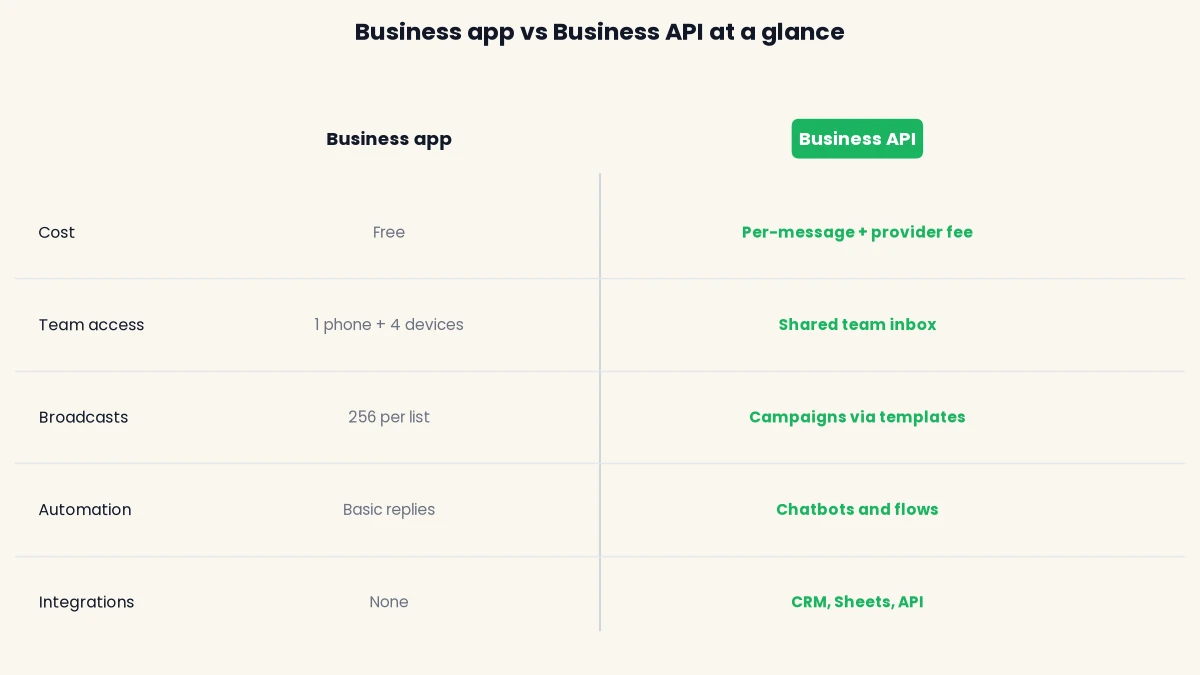
The app is free, manual and built around one phone, while the API is paid, automated and built around a team and software. The table below compares them on the points that decide most switches.
| Feature | WhatsApp Business app | WhatsApp Business API |
|---|---|---|
| Cost | Free | Meta’s per-message rates plus a provider fee |
| Team access | One phone plus up to four linked devices | Shared team inbox, chats assigned to people or teams |
| Broadcasts | Lists of up to 256 contacts who saved your number | Campaigns to any opted-in audience using approved templates |
| Automation | Away message, greeting, quick replies | Chatbots, flows, triggered messages, AI replies |
| Integrations | None | CRM, Google Sheets, payment links, webhooks, REST API |
| Reporting | Basic message stats | Delivery, read and failure tracking per campaign |
| Message rules | Free-form messages | Templates outside the 24-hour window, plus quality rating and messaging limits |
| Setup | Install and verify your number | Sign up with a provider and connect your Meta account |
Broadcasts are where most people feel the gap
A broadcast on the app reaches only contacts who have saved your number, and only up to 256 per list. An API campaign has no such contact list rule, but it does need opt-in and a template Meta has approved. That trade is what protects your number. If you have ever worried about a block from mass forwarding, read our guide on how to avoid getting your WhatsApp number blocked before your first big send.
Automation and chatbots
The app can send a greeting and an away message. The API can hold a real conversation. A cafe in Ahmedabad can answer “are you open?” and “book a table” with a flow, and hand the chat to a person only when the customer asks. Meta restricts general-purpose AI chatbots on WhatsApp from 15 January 2026, but support, order status, lead qualification and other scoped business bots are still allowed.
Rules that come with the API
The API gives you more reach than the app, and Meta balances that with rules that apply to every provider. These are Meta’s platform rules, not DTB policy, so they are the same whether you use DTB, WATI, AiSensy or Interakt.
Opt-in and templates
Meta requires you to get opt-in before you message people on WhatsApp, and to honour any request to stop. Outside the 24-hour reply window you can only send an approved template, and Meta’s review can take up to 24 hours. A common reason for rejection is a category mismatch, such as promotional wording inside a utility template.
Quality rating and messaging limits
Your number carries a quality rating driven by blocks and spam reports, and a poor rating can limit messaging or stop you scaling. Meta also caps how many unique customers you can start conversations with in a rolling 24 hours, in tiers of 250, 1,000, 10,000, 100,000 and unlimited. These limits are now calculated at the business portfolio level and shared across every number in it. No provider can promise your number will never be restricted, because Meta decides. What a good provider does is make the compliant path the easy one.
What each costs in India
The Business app costs nothing, while the API costs Meta’s per-message rate plus your provider’s platform fee. Since 1 July 2025 Meta charges per delivered template message instead of per 24-hour conversation, according to Meta’s pricing documentation.
Meta’s India rate card, effective 1 July 2026, lists the following per-message rates, shown here before 18% GST.
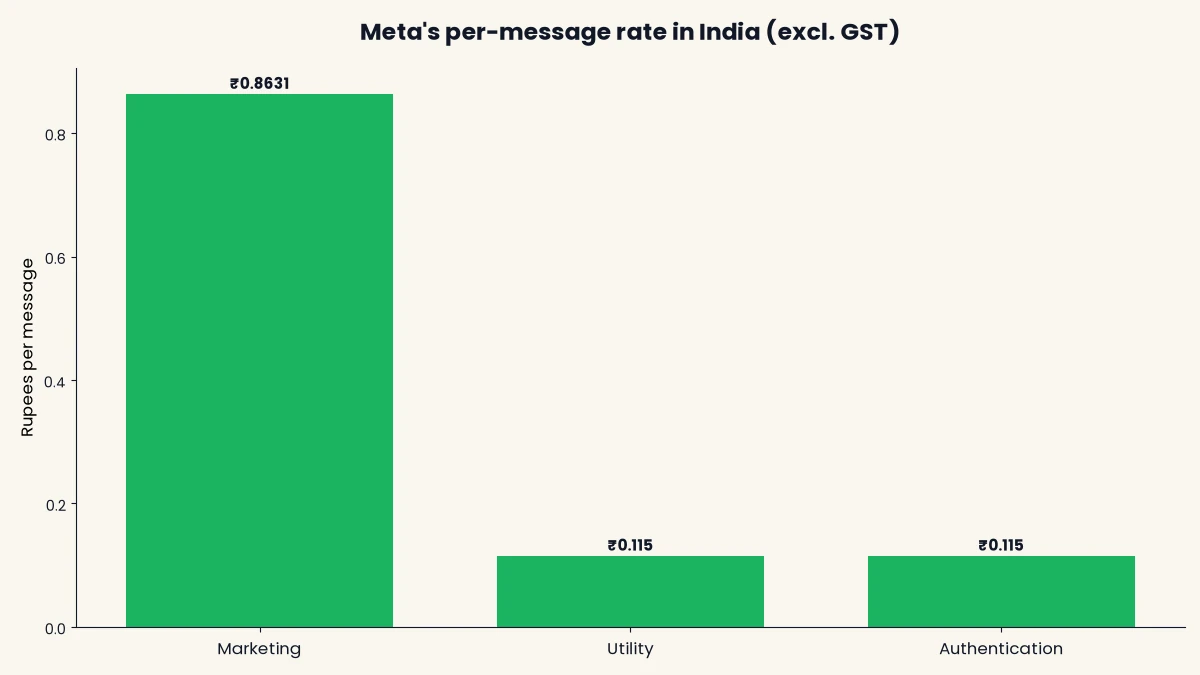
Marketing costs ₹0.8631 per message, and utility and authentication cost ₹0.115 each (rates as of 24 September 2026, matching the ones in our WhatsApp Business API pricing guide for India). Utility messages sent inside an open 24-hour reply window are free, and a 72-hour free window opens when a customer starts a chat from a Click to WhatsApp ad or a page button.
What that means for a monthly bill
Meta’s charge scales with volume, and the platform fee is a fixed line on top. The table shows Meta’s charge alone for marketing messages, before any volume-tier discount.
| Marketing messages a month | Example business | Meta charge (excl. GST) | Meta charge (incl. 18% GST) |
|---|---|---|---|
| 500 | Salon sending monthly offers | ₹432 | ₹509 |
| 2,000 | Cafe with a regular customer list | ₹1,726 | ₹2,037 |
| 10,000 | D2C brand with festive campaigns | ₹8,631 | ₹10,185 |
These are our own calculations from Meta’s rate, not quotes. Add your provider’s plan on top. DTB charges ₹500 a month for Basic and ₹1,499 a month for Pro, and adds no markup on Meta’s per-message charges. Meta does apply volume-tier discounts at higher volumes, which the pricing page explains.
The change coming on 1 October 2026
Replies inside the 24-hour window are free today, but Meta’s documentation says that from 1 October 2026 it will charge per message for service messages too, at the same rates as utility and authentication messages by market. You can read the wording on Meta’s page for non-template message pricing. If your team sends many free-form replies through the API, factor this in. Meta also notes that messages sent from the Business app itself stay free, which is one more reason coexistence is worth understanding.
Which one fits your business
For the WhatsApp Business app vs WhatsApp Business API decision, pick the app if one person answers a few dozen chats a day, and pick the API when the volume, the team or the automation you need has outgrown a single phone. These examples show where the line usually falls.
| Business situation | Best fit | Why |
|---|---|---|
| Home baker in Surat taking orders from a phone | Business app | One person, low volume, no need for templates |
| Salon with one receptionist and a small list | Business app, then API for reminders | Appointment reminders are better as utility templates |
| Ahmedabad cafe with three staff answering orders | API with coexistence | Shared inbox, order updates, a bot for common questions |
| Pune clinic with front desk and doctors | API | Appointment reminders and follow-ups at volume, assigned chats |
| Saree seller with 5,000 past customers | API | Festive campaigns far above the 256 list limit |
| Real estate team chasing leads from ads | API | Lead follow-up flows and a pipeline linked to the chat |
These are illustrative scenarios, not customer stories. For examples by industry, browse our WhatsApp use cases.
Signs you have outgrown the WhatsApp Business app
You have outgrown the app when the phone, not your customers, becomes the bottleneck. Watch for these signs.
- More than one person needs the number. Passing a phone around, or juggling four linked devices, means missed messages and no record of who replied.
- Your customer list is bigger than 256. Splitting broadcasts into many lists is slow, and people who have not saved your number never see them.
- You repeat the same answers all day. Prices, timings and order status are a job for a chatbot flow.
- Leads live in chats and get lost. With no CRM link, nobody sees which lead was followed up.
- You worry about a ban. Manual bulk sending from a personal-style number invites reports and blocks, which the API’s opt-in and template model is designed to reduce.
Two or three of these together usually mean it is time. One alone rarely does, and coexistence can bridge the gap.
Can you use the WhatsApp Business app and API on the same number?
Yes, Meta’s coexistence feature lets one number run the Business app and the API together. You keep answering customers from your phone, while campaigns, chatbots and the shared inbox run through the API. Meta describes it in its guide to onboarding WhatsApp Business app users, and says history stays in sync between both.
What carries over
Meta syncs up to 180 days of one-to-one chat history in phases. Media only comes across for messages from the last 14 days, and group chats are not synced. Your phone keeps working, and a reply typed on it shows up in your provider’s dashboard.
What changes when you turn coexistence on
Coexistence is not the same as keeping every app feature. Meta’s documentation lists these changes.
- Shared speed limit: numbers used with both the app and the Cloud API have a fixed throughput of 20 messages per second.
- Broadcast lists become read-only: you can no longer create new ones in the app.
- Some chat features turn off: disappearing messages, view once and live location are disabled in one-to-one chats.
- Groups and Windows app: group chats are not supported, and WhatsApp for Windows is unlinked.
- Green tick: the Official Business Account badge is not supported on coexistence numbers, as documented by Meta partners.
- Keep the app alive: open the Business app at least once every 13 to 14 days, and do not uninstall it, or the connection can drop.
For most small businesses these limits do not matter. The 20 messages per second cap only bites on very large sends, and it still lets you send thousands of messages in a few minutes.
How to move from the WhatsApp Business app to the API
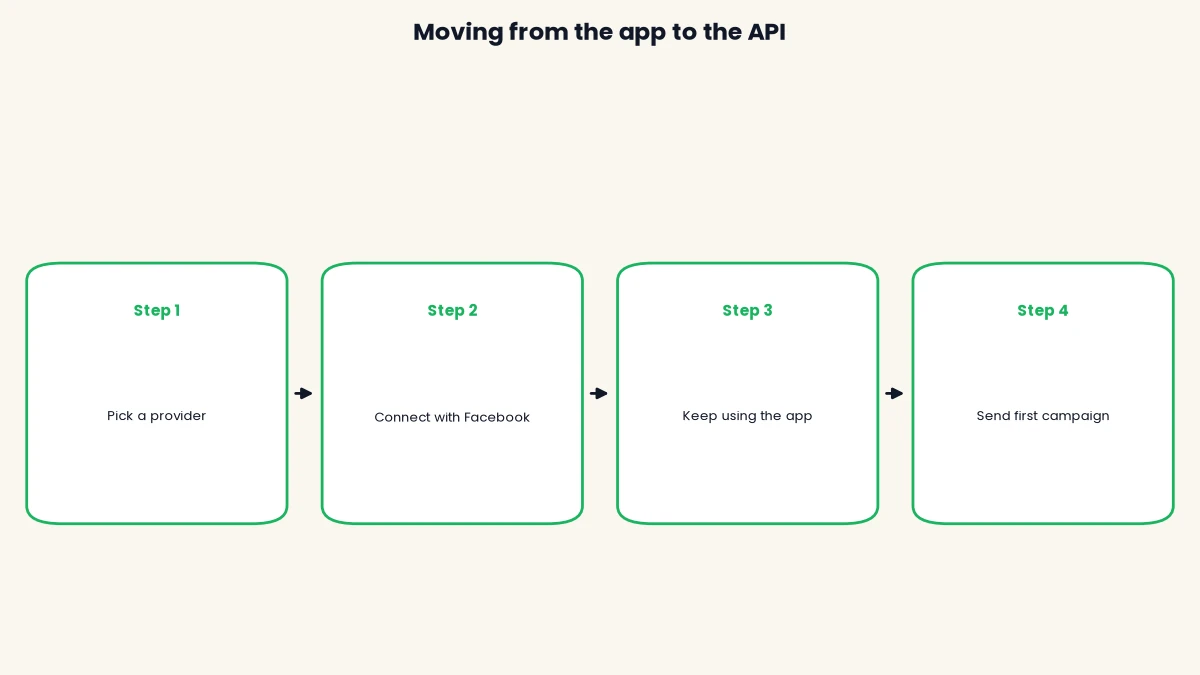
You can move in an afternoon if you connect through coexistence, because your phone and your chats stay in place. These are the steps.
- Update the Business app and check your login. Install the latest version of the WhatsApp Business app (Meta requires version 2.24.17 or newer for coexistence) and make sure you can log in with the Facebook account linked to your business.
- Choose your provider. Pick a provider and sign up. On DTB, Basic at ₹500 a month covers campaigns and the team inbox, and Pro at ₹1,499 a month adds the AI chatbot, flows, automations and the sales pipeline.
- Connect with Facebook. In the setup screen choose Connect with Facebook, then pick Keep using the Business app (Coexistence) so your phone keeps working on the same number.
- Let your chat history sync. Meta syncs up to 180 days of one-to-one chats, with media only for the last 14 days. Keep the app open on your phone while it syncs.
- Create and submit templates. Write your message templates by category (utility, marketing, authentication) and submit them to Meta. Review can take up to 24 hours, so do this before your first campaign.
- Collect opt-ins, then send a small first campaign. Send only to people who agreed to hear from you on WhatsApp, start with a small batch, and watch delivery and read rates before you scale up.
Common mistakes when you switch
- Uninstalling the app. With coexistence, removing the Business app or not opening it for two weeks can disconnect the number.
- Uploading a purchased or old list. Meta requires opt-in, and people who did not ask to hear from you will report or block. Read our number-blocking guide first.
- Expecting everything to carry over. Groups do not sync, broadcast lists become read-only and older media is not copied.
- Mixing up template categories. Putting promotional wording in a utility template is a common reason Meta rejects it.
- Ignoring the 1 October 2026 change. If your team sends lots of free-form replies through the API, those will be charged from that date.
The rest of the setup, including business profile and phone registration, happens inside the provider’s dashboard. Our pricing guide helps you check the cost side before you commit.
Ready to try it on your own number? Start with DTB at ₹1,499/month and connect using coexistence, or begin on Basic at ₹500 a month.
How DTB helps when you move to the API
DTB is a WhatsApp Business API platform for Indian SMBs, run by an official Meta Tech Provider. It is built for the exact jump this guide describes, from one phone to a team. These are the parts that matter here.
- Connect with Facebook: log in and your WhatsApp Business account connects with no copy-pasting. Choose Keep using the Business app to stay on your existing number.
- Team inbox: a shared inbox grouped into Open, Expired, Snoozed and Resolved, with chats assignable to a user or team. You can invite up to 3 team members.
- Campaigns: send by CSV upload, segment or tag using an approved template, sent now or scheduled.
- Templates: build and submit templates to Meta, and sync the ones you already have.
- Chatbots and flows (Pro): AI auto-replies with four trigger modes, including replying only outside business hours, plus drag-and-drop keyword flows.
- Sales pipeline (Pro): track deals from chat to close in a built-in CRM.
- Zero markup on Meta charges: you pay Meta’s per-message rate, and DTB’s plan is a separate fee.
Basic is ₹500 a month or ₹5,000 a year, and Pro is ₹1,499 a month or ₹14,999 a year. Meta’s per-message charges are billed separately from both plans.
WhatsApp Business app or API: making the call
The right answer in the WhatsApp Business app vs WhatsApp Business API question depends on people and volume, not on company size. If one person can answer everything from one phone, the free app is enough. The moment a second person, a big broadcast or a chatbot enters the picture, the API pays for itself in saved time and safer sending, and coexistence lets you make the move without giving up your phone.
To size the cost before you decide, start with our WhatsApp Business API pricing guide for India. When you are ready, book a free demo and we will help you connect your existing number.
Frequently asked questions
What does WhatsApp API mean?
WhatsApp API means the WhatsApp Business Platform, the interface Meta gives businesses to connect WhatsApp to their own software instead of a phone. It lets you send template messages, run chatbots and share one number across a team. Most Indian businesses use it through a provider such as DTB rather than coding against Meta directly.
What is a WhatsApp BSP and do I need one?
A BSP (Business Solution Provider) is a company that gives you a dashboard and support on top of Meta’s WhatsApp Business Platform. You do not strictly need one, but building your own integration on the Cloud API needs developers, so almost every small and mid-size business picks a provider. Compare what each one charges on top of Meta’s own rates before you choose.
What is a WABA in WhatsApp?
A WABA is a WhatsApp Business Account, the account on Meta’s side that holds your phone numbers, message templates and billing details for the API. Your provider connects to it for you when you sign up. One business can hold more than one number under a single WABA.
Is the WhatsApp Business API free?
No. The Business app is free, but the API charges you per delivered template message at Meta’s rates, plus your provider’s platform fee. Meta’s per-message rates are published on its pricing page, and some replies inside an open 24-hour window are free today. Our pricing guide for India walks through a full monthly cost example.
Can I use the WhatsApp Business app and API on the same number?
Yes, through a Meta feature called coexistence. You connect your existing Business app number to the API and keep answering from your phone, while campaigns, chatbots and the team inbox run through the API. A few app features change or switch off, and messages share a fixed throughput limit, so read the coexistence section above before you connect.
Will I lose my chats if I move to the API?
Not if you connect with coexistence. Meta syncs up to 180 days of your one-to-one chat history, though media only comes across for the most recent 14 days and group chats are not synced. If you instead move the number to the API alone, the Business app stops working on that number and you should export anything you need first.
Do I need coding skills to use the WhatsApp Business API?
No. With a provider’s dashboard you connect your number by logging in with Facebook, then send campaigns, build chatbot flows and reply from a team inbox without writing code. Coding only becomes useful for custom integrations, and even then many providers offer webhooks and ready-made connectors.
How many customers can I message a day on the API?
It depends on your messaging limit, which Meta sets in tiers of 250, 1,000, 10,000, 100,000 and unlimited unique customers in a rolling 24 hours. Every business starts at a low tier and moves up as it sends good-quality messages that people do not block. Replies to customers who message you first do not count towards the limit.