WhatsApp Cloud API is the version of the WhatsApp Business Platform that Meta hosts on its own servers, instead of a provider’s. If you have read that you need a Business Solution Provider (BSP) to use it, or that it comes with a monthly batch of free messages, both of those have changed, and this guide covers what is actually true today.
Quick answer: WhatsApp Cloud API is Meta’s cloud-hosted version of the WhatsApp Business Platform, built to replace the old On-Premises API, which fully stopped working on 23 October 2025. You can technically register for it directly with Meta, but almost every business works through a BSP or Tech Provider instead, since Meta’s raw API has no inbox, no template builder and no automation tools of its own. Pricing moved from a monthly free allowance to per-message charges on 1 July 2025, with messages still free inside an open customer service window.
Key takeaways
- WhatsApp Cloud API is Meta-hosted. On-Premises API, the self-hosted alternative, fully stopped working on 23 October 2025, so Cloud API is now the only option, not a choice.
- You can register directly with Meta, but Meta only gives you API access, not a dashboard, inbox or automation builder. A BSP or Tech Provider such as DTB supplies those.
- There is no monthly free-message allowance any more. Messages are free only inside an open 24-hour customer service window or a click-to-WhatsApp ad’s entry-point window; everything else is charged per message by category.
- Setting up through a Tech Provider typically takes about 15 minutes from signup to sending a first message.
- DTB connects to WhatsApp Cloud API as an official Meta Tech Provider, with coexistence available if you want to keep using the WhatsApp Business app on the same number.
Published 1 October 2026 by the Digital Toolbox team. Meta’s on-premises sunset date and pricing model checked the same day against Meta’s developer documentation.
In this guide
- What is WhatsApp Cloud API?
- Key features of WhatsApp Cloud API
- WhatsApp Cloud API vs on-premises API: why there is no more choice
- Do you need a BSP to use WhatsApp Cloud API?
- How WhatsApp Cloud API pricing works
- How to get started with WhatsApp Cloud API
- What WhatsApp Cloud API cannot do on its own
- How DTB helps
- Frequently asked questions
What is WhatsApp Cloud API?
WhatsApp Cloud API is Meta’s own cloud-hosted version of the WhatsApp Business Platform. Instead of a Business Solution Provider running servers to connect your business number to WhatsApp, Meta hosts the infrastructure itself, and your provider’s dashboard or your own code talks to it over the internet using Meta’s Graph API.
It is built for businesses that need more than one person replying from a single phone: a shared inbox, bulk messaging through approved templates, and automation. That is the line that separates it from the ordinary WhatsApp Business app, which one person uses from one phone.
How it differs from the WhatsApp Business app
The WhatsApp Business app is a free mobile app for a single device, built for a shop owner or freelancer handling their own chats. WhatsApp Cloud API is infrastructure, not an app: it has no screen of its own, and every message sent through it goes through a provider’s dashboard or custom code calling the API directly. Our WhatsApp Business app vs API guide covers that decision in full if you have not made it yet.
Who actually needs it
A single-person business answering a few dozen chats a day rarely needs Cloud API, since the free app covers that comfortably. The decision usually comes down to three signals: more than one or two people need to reply from the same number, you send enough bulk messages (order updates, appointment reminders, festival offers) that typing each one by hand is no longer realistic, or you want the conversation connected to a CRM, a chatbot or an ecommerce catalog. An Ahmedabad cafe doing a handful of daily orders can stay on the app. The same cafe running a loyalty programme with weekly offers to a few thousand saved numbers has already outgrown it.

Key features of WhatsApp Cloud API
WhatsApp Cloud API carries over everything that made the WhatsApp Business Platform useful at scale, since it is the same platform, just hosted differently. These are the capabilities that are not available on the ordinary WhatsApp Business app.
- Multiple team members on one number. Several people can send and receive messages through the same business number at once, through a shared inbox, instead of one phone passed between staff.
- Rich media messages. Images, PDFs, videos and location pins send the same way a template or free-form message does, useful for a Surat saree seller sharing a fabric catalogue or a Pune clinic sending a scanned prescription.
- Interactive messages. Reply buttons and list menus let a customer tap an answer instead of typing one, which keeps structured flows like booking a visit or choosing a product short.
- Product catalog messages. A Meta product catalog, including one synced from Shopify or WooCommerce, can be referenced directly inside a chat, so a customer browses products without leaving WhatsApp.
- Real-time webhooks. Delivery and read receipts, and inbound replies, arrive as events the moment they happen, which is what a dashboard or automation builder uses to show message status live.
- Official business verification. Cloud API numbers are eligible for Meta’s green tick verified badge, which the WhatsApp Business app alone does not offer to most small businesses.
WhatsApp Cloud API vs on-premises API: why there is no more choice
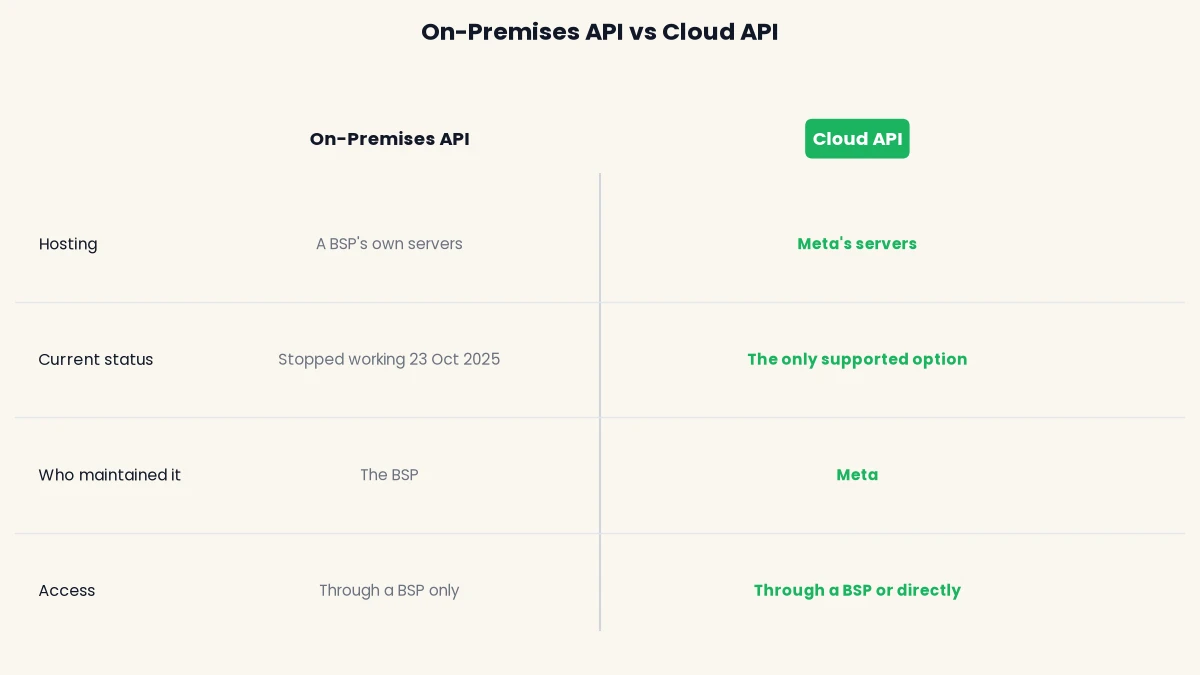
WhatsApp Cloud API used to be one of two ways to run the WhatsApp Business Platform at scale. The other, On-Premises API, required a BSP to run a self-hosted server, a database and TLS certificates, and to ship their own security patches. Meta’s own documentation confirms that the final supported version of the On-Premises API client expired on 23 October 2025, and messages sent to or from numbers still registered for On-Premises API are no longer delivered at all.
That date has already passed, which matters for how you read older articles on this topic: anything describing Cloud API and On-Premises API as two current options is out of date. Meta stopped registering new numbers for On-Premises API back on 1 July 2024, and new feature development moved to Cloud API even earlier than that. On-Premises API was never available to a small or mid-size business directly, since it demanded a dedicated infrastructure team, so this change mostly affects larger BSPs who had not migrated their own customers yet.
| On-Premises API | Cloud API | |
|---|---|---|
| Hosting | A BSP’s own servers | Meta’s servers |
| Current status | Fully stopped working on 23 October 2025 | The only supported option |
| Who maintained it | The BSP: database, TLS certificates, security patches | Meta |
| Access | Through a BSP only | Through a BSP, or directly with Meta |
Do you need a BSP to use WhatsApp Cloud API?
Technically, no. Meta lets a business register directly for WhatsApp Cloud API through its own developer account, with no BSP in between. In practice, almost nobody who is not a software team does this, because what Meta gives you directly is an API, not a product.
What Meta gives you directly
A direct Meta registration gets you a Meta Business app, a test business phone number to start with, and raw access to the Graph API: endpoints for sending messages, managing templates and receiving webhooks. There is no inbox screen, no team login, no campaign builder and no automation canvas. Every one of those has to be built by your own developers on top of the API, and Meta’s support for a direct integration is limited to documentation and email.
What a BSP or Tech Provider adds on top
A Business Solution Provider, now more often called a Tech Provider in Meta’s own terminology, is a company Meta has approved to build a product on top of Cloud API and sell it to businesses. That product is the part Meta does not supply: a shared team inbox, a drag-and-drop template builder, contact management, bulk campaigns, chatbots and automation, usually with support included. DTB is one such Tech Provider.
The practical gap shows up the first time you need to do something simple. A Surat saree seller registering directly with Meta would need a developer on staff to format a template submission as a JSON request and call the right API endpoint. The same seller signing up through a Tech Provider fills in a form with a live preview and clicks submit, and the provider’s dashboard handles the API call underneath.
| What you need | Direct with Meta | Through a Tech Provider |
|---|---|---|
| API access to WhatsApp Cloud API | Yes | Yes |
| Shared team inbox | No, build it yourself | Included |
| Template builder with a live preview | No, submit templates via raw API calls | Included |
| Bulk campaigns, segments and tags | No, build it yourself | Included |
| Automation and chatbot tools | No, build it yourself | Included |
| Support | Documentation and email only | Dedicated support from the provider |
How WhatsApp Cloud API pricing works
WhatsApp Cloud API pricing changed on 1 July 2025, when Meta’s own pricing documentation confirms that conversation-based pricing was deprecated in favour of per-message pricing. Under the old model, a 24-hour conversation window bundled several messages under one charge, and most businesses got 1,000 free conversations a month. Neither of those exist any more.
Under the current model, you pay per template message sent, with the rate set by its category (marketing, utility or authentication). Non-template messages, and utility templates, are free when sent inside an open 24-hour customer service window, which opens whenever a customer messages you first. Messages are also free during the 72-hour window after someone starts a conversation through a click-to-WhatsApp ad. Charges are counted at the business portfolio level, across every WhatsApp Business Account the portfolio owns, not per phone number.
| Message type | When it is free | When it is charged |
|---|---|---|
| Non-template, free-form text | Inside an open 24-hour service window | Never charged on its own; it requires an open window to send |
| Utility template | Inside an open 24-hour service window | Outside the window, charged at the utility rate |
| Marketing template | During a 72-hour click-to-WhatsApp entry-point window | Charged at the marketing rate in every other case |
| Authentication template | Not applicable | Always charged at the authentication rate |
The current India rates for each category change from time to time, so this guide will not repeat exact figures here. Our WhatsApp Business API pricing in India guide tracks the current numbers with the date they were last checked, and DTB passes on Meta’s rate with zero markup either way.
How to get started with WhatsApp Cloud API
There are two honest paths, and most businesses only need to seriously consider the first one.
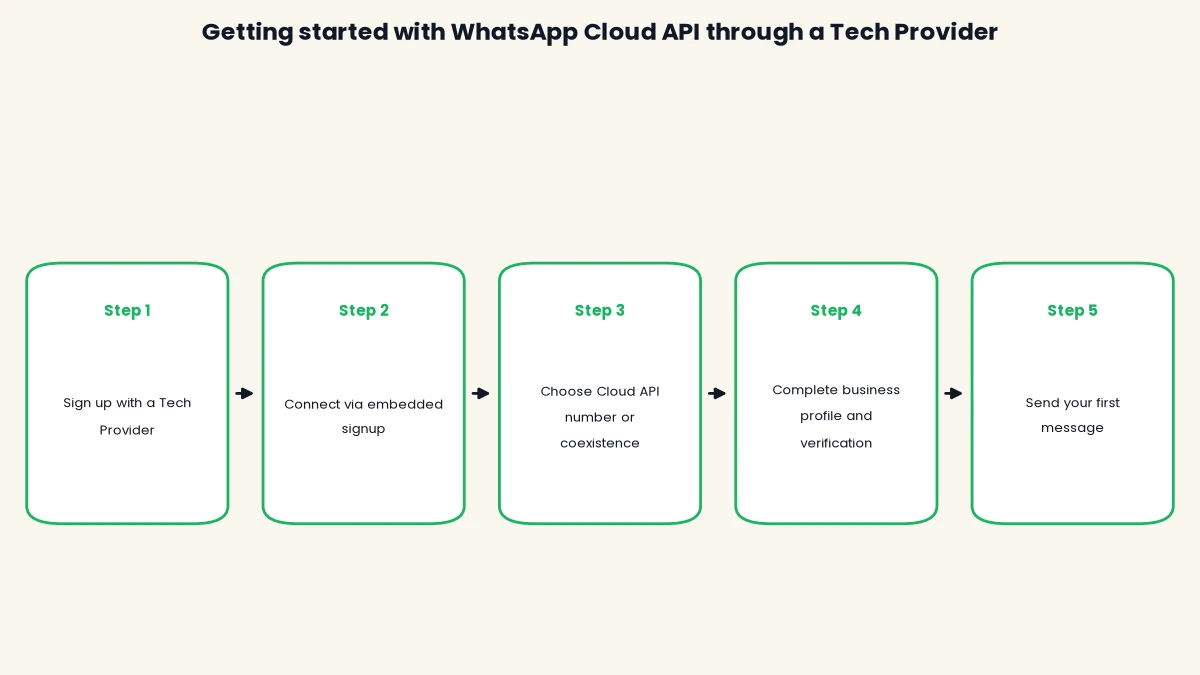
- Through a Tech Provider: sign up with a provider such as DTB, connect your Facebook Business account through embedded signup, choose a dedicated Cloud API number or keep using the WhatsApp Business app on the same number with coexistence, then complete your business profile and phone verification inside the provider’s dashboard.
- Directly with Meta: create a Meta Business app, add the WhatsApp product, verify your business in Meta Business Manager, register a phone number for Cloud API only, build your own integration against the Graph API, and submit templates through the API yourself.
Through a Tech Provider
This is the route almost every business takes, since it replaces weeks of integration work with a dashboard you can use the same day. DTB’s own setup covers business profile details (photo, about text, address, up to two websites, business category), phone registration with Meta, an optional two-step verification PIN, and the webhook details a direct integration would otherwise require you to configure by hand. Per Ankit, typical time from signup to sending a first message through DTB is about 15 minutes, with DTB’s team walking the customer through it.
Directly with Meta
This path makes sense only if you have developers who will build and maintain the inbox, template management and automation yourself, since none of that comes with the API. Meta’s own get-started documentation walks through creating the test number and sending a first message, but everything past that first test message, production access, templates, webhooks, is on your own integration. You will still need to meet Meta’s business verification and WhatsApp Business API eligibility requirements, which are the same whether you go direct or through a provider.
What WhatsApp Cloud API cannot do on its own
It is worth being direct about this before you plan around it: the raw API is infrastructure, and infrastructure has no opinions about how your team works. Several things people assume come with WhatsApp Cloud API are actually the provider’s layer on top of it.
Meta’s API does not include a shared inbox for a team to work from together, a visual builder for templates or chatbot flows, contact segmentation, or scheduling for bulk sends. It also does not raise your messaging limit for you. Every business phone number still has a messaging tier, the number of unique customers you can start a conversation with in a rolling 24-hour period, and a quality rating driven by blocks and reports, regardless of whether you connect directly or through a provider. A direct integration still has to monitor both itself, usually by polling the API, since there is no dashboard to glance at.
Template submission is a clear example. Through the raw API, submitting a template means sending a correctly formatted JSON request naming the category, language and body variables, then polling for an approval or rejection status. Get the category wrong, a common mistake when a promotional line sneaks into what was meant to be a utility template, and the rejection reason arrives the same way, as a status code and a short message, with no live preview to have caught it beforehand.

Book a free demo and DTB’s team will show you the dashboard before you decide between a direct integration and a provider.
How DTB helps
DTB is an official Meta Tech Provider, connecting to WhatsApp Cloud API the same way every approved provider does, with no shortcuts or unofficial workarounds. For a business comparing a direct integration against a provider, these are the parts you get from day one:
- Two connection options: embedded signup through Facebook for a dedicated Cloud API number, or coexistence to keep using the WhatsApp Business app on the same number alongside the API.
- A full dashboard: team inbox, contact management with custom fields, smart segments, tags, bulk campaigns and a template builder with a live preview, none of which Meta’s raw API provides.
- Automation and chatbots: an automation canvas, keyword-triggered chatbot flows, and an AI chatbot with a knowledge base, for the conversations you do not want a person to handle manually.
- Your own API, if you want it: DTB also exposes a REST API at app.digitaltoolbox.in/api/v1 for sending messages and managing contacts programmatically, for teams that want to build on top of DTB rather than Meta’s raw Graph API directly.
Conclusion
WhatsApp Cloud API is Meta’s hosting model for the WhatsApp Business Platform, not a product you use by itself. On-Premises API is gone for good as of 23 October 2025, pricing has moved to a per-message model with no monthly free allowance, and the dashboard, inbox and automation tools you actually use day to day come from a Tech Provider, not from Meta directly. See our comparison of WhatsApp Business API providers in India if you are choosing between providers, or our WhatsApp coexistence guide if you want to keep the WhatsApp Business app running on the same number. Start with DTB at ₹1,499/month and connect your number the same day.
Frequently asked questions
What is WhatsApp Cloud API in simple terms?
It is Meta’s own cloud-hosted version of the WhatsApp Business Platform, built for businesses that need more than one person messaging from one phone. A provider’s dashboard or custom code connects to it to send and receive messages at scale.
Is WhatsApp Cloud API free?
Access to the API itself has no signup fee from Meta, but message sending is charged by category, with no monthly free allowance since 1 July 2025. Non-template and utility messages are free only inside an open 24-hour customer service window.
Is the WhatsApp On-Premises API still supported?
No. Meta’s own documentation confirms the final supported On-Premises API client expired on 23 October 2025, and messages from numbers still registered for it are no longer delivered. Cloud API is now the only supported option.
Can I use WhatsApp Cloud API without a BSP?
Yes, Meta allows direct registration through its own developer tools. You will still need to build the inbox, template management and automation yourself, since Meta’s API does not include any of that, which is why most businesses use a Tech Provider instead.
What is the difference between a BSP and a Tech Provider?
They refer to the same kind of company. Business Solution Provider is the older term; Meta now more often calls an approved partner a Tech Provider. Both describe a company Meta has approved to build a product on top of Cloud API and support businesses using it.
How long does it take to set up WhatsApp Cloud API?
Through a Tech Provider, typically about 15 minutes from signup to sending a first message, since the provider’s dashboard handles business profile setup and phone registration. A direct integration with Meta takes considerably longer, since your developers have to build the inbox and automation layer first.
Does WhatsApp Cloud API work with the WhatsApp Business app on the same number?
Yes, through coexistence, supported by providers such as DTB. You keep using the WhatsApp Business app for personal replies on the same number while the API handles templates, automation and broadcasts.
What is the messaging limit on WhatsApp Cloud API?
Every business phone number has a messaging tier, the number of unique customers you can start a conversation with in a rolling 24-hour period, starting at 250 and scaling up based on your quality rating. This applies the same way whether you connect directly or through a provider.