The WhatsApp Business API requirements India businesses must meet come down to four things: a genuine registered business, a phone number that is not already active on WhatsApp, a Meta business portfolio, and a Business Solution Provider (BSP) to connect it all. Most delays happen because a document does not match, the number is still on a personal WhatsApp account, or the business sells something Meta does not allow. This checklist walks through each requirement in the order you will meet it, for Indian business owners who want approval the first time.
Key takeaways
- You need a real, operating business with documents that match on name and address. Meta decides which documents it accepts.
- You need a dedicated phone number that can receive an SMS or voice OTP and is not active on WhatsApp Messenger. A number on the WhatsApp Business app can stay in use through Coexistence.
- Business verification is not required to start. New portfolios begin at 250 customers a day and need verification, or another scaling path, to grow.
- Some categories are banned outright, including alcohol, tobacco, real money gaming and multi-level marketing.
Meta’s rules are the same whichever provider you pick, so this guide attributes them to Meta and points to its documentation. Details were last checked on 24 September 2026, and Meta changes them often.
In this guide
- WhatsApp Business API requirements India: the full checklist
- Business and document requirements
- Phone number requirements
- Do you need Meta business verification?
- Businesses that cannot use the API
- Display name and opt-in requirements
- Common reasons applications get delayed
- How DTB helps
- Frequently asked questions
WhatsApp Business API requirements India: the full checklist
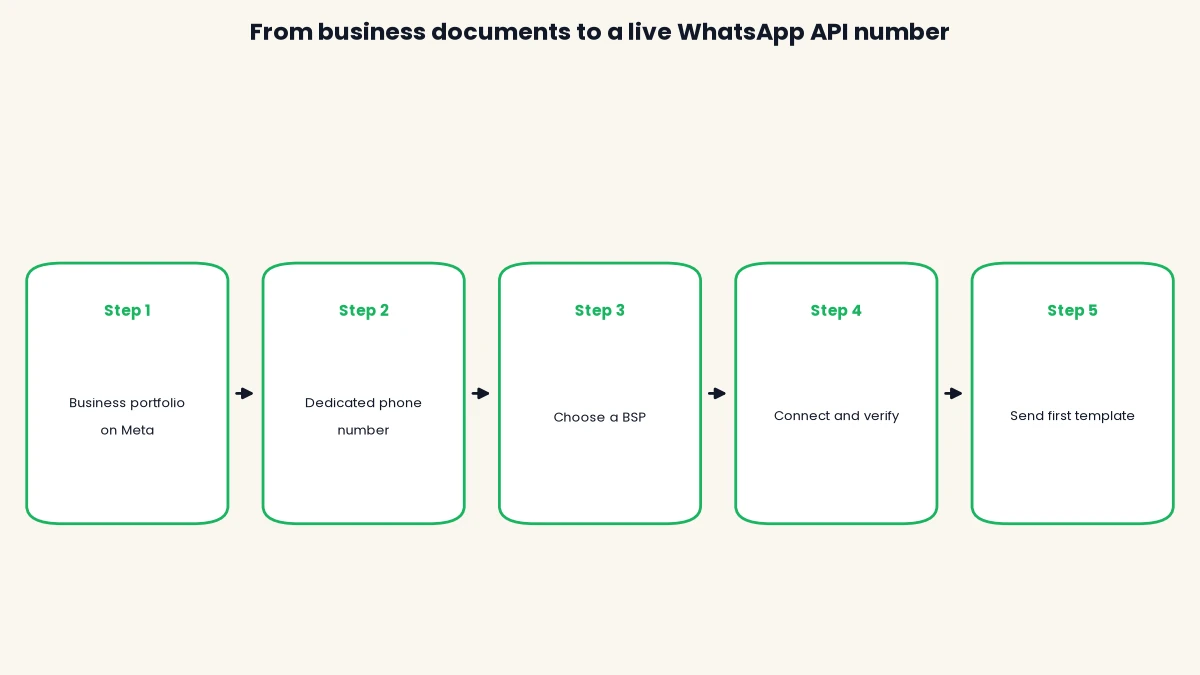
You need seven things in place: a real business, a Meta business portfolio, a dedicated phone number, a display name, a BSP, customer opt-in and a business that follows WhatsApp’s policies. The table shows what Meta expects for each and where it comes into play.
| Requirement | What Meta expects | When it matters |
|---|---|---|
| Business identity | A real, operating business, backed by documents if you verify | Verification and scaling |
| Meta business portfolio | A portfolio (Meta’s container for your business assets) that holds your WhatsApp Business Account | Setup |
| Phone number | Owned by you, with country and area code, able to receive an SMS or voice call, not active on WhatsApp Messenger | Registration |
| Display name | A business name shown on your profile, reviewed by Meta | Registration |
| BSP or direct access | A provider such as DTB, or your own developers using the Cloud API | Setup |
| Customer opt-in | Permission before you send template messages, stating your business name and intent | Sending |
| Policy compliance | Follow the WhatsApp Business Messaging Policy and Commerce Policy | Always |
Most of these are one-time setup items. Opt-in and policy compliance carry on for as long as you use the API. Our guide on how to avoid getting your WhatsApp number blocked covers the ongoing side.
Business and document requirements
Meta needs proof that your business is real, and your documents need to tell one consistent story about who you are. The rules here are less about company size and more about matching details.
Who is eligible
Meta expects a legally operating business, and companies, LLPs, partnerships and proprietorships all commonly apply. A Surat saree seller with a GST registration and an Ahmedabad cafe with a shop and establishment certificate are in the same position: both need documents that show the same business name. Your business must also sell something WhatsApp allows, covered further down.
Documents Indian businesses commonly use
Meta decides which documents it accepts and shows the accepted types during verification, so treat the table below as the usual starting point rather than a guarantee. Have these ready before you begin.
| What you need to prove | Documents commonly submitted in India |
|---|---|
| Legal business name and registration | Certificate of incorporation, GST certificate, Udyam (MSME) registration, shop and establishment certificate, trade licence |
| Business address | Utility bill, bank statement or tax registration record showing the same address |
| Online presence | A website or business page showing the same business name |
Upload clear PDFs or full-page scans, not cropped photos or screenshots. Your legal name and address should read the same across every file, down to abbreviations like “Pvt. Ltd.” versus “Private Limited”.
Website and privacy policy
A website is the easiest way to show Meta that the business exists, and a page listing your business name, address and a privacy policy removes most doubt. If you sell through Shopify or WooCommerce, your store can serve as that page as long as the business name matches your documents. A missing or half-built site can stall verification.
Phone number requirements
Your WhatsApp API number must be one you own, with a country and area code, that can receive an SMS or voice call, and that is not currently active on WhatsApp Messenger. These come from Meta’s business phone number documentation, which is the source to trust if any guide disagrees.
The rules in one list
- The number must be owned by you.
- It needs a country code and area code. Short codes are not supported.
- It must be able to receive an SMS or a voice call for the verification OTP.
- You must set a two-step verification PIN when you register it.
- You must give a display name when registering.
Meta also allows real or virtual numbers, so a fresh SIM bought for the purpose works as well as an existing business line.

The number cannot already be on WhatsApp Messenger
A number active on personal WhatsApp Messenger cannot be registered directly, and you have to delete that account first. This trips up many small businesses, because the owner’s everyday number is often the one they want to use. If the number is currently on the WhatsApp Business app, you have a different option: Coexistence lets you connect it to the API and keep using the app on the same number.
Landlines and call forwarding
A landline can work, but Meta rates SMS OTP on a fixed line as “Not Recommended” and voice OTP as “Standard”, so choose the voice call option. Turn off call forwarding and IVR menus on the line before you verify, since they can swallow the OTP call. Keep the number free for the day you register it.
Do you need Meta business verification?
No, you do not need business verification to start, but you need it, or another scaling path, to grow your sending limit. Meta says newly created business portfolios start with a limit of 250 unique customers you can start conversations with in a rolling 24 hours. Customer-initiated chats do not count against it.
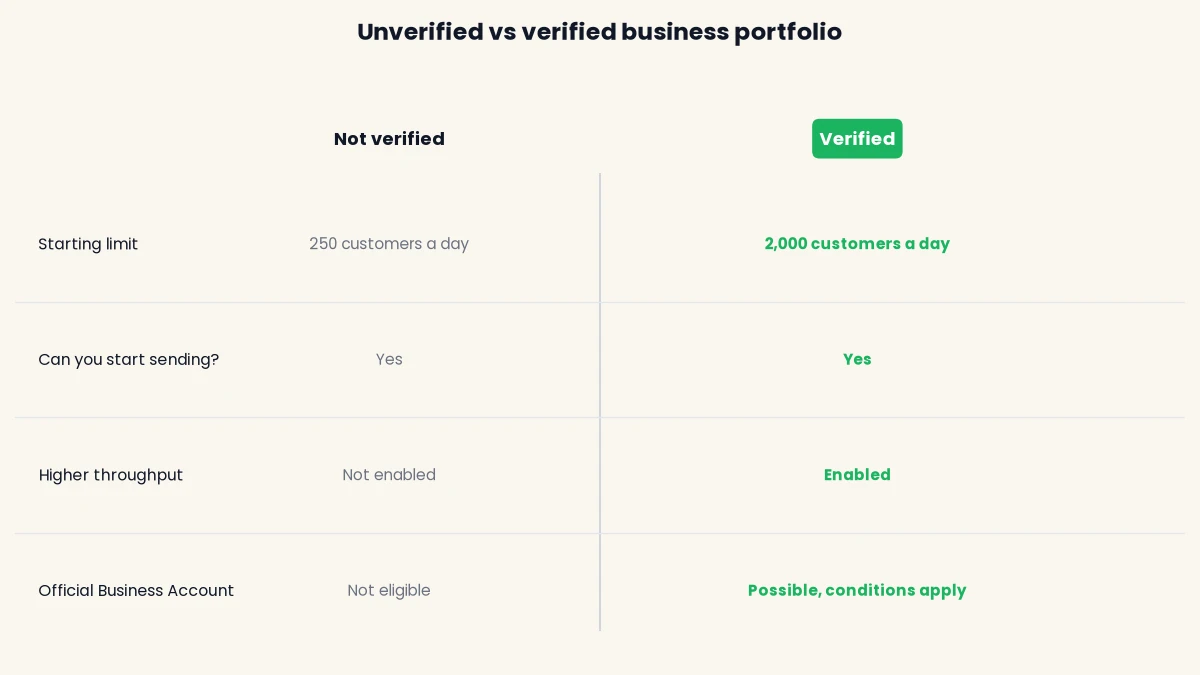
Meta lists three scaling paths to reach 2,000, and you only need one:
- Business verification: submit your documents to Meta.
- Partner verification: a BSP verifies your business for you where the partner offers it.
- Message performance: send 2,000 delivered messages outside customer service windows to unique numbers within 30 days, using high quality templates.
After 2,000, Meta raises the limit automatically to 10,000, 100,000 and then unlimited if your quality stays high and you use at least half your current limit within 7 days. Verification also matters for Official Business Account status (the green tick), which needs other conditions on top. If a small restaurant or clinic only messages a few hundred regulars, the starting limit may be enough for months.
Businesses that cannot use the API
Some categories are banned no matter how good your paperwork looks. Under the WhatsApp Business Commerce Policy, you cannot buy, sell or promote these through WhatsApp:
- Firearms, alcohol and tobacco
- Drugs, and medical and healthcare products
- Real money gambling and gaming
- Adult products and services, and dating services
- Multi-level marketing
- Payday loans, peer-to-peer lending, debt collection and bail bonds
- Currency, including virtual currency and binary options
- Hazardous goods, live animals other than livestock, and anything Meta judges to be fraudulent or misleading
The policy targets selling these goods, so a clinic sending appointment reminders is in a different position from a pharmacy selling medicines over chat. If your business sits near the line, ask your BSP before you build a plan around it. The same policy allows limited exceptions in some countries for over-the-counter drugs, alcohol and online gaming, with licensing and age rules, so check the current position for India.
Display name and opt-in requirements
You need a display name Meta approves and a way to collect opt-in from every customer you message. Both are checked before and after you go live.
Display name and business profile
The display name appears on your WhatsApp profile and Meta reviews it, so it should clearly match your business or brand. A name with no link to your documents or website invites questions. Fill in the profile too: a photo, an about line, an address, an email and a website give customers a reason to trust your messages.
Opt-in and template rules
Meta requires you to get opt-in before sending template messages, and the opt-in must state your business name and what you intend to send. A checkout tick box, a form field or a customer starting the chat can all serve, as long as the permission is clear and you honour opt-outs. Templates go to Meta for review, which can take up to 24 hours, and a wrong category is a common cause of rejection, for example promotional wording in a utility template. Low-quality messaging gets rate limited, so bought contact lists are a fast way to lose the number.
Common reasons applications get delayed
Most problems fall into six patterns, and all of them are fixable before you apply.
- Names that do not match. The business name on your GST certificate, bank statement and website differ. Make them identical or explain the difference with a supporting document.
- A number still on personal WhatsApp. Registration fails until you delete that account, or connect a Business app number through Coexistence.
- Poor document quality. Blurry, cropped or screenshot files get bounced. Use full-page PDF scans.
- A display name unrelated to the business. Use the trading name that appears in your documents and website.
- A restricted category. Selling anything on the banned list above ends the application, so check it first.
- No opt-in plan. You can connect without one, but sending to contacts who never agreed puts the number’s quality rating at risk.
Book a free demo and DTB’s team will check your documents and number against this list before you apply.
How DTB helps
DTB is an official Meta Tech Provider, so you connect through Meta’s own sign-in flow. On the setup screen you choose Connect with Facebook and then either a Cloud API number dedicated to DTB, or Keep using the Business app, which is Coexistence on your existing number. DTB’s team helps end to end and shows you how to send your first message, and customers can typically be connected and sending in about 15 minutes.
The setup screen also covers your business profile, phone registration with Meta, an optional two-step verification PIN and product catalog sync, and shows Verified Active once the account is connected. Plans start at ₹500 a month for Basic and ₹1,499 a month for Pro, and Meta’s per-conversation charges are separate with no markup from DTB. Our WhatsApp Business API pricing in India guide breaks down what you pay Meta, and the use cases page shows how businesses like yours put the API to work.
Frequently asked questions
Do I need a GST number for WhatsApp Business API?
Not necessarily. A GST certificate is the document Indian businesses use most often, but Meta also looks at incorporation certificates, Udyam registration, shop and establishment certificates and trade licences. Meta decides what it accepts, and shows the accepted types during verification.
Can I use my existing WhatsApp number for the API?
It depends on which app the number is on. A number active on personal WhatsApp Messenger has to be deleted from it before registration. A number on the WhatsApp Business app can be connected through Coexistence, so you keep using the app.
Is Meta business verification mandatory?
No, you can start without it. New business portfolios begin with a limit of 250 unique customers in 24 hours. Business verification, partner verification or strong message performance raises that to 2,000, and it also matters for the green tick.
Can I use a landline number for WhatsApp Business API?
Yes, with care. Meta rates SMS OTP on a fixed line as “Not Recommended”, so choose the voice call option. Disable call forwarding and IVR on the line first so the OTP call gets through.
Which businesses cannot get WhatsApp Business API?
Businesses selling goods and services on WhatsApp’s prohibited list cannot use it. That includes firearms, alcohol, tobacco, drugs, real money gambling, adult services, dating, multi-level marketing and payday loans. Read the Commerce Policy if you are near the line.
How long does it take to get set up on WhatsApp Business API?
With DTB, customers can typically connect and send a first message in about 15 minutes once their Meta and phone number details are ready. Meta’s business verification is separate and its timing varies, so it is best started early if you plan to scale.
How much does it cost to meet the requirements?
The requirements themselves are documents and a dedicated number. Once connected, DTB’s Basic plan is ₹500 a month and Pro is ₹1,499 a month, plus Meta’s per-conversation charges with no DTB markup.
Meeting the WhatsApp Business API requirements India businesses face is mostly a matter of preparation: matching documents, a clean phone number and an honest look at the banned categories. Read our pricing guide next to see what running the API costs, then get your paperwork lined up.
Start with DTB from ₹500/month on Basic or ₹1,499/month on Pro and have your number connected in about 15 minutes with the team’s help.