
WhatsApp Business API for travel agencies lets a tour operator or travel agent answer enquiries, send quotes and itineraries, collect advance payments and remind travellers before departure from one shared team inbox, instead of from one agent’s phone. This guide covers the six jobs that matter most for a travel business, the message templates to start with, what Meta requires, what it costs in rupees, and what DTB includes.
Quick answer: a solo agent with a handful of travellers can run on the free WhatsApp Business app. Once several agents share enquiries, quotes go out late, or follow-ups depend on memory, the API is the better fit. You connect through a provider such as DTB, reply to new enquiries at once, send approved templates for confirmations and reminders, follow up quotes on a timer, and track every booking in a sales pipeline. DTB starts at ₹500 a month on Basic and ₹1,499 a month on Pro. Meta’s per-message charges are billed separately. Start with DTB or keep reading for the details.
Key takeaways
- Use the API when a team, not one person, handles enquiries, quotes and traveller updates.
- Send confirmations, payment reminders and pre-trip updates as Meta-approved templates, and only to people who opted in.
- Timed follow-ups, the AI chatbot, WhatsApp Flows forms and the sales pipeline are on the Pro plan.
- Collect travel documents with a WhatsApp Flows upload field, not by asking travellers to type ID numbers into chat. Meta’s policy bars asking for personal ID card numbers and other sensitive identifiers.
- Meta’s charges are separate from the DTB fee, and DTB adds no markup on them. A worked monthly example is in the cost section below.
Last checked 13 October 2026 against Meta’s pricing pages and its WhatsApp Business Messaging Policy. Meta changes rates and rules often, so confirm the current rate card before you budget.
In this guide
- Why travel agencies outgrow the Business app
- Six jobs travel agencies can run on the API
- Who WhatsApp Business API for travel agencies fits
- Sample message templates for travel agencies
- Opt-in, traveller data and compliance
- Common mistakes to avoid
- What it costs
- Setup checklist for a travel agency
- How DTB helps, and where it does not
- Where to start
- Frequently asked questions
Why travel agencies outgrow the Business app
A travel business sells a decision that takes days, not minutes. A traveller asks about Kerala in June, compares three quotes, talks to family, and comes back a week later. The agency that replies fastest and follows up most reliably usually wins that booking, and both jobs are hard to do from one phone.
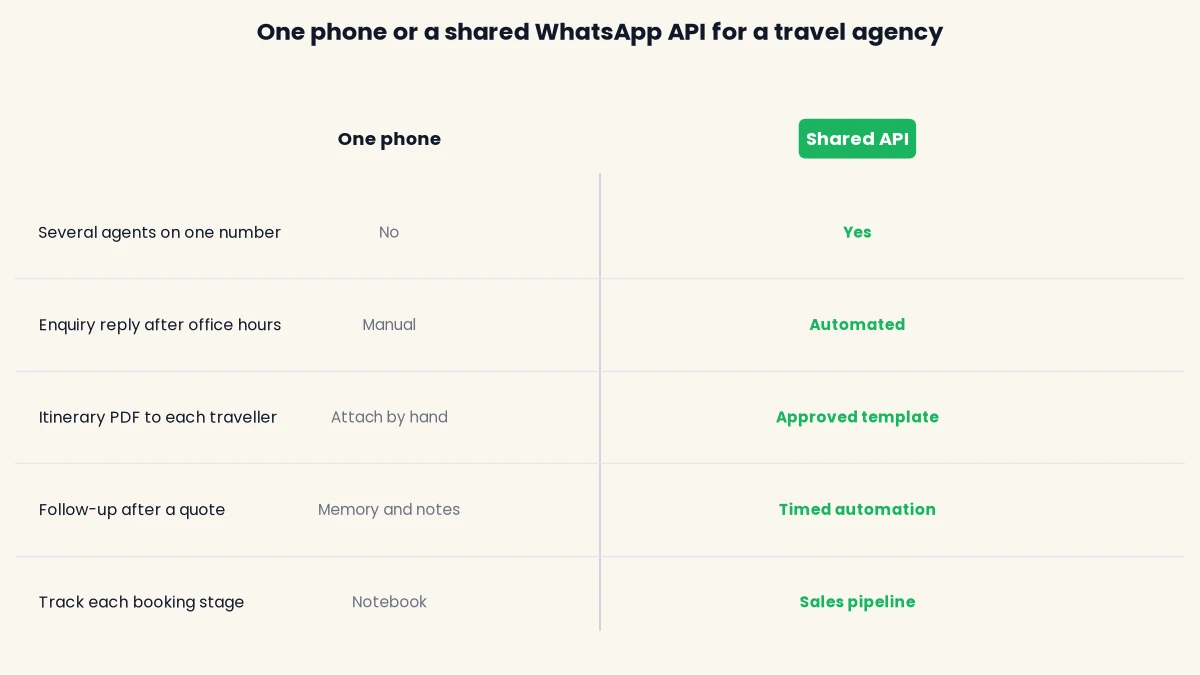
The free WhatsApp Business app is built for one device. Two agents cannot share one conversation list, nobody can see who replied last, and a quote sent on Monday has no reminder attached to it.
The API replaces the one-phone setup with a shared inbox. Chats can be assigned to a user or a team, and conversations are grouped as Open, Expired, Snoozed or Resolved, so the sales desk and the operations desk work from the same list. Routine messages go out from approved templates, so the wording stays the same whoever is on shift. If you want the full feature-by-feature view first, read our guide to the WhatsApp Business app vs API.
The comparison below shows how the two setups differ on the tasks a travel agency does every day.
Six jobs travel agencies can run on the API
Most agencies start with one or two messages and add more once the team trusts the setup. The table shows what each job does, the Meta category it usually falls under, and the DTB feature that supports it. Meta decides the category from the wording of each template, so treat the third column as a guide and check Meta’s current definitions before you submit.
| Job | What the message does | Usual Meta category | DTB feature |
|---|---|---|---|
| Instant enquiry reply | Acknowledges a new enquiry and asks for destination, dates and number of travellers | Service reply inside the 24 hour window | AI chatbot, chatbot flows, WhatsApp Flows form (Pro) |
| Quote and itinerary delivery | Sends package details and a brochure PDF | Utility or marketing, depending on wording | Template with a document header, team inbox |
| Follow-up after a quote | Checks in, answers doubts, suggests an alternative | Usually marketing | Automations with Wait steps (Pro) |
| Advance payment | Sends a payment link and confirms receipt | Utility | Razorpay payment link in a chatbot flow (Pro) |
| Pre-trip updates | Shares pickup details, hotel details and a final reminder | Utility | Automations tied to a date field (Pro) |
| Post-trip review and repeat booking | Asks for feedback and offers the next trip | Usually marketing | Segments, tags and bulk campaigns |
Start with one job. The enquiry reply is the usual first step because it costs the least to get wrong and fixes the most common leak. Book a free demo to see these jobs set up in a workspace, or start on the Pro plan at ₹1,499 a month if you already know you need follow-ups and the pipeline.
Instant enquiry reply
A traveller who messages at 9 pm and hears back the next afternoon has often asked two other agencies by then. A short, fast acknowledgement keeps the conversation with you.
There are two ways to do it on DTB. The AI chatbot answers inbound messages, with four trigger modes: always on, outside business hours, no human reply yet, or keyword match. A chatbot flow can then ask for destination, travel month and group size using buttons and list menus, save the answers to the contact, and create a deal in your pipeline. Keep the bot’s scope narrow. It is a business assistant for your packages, not an open chatbot, which matters because Meta has banned general-purpose AI chatbots on WhatsApp since 15 January 2026.
Quote and itinerary delivery
A quote is a document, and travellers expect to forward it to a spouse or a parent. WhatsApp suits that well, because the PDF sits in the same chat as the questions about it.
DTB templates that need media accept an image, video or document, with an optional caption and up to three buttons. That means you can send a package brochure as an approved template and add quick-reply buttons such as “Talk to an agent” or “Send another option”. A quick-reply button can also start a chatbot flow when the button text matches a trigger keyword. Within the 24 hour service window, your agent can reply to questions in the shared inbox like any other chat.

One limit to know about. DTB does not generate an itinerary from a booking system on its own. If your booking engine produces the itinerary, it can be connected through the webhook node and the REST API, but confirm with the DTB team how you would deliver a unique PDF to each traveller before you plan the workflow.
Follow-up after a quote
On the Pro plan, a segment-entry automation can send a template, wait, check whether the traveller replied, read or only received it, and send the next message accordingly. A common pattern is a check-in a day after the quote, a short answer to likely doubts a few days later, and an alternative package after about a week. Keep each message tied to what the traveller asked for. A goal or exit step stops the sequence once the traveller replies or pays, so nobody gets a nudge after they have already booked.
Follow-ups are marketing messages in most cases, so send them only to contacts who opted in. Repeated messages that nobody asked for lead to blocks and spam reports, and those feed into your number’s quality rating. Read how to avoid getting your WhatsApp number blocked for the checks to run first.
Advance payment
DTB has a native Razorpay integration, and its chatbot flows have a payment link node. The flow branches automatically on paid or expired outcomes. A paid outcome can add a tag and move the deal to a stage such as Advance paid, and an expired outcome can send a reminder. Refunds, cancellation terms and GST on your invoices stay with your own booking and accounting process, because the integration covers sending payment links from flows, not running your billing.
Pre-trip updates
The days before departure generate the most repeat questions: what time is the pickup, what should I pack, who is the driver, what is the hotel address.
On the Pro plan, an automation can fire relative to a date custom field on the contact, such as a travel date, and not only after a fixed wait from segment entry. DTB supports custom fields of type date, so you can store the departure date on each contact and build the sequence around it. A typical set is a packing and weather note about a week before, pickup and hotel details three days before, and a final reminder the day before. These are tied to a real booking, which is the kind of message Meta’s utility category covers. Keep sales wording out of them, or Meta may reject the template.
Post-trip review and repeat booking
A message a few days after the return date asking how the trip went is the easiest way to collect reviews, and the same chat is where the next booking starts.
Tag each traveller by destination and trip type, then use a segment to message only the right group. Segments in DTB update automatically as contacts match their rules, and the rule builder supports AND and OR logic with nested groups, so a segment such as “travelled to Kerala, last 12 months, opted in to marketing” takes a few clicks. Offers go in marketing templates and only to opted-in contacts.
Who WhatsApp Business API for travel agencies fits
The API fits a travel business when messages are part of how it sells and delivers trips. It is less useful for a one-person agent who handles a few bookings a month and knows every client personally.
Use this as a quick check:
- Good fit: two or more people answer enquiries, or the owner is tired of being the only person who knows the status of every lead.
- Good fit: you run group tours or seasonal packages and need to reach a segment of past travellers.
- Good fit: enquiries arrive from Facebook Lead Ads and need a quick reply.
- Not yet: one agent handles a few bookings a month and every conversation is personal.
- Check first: you need a GDS, a booking engine or an itinerary builder connected. DTB has no native sync for these, but a booking engine can be connected through the webhook node in chatbot flows and DTB’s REST API.
If you already use the free app on your agency’s number, you do not have to give it up. Coexistence lets you connect that number to DTB and keep using the mobile app on it. Read the limits of Coexistence before you rely on it for high volume.
Sample message templates for travel agencies
Meta reviews every template before it can be sent, and the review can take up to 24 hours. A common reason for rejection is a category that does not match the content, such as a promotional offer written inside a utility template. Meta sets the category rules, so check its current definitions before you submit. The five templates below use {{1}}-style variables. Replace the example text with your own wording.
Booking confirmation (utility)
“Hi {{1}}, your booking {{2}} for {{3}} from {{4}} to {{5}} is confirmed. We have received your advance of ₹{{6}}. Reply here if any detail looks wrong.”
Quote brochure with buttons (utility or marketing)
“Hi {{1}}, here is the quote you asked for: {{2}} for {{3}} travellers. The brochure is attached. Tap a button below to talk to an agent or ask for another option.” Attach the brochure as a document and add two quick-reply buttons. If the wording reads as a promotion, Meta may treat it as marketing, so choose the category it will accept.
Payment reminder (utility)
“Hi {{1}}, the balance of ₹{{2}} for booking {{3}} is due on {{4}}. You can pay here: {{5}}. If you have already paid, please ignore this message.”
Pre-trip reminder (utility)
“Hi {{1}}, your trip to {{2}} starts on {{3}}. Pickup is at {{4}} from {{5}}. Your trip manager is {{6}}. Reply here if you need anything before you leave.”
Seasonal package offer (marketing)
“Hi {{1}}, our {{2}} packages for {{3}} are open for booking. Reply DETAILS and an agent will share the options, or reply STOP to stop these messages.”
This one is marketing, so only send it to travellers who opted in to marketing messages. A utility category would not cover a promotional offer, and a mismatch like that is a common cause of rejection.
Opt-in, traveller data and compliance
Meta requires a business to have opt-in before it messages anyone on WhatsApp. Its WhatsApp Business Messaging Policy says you may only contact people if they have given you their phone number and you have received opt-in permission confirming they want to receive subsequent messages from you. A traveller who gave a number on a booking form has not necessarily agreed to WhatsApp offers, so collect consent clearly and give people a simple way to stop.
How to collect opt-in
The easiest moment to ask is the enquiry itself. DTB’s WhatsApp Flows are multi-screen forms that travellers fill inside the chat, with a date picker, dropdowns, text inputs and an opt-in checkbox. A flow can ask for destination, travel dates and group size, then ask whether the traveller agrees to receive trip updates and offers on WhatsApp. Subscribe and unsubscribe nodes in chatbot flows handle the same job inside a conversation. Meta also asks that you honour opt-out requests and keep the opt-out route clear.
Passports, ID numbers and payment details
Travel is one of the few businesses that routinely needs identity documents, which makes this the part of WhatsApp compliance most agencies get wrong. Meta’s policy says not to share or ask people to share full-length individual payment card numbers, financial account numbers, personal ID card numbers or other sensitive identifiers. So do not ask travellers to type a passport or Aadhaar number into a chat message.
The cleaner route is to collect the document itself. DTB’s WhatsApp Flows include a document upload field and a photo upload field, so a traveller can send a passport copy through a form and the file maps back to their contact record. Ask only for what the booking needs, say why you need it, and keep the files out of the open chat. Meta’s rules and your own data protection obligations still apply, so check Meta’s current policy before you launch.
Keep payment details out of chat too. Send a Razorpay payment link instead of asking for card or account numbers.
Quality rating and messaging limits
Each business phone number has a quality rating driven by blocks and spam reports, and a poor rating limits messaging. Meta also caps the number of unique customers you can start conversations with in a rolling 24 hour period. These rules apply to every provider, so no BSP can override them, and a seasonal broadcast to an old list is the quickest way to trigger a quality drop. Our WhatsApp Business API requirements for India guide lists what you need before you send at volume.
Meta’s rules change often, so check its current developer documentation before you launch.
Common mistakes to avoid
Most problems with a travel setup come from a few avoidable choices. Each one below is easy to fix before the first send, and much harder to fix after a number has been restricted.
- Running broadcasts from a personal number. Bulk sends from a normal number or an unofficial tool put the number at risk. Use the official API for any outbound volume.
- Sending offers to everyone. A Goa beach offer to a traveller who only books pilgrimages is noise, and noise turns into blocks. Segment by destination and trip type first.
- Putting sales wording in utility templates. A confirmation that ends with “book your next trip at 20 percent off” does not match the category, and Meta can reject it. Keep offers in marketing templates.
- Asking for ID or card numbers in chat. Do not ask travellers to type passport, Aadhaar or card numbers into a message. Use a Flows document upload for documents and a payment link for payments. See the compliance section above.
- Stopping at one follow-up. A single “any questions?” message is not a sequence. Build a short timed series with an exit step when the traveller replies or pays.
- Giving the chatbot no scope. A bot that answers anything will wander away from your packages. Give it a clear persona and a knowledge base built from your own files.
What it costs
Your bill has two parts. The first is the DTB platform fee. The second is Meta’s per-message charge, which Meta bills separately from DTB. DTB adds no markup on Meta’s charges.
| DTB plan | Monthly | Yearly | What it includes |
|---|---|---|---|
| Basic | ₹500 | ₹5,000 (₹417 a month, saves 17%) | Contacts, tags and segments, team inbox, bulk campaigns, message templates, campaign reporting |
| Pro | ₹1,499 | ₹14,999 (₹1,250 a month, saves 17%) | Everything in Basic, plus AI chatbot and flows, automations, WhatsApp Flow builder, integrations, sales pipeline and priority support |
Basic covers broadcasts and the shared inbox. The chatbot, timed follow-ups, pre-trip automations, payment links and the sales pipeline all need Pro.
Meta’s per-message charges
Meta charges per message, by category. Our WhatsApp Business API pricing in India guide works from about ₹0.8631 per marketing message and ₹0.115 per utility message before GST. Meta’s pricing page lists its India rate card only as a downloadable file, and says its current rate cards took effect on 1 July 2026, so confirm the figures on Meta’s pricing page before you budget.
One change affects travel agencies in particular, because so much of the conversation happens after a traveller replies. Meta’s pricing documentation for non-template messages says that service messages and utility templates sent in an open customer service window were free until 1 October 2026 and are now charged per message. The example below leaves those replies out, so your real bill will be a little higher.
A worked monthly example
The three sizes below are illustrations, not customer data. Marketing covers seasonal offers and follow-ups, utility covers confirmations, payment reminders and pre-trip updates. GST is taken at 18 percent on the Meta charges, as reported in the pricing guide.
| Agency size | Marketing messages | Utility messages | Meta charge before GST | Meta charge incl. 18% GST |
|---|---|---|---|---|
| Small | 300 (₹258.93) | 450 (₹51.75) | ₹310.68 | ₹367 |
| Medium | 1,500 (₹1,294.65) | 2,500 (₹287.50) | ₹1,582.15 | ₹1,867 |
| Large | 6,000 (₹5,178.60) | 9,000 (₹1,035.00) | ₹6,213.60 | ₹7,332 |
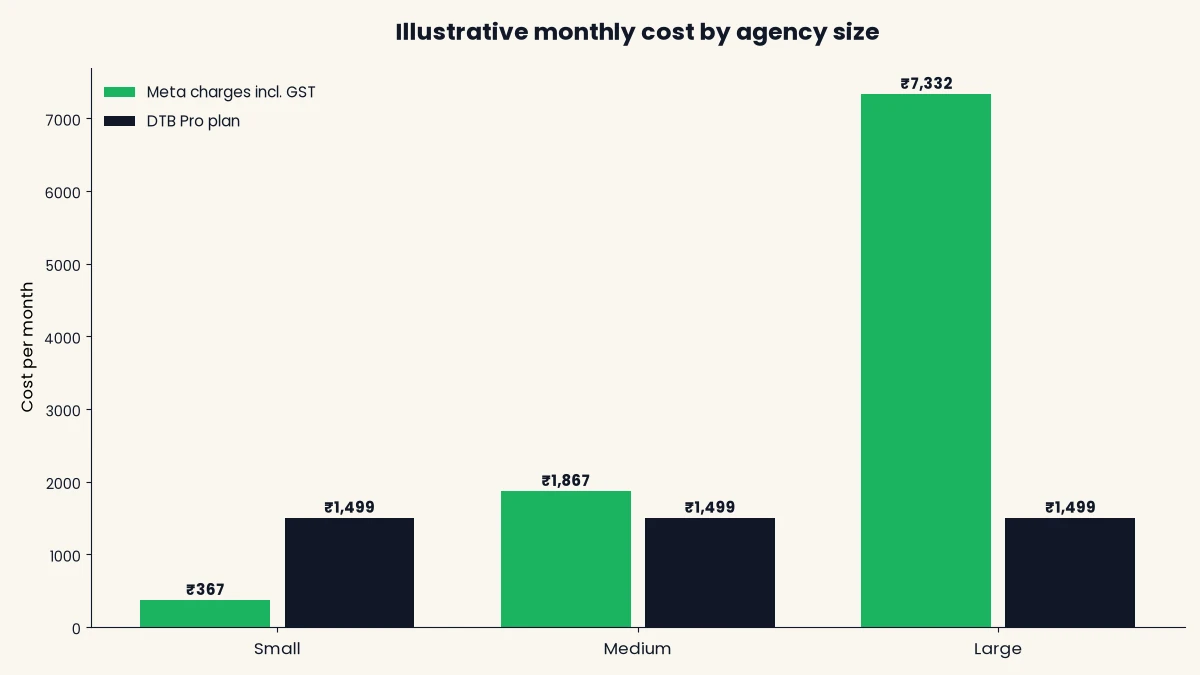
The pattern is worth noticing. Marketing messages cost about seven and a half times as much as utility messages at these rates, so the offers you broadcast decide your bill far more than the confirmations you send. Sending fewer, better targeted offers is both the cheaper and the safer choice.
Setup checklist for a travel agency
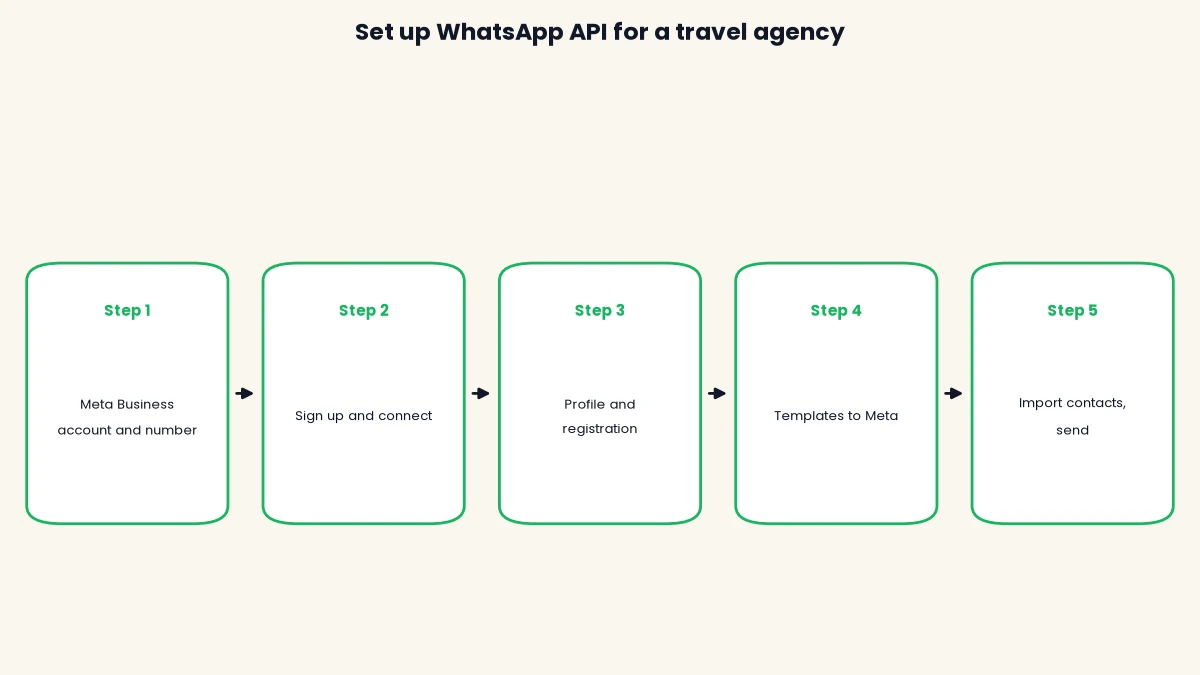
Setup takes about 15 minutes from signup to your first message, once your Meta Business account and number are ready. DTB’s team helps you through it end to end and shows you how to send your first message. Template review by Meta can take up to 24 hours, so submit your templates early. Follow these five steps in order.
- Create a Meta Business account and choose your number. Use a number dedicated to the API, or keep your existing WhatsApp Business app number through Coexistence.
- Sign up at DTB and choose Connect with Facebook. The WhatsApp Business account connects automatically, with no copy-pasting.
- Complete your business profile and register the phone number with Meta. Add a two-step verification PIN if you want one.
- Create your confirmation, payment and pre-trip templates, pick the right category for each, and submit them to Meta for review.
- Import contacts who have opted in, tag them by destination and trip type, store each travel date in a date field, and send your first message.
How DTB helps, and where it does not
DTB is an official Meta Tech Provider, so the connection, the templates and the billing follow Meta’s process. DTB charges a platform fee and adds no markup on Meta’s per-message charges. For a travel agency, these features matter most:
- A shared team inbox, with chats assigned to a user or a team and grouped as Open, Snoozed and Resolved.
- Approved message templates with document, image or video headers and up to three buttons.
- An AI chatbot with four trigger modes, including replies only outside business hours, and a knowledge base built from uploaded PDFs and CSVs, such as your package list and cancellation policy.
- Chatbot flows with Create Deal, deal stage moves, Razorpay payment links, Google Sheets and a webhook node, so an enquiry can become a deal, a payment request or a call to your booking system.
- WhatsApp Flows for enquiry forms with a date picker, dropdowns, an opt-in checkbox and document upload.
- Automations that follow up on a timer or relative to a date field, such as a travel date.
- Facebook Lead Ads import, so ad leads land in your contact list automatically.
- A sales pipeline with custom stages, such as Enquiry, Quote sent, Advance paid and Travelling.
Some things are not in DTB’s current feature list, so check before you plan around them:
- A native GDS, booking-engine or itinerary-builder sync. DTB’s listed integrations are Zapier, n8n, Google Sheets, Razorpay, OpenAI and Facebook Lead Ads, and anything else connects through the webhook node and the REST API.
- Automatic itinerary generation from a booking system.
Support runs from 10:00 to 19:00 IST, Monday to Friday, by chat and call. Reach it from the link in the app sidebar.
[ankit] Customer story: Travel Safari is a DTB customer, but there is no case study yet. Add their setup and any before and after numbers once Travel Safari approves them. Until then this page makes no customer claim.
[ankit] Original insight: what DTB has seen across its travel customers. Add it only if it is true, otherwise delete this line.
Where to start
Start with the enquiry reply, then add the quote follow-up and the payment link once the team is comfortable. Get opt-in and template categories right from the first send, because those mistakes are the hardest to undo later. If you are still comparing platforms, our guide to the best WhatsApp Business API providers in India explains what to ask each one.
Start with DTB at ₹1,499/month on Pro, or from ₹500/month on Basic. You can also book a free demo to see the enquiry and follow-up setup on your own number.
Frequently asked questions
What does WhatsApp Business API for travel agencies cost in India?
DTB’s platform fee is ₹500 a month on Basic or ₹1,499 a month on Pro, and yearly plans save 17%. Meta’s per-message charges are billed separately, and DTB adds no markup on them. At about ₹0.8631 per marketing message and ₹0.115 per utility message before GST, a small agency sending 300 marketing and 450 utility messages pays Meta about ₹367 a month including GST.
Can a travel agency keep using its existing WhatsApp number?
Yes, with Coexistence. You connect your existing WhatsApp Business app number to DTB and keep using the mobile app on that same number. Check the Coexistence limits before you rely on it for high message volumes.
Can I send an itinerary PDF through the WhatsApp API?
Yes, as a document in a template. DTB templates that need media accept an image, video or document, with an optional caption and buttons. DTB has no native booking-engine sync, but a booking engine can connect through the webhook node and the REST API, so confirm with the DTB team how you would deliver a unique file to each traveller.
Can I collect passport or Aadhaar documents on WhatsApp?
You can collect the documents with a WhatsApp Flows upload field, but do not ask travellers to type ID numbers into chat. Meta’s WhatsApp Business Messaging Policy says not to ask people to share personal ID card numbers or other sensitive identifiers. Ask only for what the booking needs, and check Meta’s current policy before you launch.
Do I need opt-in before sending package offers?
Yes. Meta requires opt-in permission confirming the person wants to receive messages from you. Capture it with the opt-in checkbox in a WhatsApp Flow or a subscribe node in a chatbot flow, and give people a clear way to opt out.
Can a chatbot handle bookings for my travel agency?
It can handle the first steps, not the whole booking. DTB’s chatbot answers questions from your uploaded files, collects enquiry details, creates and moves a deal in the pipeline and sends a Razorpay payment link. An agent should confirm availability and the final booking. Meta has banned general-purpose AI chatbots on WhatsApp since 15 January 2026, so the bot works as a business assistant with a defined scope.
Can I schedule pre-trip reminders based on the travel date?
Yes, on the Pro plan. An automation can fire relative to a date custom field on the contact, such as a travel date, so you can send a packing note a week before, pickup details three days before and a reminder the day before. Keep these messages factual and tied to a real booking so Meta treats them as utility messages.
How long does WhatsApp API setup take for a travel agency?
About 15 minutes from signup to your first message, once your Meta Business account and number are ready. DTB’s team helps you through it. Meta reviews each template and the review can take up to 24 hours, so submit your templates early.