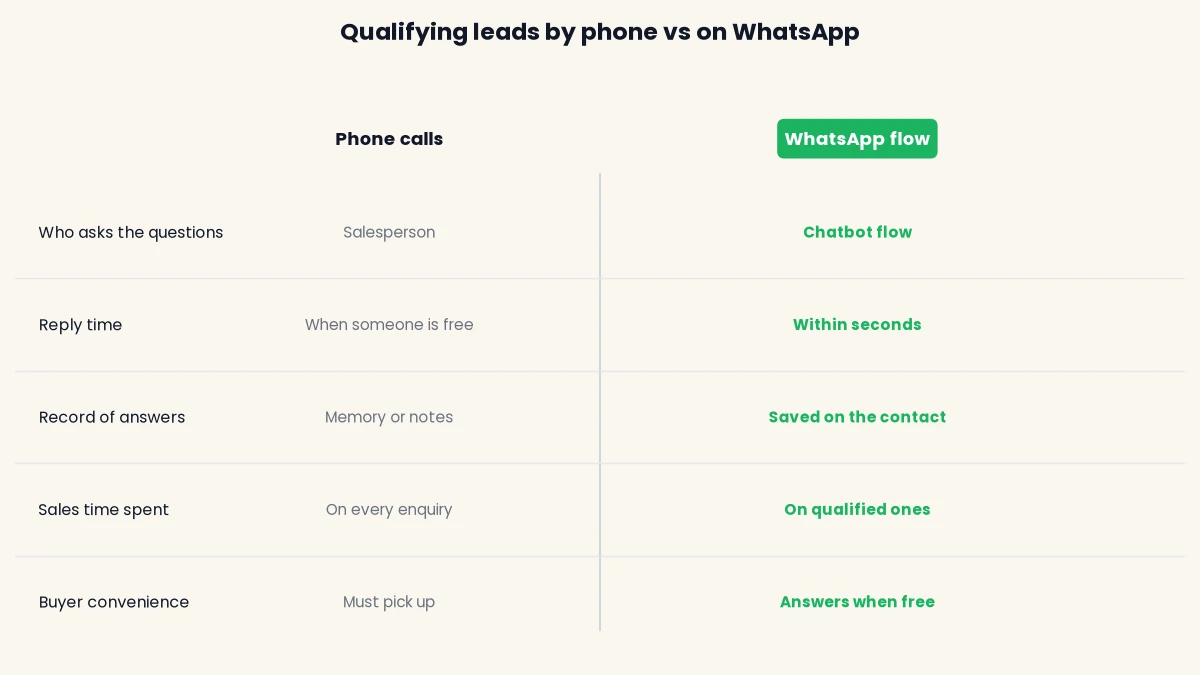
WhatsApp lead qualification for manufacturers means asking every new enquiry a handful of short questions in a chat, so your sales team only spends time on buyers who are real, ready and a fit. Most manufacturers do this by phone today, one slow call at a time, and the genuine bulk order waits behind the person asking for a price they will never pay.
Quick answer: ask five questions on WhatsApp (what they need, how much and how often, who they are, where and by when, and their company and GSTIN), save each answer on the contact, tag the lead hot, warm or cold from those answers, and pass only hot and warm leads to a salesperson. Buyers who message you first can be answered straight away. Anyone you contact first needs their permission before you start. This guide gives you the questions, the scoring, the opt-in rules and a build you can finish in an afternoon.
Key takeaways
- Five questions are enough for a manufacturer: product, quantity, buyer type, city and timeline, company and GSTIN. More than that and buyers stop replying.
- Use buttons and lists for most answers. They keep replies clean and make scoring possible.
- Score leads from the answers, then route them: hot leads to a named salesperson now, warm leads to a follow-up sequence, cold leads to a tag and a catalogue.
- A marketplace or form enquiry is not automatically your WhatsApp opt-in. Meta requires you to state your business name and get permission before you message first.
- DTB has no IndiaMART or Tally integration. Leads reach DTB through Facebook Lead Ads import, CSV upload, the REST API, or Zapier and n8n.
Published 13 October 2026 by the Digital Toolbox team. Meta documentation checked the same day.
In this guide
- Why manufacturers lose good leads before qualifying them
- Where manufacturing leads come from, and how each one reaches WhatsApp
- The five qualification questions
- Scoring leads: hot, warm and cold
- Opt-in for leads from marketplaces, forms and trade shows
- Build the flow in six steps
- Handing a qualified lead to a salesperson
- Common mistakes
- Reading the results after two weeks
- How DTB helps
- Frequently asked questions
Why manufacturers lose good leads before qualifying them
Manufacturers lose good leads because enquiries arrive faster than a sales team can call them, and the slow reply goes to a competitor who answered first. Qualifying on WhatsApp moves the first conversation from your salesperson’s phone to a chat that runs while they are busy.
Picture a Rajkot pump manufacturer with two salespeople. Monday brings thirty enquiries from a marketplace listing, a few from Facebook ads and a handful of visiting cards from a trade fair. Some are dealers asking for a bulk price. Some are students writing a project. Some want one piece for a repair. By the time both salespeople have called everyone, the dealer who wanted 200 units has already ordered from someone who replied in ten minutes.
B2B buying also differs from consumer shopping in ways that matter here. The buyer is often researching for someone else, the order is large enough to need a quote, and the decision involves a spec, a quantity and a delivery date. Most generic lead-qualification guides were written for software sales, so they ask about seats, budgets and demos. A manufacturer needs to know the grade, the quantity, whether the buyer is a dealer or an end user, and where the goods must go. This guide is built around those questions.
WhatsApp suits this because your buyers already use it all day, and a chat feels lighter than a form or a call. A buyer can answer a button question in five seconds between two meetings, which is something a phone call cannot offer.
Where manufacturing leads come from, and how each one reaches WhatsApp
Manufacturing leads reach you from five common sources, and the source decides whether the buyer starts the chat or you do. That difference matters for opt-in, cost and speed, so sort your sources before you build anything.
| Lead source | How the lead reaches you | Who starts the WhatsApp chat | First move |
|---|---|---|---|
| Click-to-WhatsApp ad, QR code, website chat button | The buyer taps a link and messages you | The buyer | Start the flow at once. Your team can reply freely for 24 hours. |
| Website enquiry form | Name and phone number in a form | You | Check the form’s consent wording, then send an approved template. |
| Facebook Lead Ads | Form submission imported as a contact | You | Check the ad form’s wording, then send an approved template. |
| Marketplace enquiry (IndiaMART and similar) | Number from the enquiry, usually by email or app | You | Get permission first. A marketplace enquiry is not your opt-in by default. |
| Trade show, visiting card, dealer meet | Paper or in person | You | Put a WhatsApp consent line on the sign-up sheet. |
The cleanest leads are the ones who message you first. Meta starts a 24-hour customer service window when a person messages your business, and during it you can send free-form replies without a pre-approved template, as Meta’s documentation on sending messages explains. A link or QR code that opens a chat with a pre-filled message such as “quote” is a standard WhatsApp feature, and it puts the buyer straight into your flow.
For leads you contact first, you must send an approved template, because the 24-hour window is not open yet. Meta also caps how many unique people you can message outside a window in 24 hours. Meta’s messaging limits page says new business portfolios start at 250, with higher tiers reached later. If you import 2,000 old enquiries on day one, most of them will not be reachable yet. Start with your freshest leads and build up.
The five qualification questions
Five questions are enough to qualify most manufacturing leads: what they need, how much and how often, who they are, where and by when, and their company and GSTIN (the 15-character GST registration number). Each question maps to a decision your sales team would otherwise make by phone.
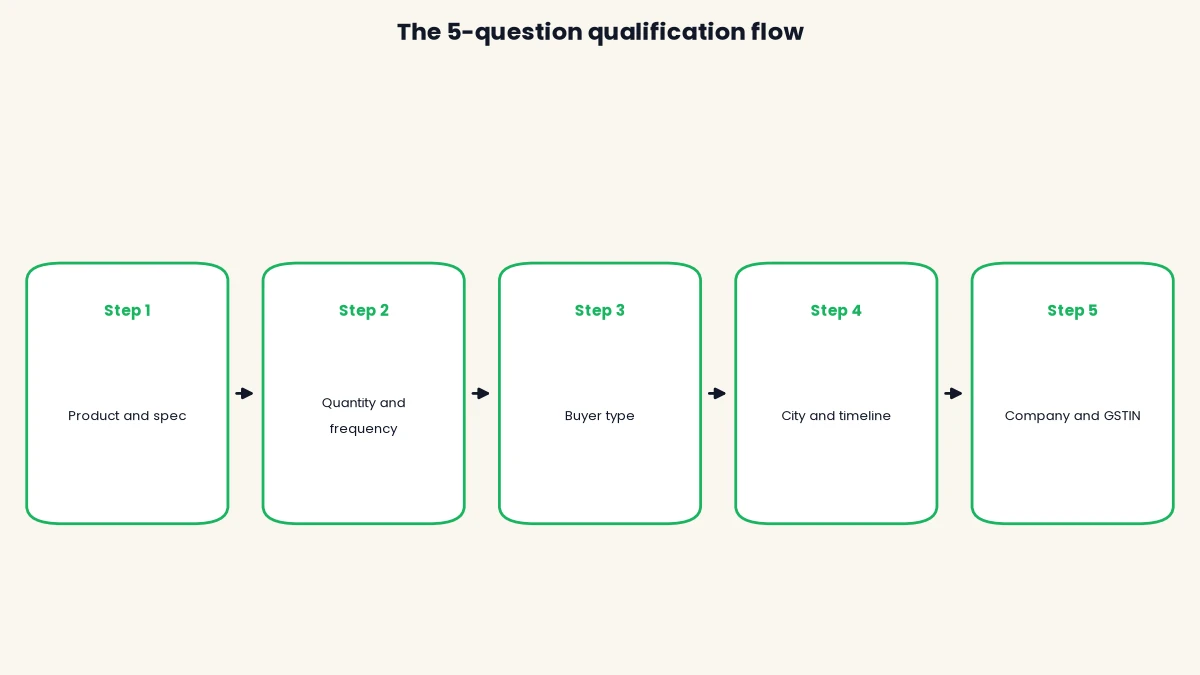
The order matters. Start with the question the buyer most wants to answer, which is what they need. Leave company details and GSTIN for last, once the buyer has put in some effort and is more likely to finish.
Question 1: what do you need?
Ask for the product, grade or specification first, because it decides which salesperson or plant handles the lead. Use a list message with your product categories (for example “Centrifugal pumps”, “Submersible pumps”, “Spares”, “Something else”) so the answer is clean and can be saved on the contact. Add a free-text follow-up only for “Something else” or when you need a drawing or spec sheet. A buyer who shares a drawing or model number is already showing a strong signal.
Question 2: how many, and how often?
Quantity and frequency separate a one-off buyer from a repeat account. Offer buttons such as “1 to 10 units”, “11 to 100”, “100 or more” and a second question for “One-time” or “Regular”. Set the ranges to match your own minimum order quantity (MOQ, the smallest batch you will produce or ship). If your MOQ is 50 units, a buyer who picks “1 to 10” has told you something useful without any awkward conversation.
Question 3: who are you?
Buyer type tells you which price list and which salesperson apply. Offer buttons for “Dealer or distributor”, “OEM or manufacturer”, “End user or project” and “Other”. A dealer asks for a margin and a territory. An OEM asks for a supply contract. An end user asks for a single price and delivery. These are three different conversations, and the flow should send each to a different person or follow-up.
Question 4: where and by when?
Delivery city and timeline show whether you can serve the buyer and how urgent the need is. Ask for the city or state as typed text, or use a list of your main regions. Then ask for timing with buttons: “This week”, “This month”, “Within 3 months”, “Just exploring”. A buyer who needs goods this month and sits in a city you already serve is worth a call within the hour.
Question 5: company name and GSTIN
Company name and GSTIN come last because they ask the most of the buyer. A GSTIN confirms a registered business and lets your accounts team raise a proper tax invoice later. Make this question optional for small buyers (“Share it now or send later”), and never refuse a quote because the buyer skipped it at this stage. You are qualifying, not auditing.
| Question | Best format | What it tells you | Saved as |
|---|---|---|---|
| 1. What do you need? | List message, then optional file | Product line and who handles it | Custom field: product |
| 2. How many, how often? | Reply buttons | Bulk or small, one-off or repeat | Custom field: quantity band |
| 3. Who are you? | Reply buttons | Dealer, OEM or end user | Tag: buyer type |
| 4. Where and by when? | Typed city, then buttons | Serviceability and urgency | Custom fields: city, timeline |
| 5. Company and GSTIN? | Typed text, optional | A real registered business | Contact fields: company; custom field: GSTIN |
DTB contacts hold a company name, city and up to 50 custom fields of type text, phone, name, date or number, so every answer in the table has a place to live. Add a custom field each for quantity band, timeline and GSTIN before you build the flow.
Scoring leads: hot, warm and cold
A simple score turns five answers into one decision: call now, follow up, or park. You do not need a complex model. Count the strong signals in each answer and sort the lead into one of three tiers.
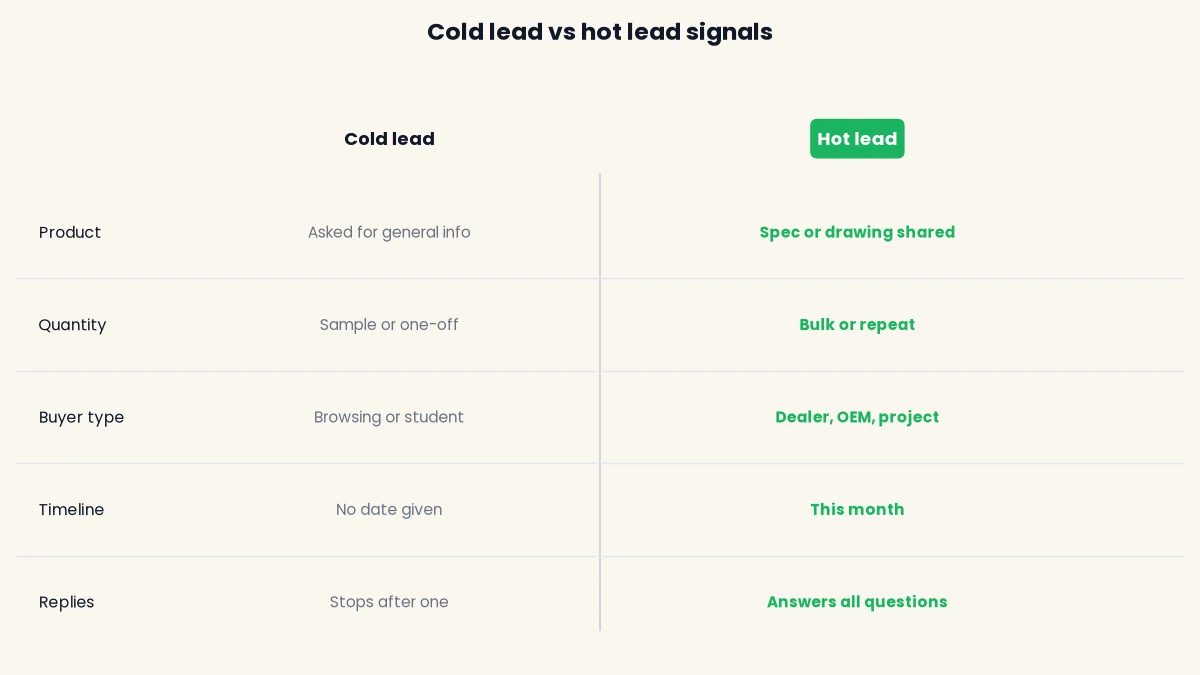
Give one point for each strong signal: a clear product or spec, a quantity above your MOQ or a repeat need, a dealer, OEM or project buyer, delivery within a city you serve, a timeline of this month, and a GSTIN shared. Then read the total against the table below. Adjust the thresholds to your own business, because a custom fabricator and a fast-moving spares maker will not agree on what “hot” means.
| Tier | Typical signals | What the flow does | Pipeline stage |
|---|---|---|---|
| Hot (5 to 6 points) | Spec shared, bulk or repeat, dealer or OEM, this month | Assigns a named salesperson and alerts them to call within the hour | Qualified |
| Warm (3 to 4 points) | Product clear, but quantity or timeline vague | Creates a deal, assigns the team and sends a follow-up after a wait | Lead |
| Cold (0 to 2 points) | General info, sample or one-off, no date | Sends the catalogue, tags the contact and checks back later | No deal yet |
The thresholds in this table are a starting point, not a benchmark from industry data. Run the flow for two weeks, compare the tiers against the orders you actually won, and move the lines. If your cold bucket produces orders, your threshold is too strict.
Keep cold leads, do not bin them
A cold lead today is often a warm lead in six months. A buyer who asked for a sample may come back for a bulk order after the trial. Tag them, keep them out of your salespeople’s queue, and revisit the tag when you launch a new product or a seasonal price list.
Opt-in for leads from marketplaces, forms and trade shows
Meta requires you to get opt-in before you message someone first on WhatsApp, and a marketplace enquiry or a form fill does not automatically count. The rule is Meta’s, and it applies to every provider, including DTB.
Meta’s opt-in documentation says a business must clearly state that the person is opting in to receive messages from it, and must name the business. It lists SMS, a website, a phone call using an interactive voice response flow, and in person or on paper as supported ways to collect it. It also says you must comply with applicable law.
That has practical effects for a manufacturer:
- Website and Facebook lead forms: add a consent line next to the phone number, such as “I agree to receive quotes and updates from [your company] on WhatsApp”. A plain phone field does not tell the buyer you will use WhatsApp.
- Marketplace enquiries: the buyer agreed to share their number with the marketplace and its sellers, but you should not assume that covers a WhatsApp message from you. Ask first by phone or SMS, or invite them to message you, which starts a chat they initiated.
- Trade shows and visiting cards: put a consent tick on the sign-up sheet. Paper is an accepted method, so a signed line is enough if it names your company.
- Inside the chat: when a buyer messages first, end your flow with a clear question such as “Can we send you quotes and updates on this number?” with Yes and No buttons. Tag the answer and subscribe or unsubscribe the contact to match.
This is guidance on Meta’s rules, not legal advice. If you are unsure whether a particular source counts, treat it as no opt-in and ask. Messaging people who did not expect it raises block and report rates, and Meta lowers a number’s quality rating when that happens. Our guide on how to avoid getting your WhatsApp number blocked covers what that costs you.
Step-by-step: how to build WhatsApp lead qualification for manufacturers
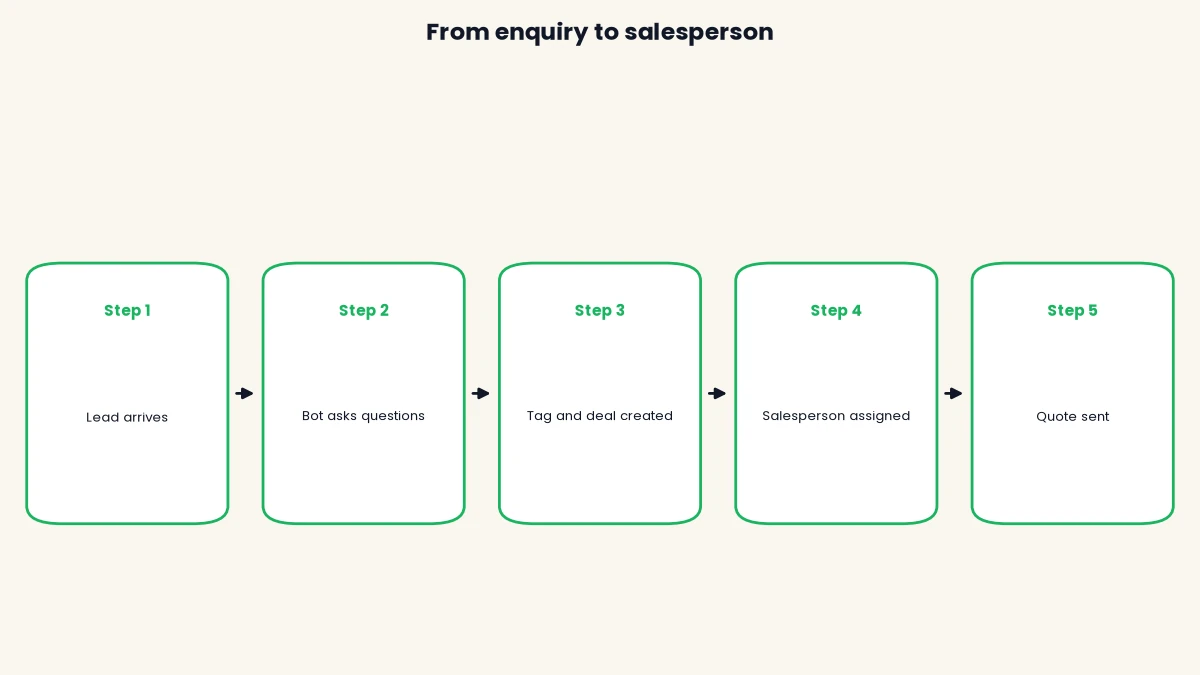
You build the flow in six steps: connect your number, bring leads in, ask the questions, save and tag the answers, route to a person, and follow up on silence. Plan on an afternoon for the first working version.
Step 1: connect your WhatsApp number
Sign in to DTB and choose Connect with Facebook, which links your WhatsApp Business account without copying credentials. If your sales team already uses the WhatsApp Business app on this number, pick the option to keep using the app (coexistence), so they can keep chatting from their phones. Read the WhatsApp Business app vs API guide to decide which setup fits you.
Step 2: bring leads into DTB
Pick the route that matches where your leads live today. Facebook Lead Ads submissions import as contacts automatically through the integrations panel. For everything else, upload a CSV (a spreadsheet saved as comma-separated values) of enquiries, or push contacts in through the REST API, Zapier or n8n. Only import people whose consent you hold, and tag each contact with its source, so you can compare sources later.
Step 3: write the opening template
For leads you contact first, submit a template for Meta’s review, which can take up to 24 hours. Keep it short: your company name, the product they enquired about, and a quick-reply button such as “Get a quote”. Pick the category honestly, because Meta may re-categorise a template that reads as promotion. Check Meta’s current rate card for what each category costs. A button reply starts the buyer’s own chat, and your five questions follow inside the 24-hour window that the reply opens.
Step 4: build the qualification chatbot flow
Open the chatbot flow builder and set a trigger keyword, such as “quote”, which the flow matches with a “contains” rule. Add a Buttons or List node for each question, with the answers listed in the table earlier. A Condition node can branch on an answer, and a Time Delay node can pause between messages. A quick-reply button on a template starts a keyword-triggered flow, so make the button text contain your trigger keyword. Test the flow in the builder before saving, then on your own phone.
Step 5: save the answers, tag and create the deal
Use Update Attribute nodes to store each answer in a custom field, and Set Tag nodes to apply the buyer-type and tier tags. For the score, a Code Block node can run JavaScript on the collected answers and save the total as a variable, which a Condition node then reads. Code Block runs synchronously, makes no network calls and times out after 3 seconds, so keep the logic to simple arithmetic. Then add a Create Deal node for hot and warm leads. It writes a deal to the sales pipeline with a stage, title, value and note, and supports merge tags such as the buyer’s company name.
Step 6: route to a salesperson and chase the silent ones
Add an Assign User or Assign Team node so the chat lands with the right person, and an Update Chat Status node to mark it open. For buyers who stop replying, build an automation triggered when a contact enters a segment, for example “Warm, no reply”. It can Wait a day, Send Template as a gentle nudge, and exit when the buyer replies, using the Goal or Exit node. Automations and chatbot flows are part of the Pro plan.
Handing a qualified lead to a salesperson
A good handoff gives the salesperson everything the bot learned, so the first call never starts with “what were you looking for?” The bot’s job ends the moment a human can add value.
Set up three things so the salesperson is ready:
- The answers sit on the contact. Product, quantity band, buyer type, city, timeline and GSTIN are visible without scrolling the chat. Use the contact’s Notes tab for anything the buyer said in free text.
- The deal sits in the pipeline. A hot lead appears under Qualified with the buyer’s company name and an expected close date, so the manager sees the queue.
- The owner is named. The chat is assigned to a user or a team, so two salespeople never reply to the same buyer.
Tell the buyer what happens next in the last bot message: “Thanks, Rakesh from Surat Textiles. Our dealer manager will message you within an hour.” Make a promise your team can keep, based on who is actually at their desk. Nobody should promise a reply at midnight.
Once the salesperson replies, the bot should stay out of the way. If the AI chatbot is on for the same number, use the trigger mode that replies only when no human has responded yet, so it does not talk over your team. A defined, business-scoped assistant also keeps you on the right side of Meta’s rules on AI chatbots, which restrict general-purpose assistants. Check Meta’s current terms before you switch it on.
Common mistakes in WhatsApp lead qualification
- Asking too many questions at once. Ten questions feels like a form and buyers leave. Stay at five, and let the salesperson ask the rest.
- Opening with GSTIN or company details. It feels like paperwork before any value. Ask last, and make it skippable.
- Using typed answers where buttons would do. Free text is hard to score and easy to mistype. Use buttons and lists for everything except city, GSTIN and drawings.
- Treating every lead the same. A dealer and a student need different handling. Score the lead and route it, or your best salesperson spends the day on the weakest enquiries.
- Messaging marketplace leads without permission. It can raise block rates and hurt your number’s quality rating. Ask first, or invite them to message you.
- Promising a callback nobody can keep. The bot’s “within an hour” must match who is actually at their desk. A missed promise is worse than none.
- Never testing on a real phone. Buttons, lists and variables can look different on a phone. Run the full flow yourself before any buyer sees it.
- Binning cold leads. Today’s sample request is next quarter’s bulk order. Tag and keep them.
Reading the results after two weeks
After two weeks, review four numbers: how many leads started the flow, how many finished all five questions, how many reached hot, and how many hot leads became orders. These tell you where the flow leaks.
If many buyers start but few finish, a question is too heavy, so shorten it or move it later. If few hot leads become orders, your hot threshold is too loose or your callback is too slow. If cold leads later buy, your threshold is too strict. DTB’s campaign and dashboard reports show delivery and reads for the messages you send, and the sales pipeline shows deal counts and value per stage, so you can read most of this without exporting anything. Whatever you measure, record your own numbers. Do not borrow benchmarks from vendor blogs, because they are rarely sourced.
Start with DTB on the Pro plan at ₹1,499/month to get chatbot flows, automations and the sales pipeline in one place. The Basic plan at ₹500/month does not include them.
How DTB helps
DTB is an official Meta Tech Provider, and it covers the whole path for WhatsApp lead qualification for manufacturers without a separate CRM. These are the pieces this guide used, all inside one workspace.
- Lead intake: Facebook Lead Ads import as contacts automatically, and CSV upload, the REST API, Zapier and n8n cover other sources.
- Questions: chatbot flows with Buttons, List, Condition and Time Delay nodes, triggered by keywords, with a test mode in the builder.
- Saving and scoring: Update Attribute and Set Tag nodes, up to 50 custom fields per contact, and a Code Block node for a simple score.
- Routing: Assign User and Assign Team nodes, plus a shared team inbox with Open, Resolved and other statuses.
- Pipeline: a Create Deal node that writes to a kanban sales pipeline with custom stages.
- Follow-up: segment-triggered automations with Wait, Send Template and a Goal node.
- Your own AI key: connect your own OpenAI key to power the AI Assist node, and answer product questions from an uploaded catalogue PDF with the AI chatbot’s knowledge base.
DTB adds no markup on Meta’s per-conversation charges, so you pay Meta’s rate on top of the platform fee. There is no native IndiaMART, Tally or ERP connector, and DTB does not run a request-for-quotation workflow. The flow collects the details a quote needs, and your team prepares the quote. For the wider picture, see our page on WhatsApp Business API for manufacturers, our pricing guide for Meta’s rates, and our comparison of the best WhatsApp Business API providers in India.
Conclusion
WhatsApp lead qualification for manufacturers works when you keep it short, score it simply and hand over fast. Five questions, a few tags and one named salesperson turn a pile of unsorted enquiries into a ranked list your team can act on. Start with leads who message you first, add permission-based outreach next, and review the numbers after two weeks. For more on the platform behind it, read our guide to the WhatsApp Business app versus the API.
Book a free demo and see a five-question qualification flow built on your own product list.
Frequently asked questions
Can I qualify IndiaMART leads on WhatsApp?
Yes, but get permission before you message first. A marketplace enquiry is not automatically your WhatsApp opt-in under Meta’s rules. Ask by phone or SMS, or invite the buyer to message you, then run your questions in the chat. DTB has no native IndiaMART integration, so you bring leads in by CSV, the API, Zapier or n8n.
How many questions should a WhatsApp qualification flow ask?
Five is a good limit for a manufacturer. Cover the product, quantity, buyer type, city with timeline, and company with GSTIN. More questions raise the chance a buyer stops replying. Let your salesperson ask technical details on the first call.
Do I need the WhatsApp Business API, or is the Business app enough?
The app is enough for a few chats a day, but not for automated qualification. Chatbot flows, tagging, a shared team inbox and a sales pipeline need the Business API through a provider. With coexistence you can keep using the app on the same number alongside it.
Is a lead qualification chatbot allowed on WhatsApp?
Yes, when it serves a defined business purpose such as sales, support or order status. Meta restricts general-purpose AI assistants on the platform. A scoped flow that asks your own questions is a different thing, but check Meta’s current terms before launch, as they change.
How do I score B2B leads on WhatsApp?
Give one point for each strong signal, such as a clear spec, a bulk or repeat quantity, a dealer or OEM buyer, a served city, a near-term timeline and a shared GSTIN. Then sort leads into hot, warm and cold by total. Set the thresholds from your own won orders, not from a generic benchmark.
Can the bot send a product catalogue or price list?
Yes. A flow can send an image, media or template message, and the AI chatbot can answer product questions from an uploaded PDF or CSV. Send the catalogue to cold leads and keep detailed pricing for your salesperson, since pricing often depends on quantity and city.
What happens when the bot cannot answer a buyer’s question?
The chat should pass to a person. Use an option such as “Talk to our team” that assigns the chat to a user or team and marks it open in the shared inbox. Inside the 24-hour window your team can reply freely, so the buyer does not wait for template approval.