
Your site visit follow up message for real estate decides whether a warm lead books a second visit or quietly moves on to a competitor’s project. Buyers walk out of a sample flat with real interest, and that interest cools fast if the next message they get is late, generic, or never arrives at all.
Quick answer: send a short thank you within two hours of the visit, keep it in the utility template category since it follows up on something the buyer already did, then run a short sequence over the next two weeks: a question about their concerns on day one, a decision prompt on day three, an active-or-nurture check on day seven, and a reactivation message on day fourteen. Segment every visitor as hot, warm, cold or nurture so the tone and frequency match how ready they actually are.
Key takeaways
- Send the first follow up within two hours of the visit, while the property is still fresh in the buyer’s mind.
- A message that only thanks the buyer or asks for feedback is a utility template, not marketing, since it follows up on a visit they already made.
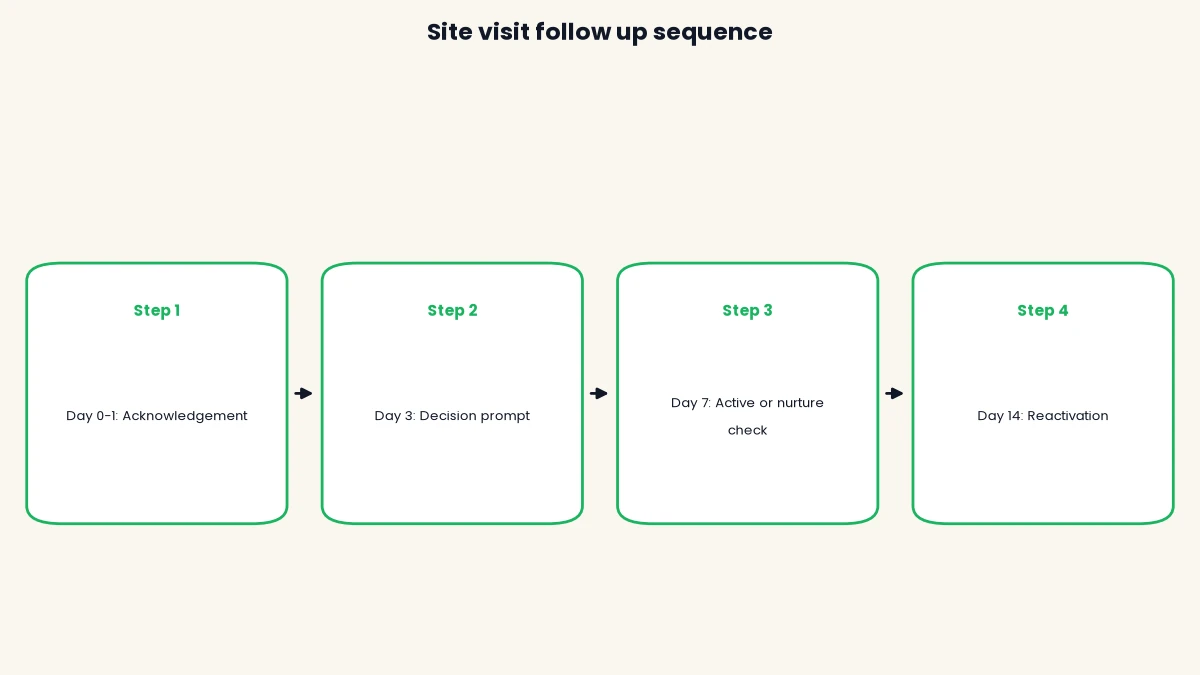
- Run a short cadence over about two weeks (day 0-1, day 3, day 7, day 14), not one message and silence.
- Segment visitors as hot, warm, cold or nurture right after the visit, so the next message matches their actual interest.
- DTB’s Segments and Automations (Pro plan, ₹1,499/month) can run this sequence without anyone manually typing a reminder.
Published 29 September 2026 by the Digital Toolbox team. Meta’s opt-in and template category rules checked the same day against Meta’s developer documentation.
In this guide
- Why real estate leads go cold after a site visit
- What to send right after the visit
- The site visit follow up sequence, step by step
- Segment leads by intent: hot, warm, cold and nurture
- Utility or marketing: how to classify a site visit follow up message for real estate
- How to automate the sequence without manual work
- Common mistakes that cost you the lead
- How DTB helps real estate teams follow up on WhatsApp
- Frequently asked questions
Why real estate leads go cold after a site visit
A site visit is the highest-intent moment in the entire sales cycle, and it is also the easiest moment to waste. The buyer has already given up an afternoon, walked the rooms, and pictured their furniture in the space. That interest is at its peak the moment they walk out, and it fades with every hour your sales team stays quiet.
Most Indian builders and brokers still rely on a sales executive to remember every lead, on top of scheduling the next site visit, answering calls, and closing paperwork. A visitor who does not hear back within a day or two assumes the interest was one-sided, and moves on to whichever project follows up first. The fix is not more sales staff. It is a follow up sequence that runs whether or not your executive remembers to send it.

What buyers are actually comparing
A serious buyer in India rarely visits only one project. They are comparing two or three sites in the same locality and budget, often in the same week. The builder or broker who reaches out first with something specific, not a generic “thank you for visiting,” gets remembered when the buyer finally sits down to decide.
What to send right after the visit
The first message sets the tone for everything after it. Keep it short, specific to the property they saw, and free of any sales pitch.
The thank you and feedback message
Thank the buyer by name, name the project and the unit they saw, and ask one easy question they can answer with a single line. “Hi Priya, thank you for visiting Aarohi Heights today. Did the 3 BHK on the 6th floor work for you?” gives the buyer something specific to respond to, instead of a vague “how was your visit.”
When to send it
Send this message within two hours of the visit, ideally the same evening. Waiting until the next morning already feels late to a buyer who is comparing you against a project that messaged within the hour. Because the buyer has not messaged you first, this message goes out as an approved template rather than free-form text. Once they reply, a 24-hour customer service window opens and you can continue in free-form text until it closes.
The site visit follow up sequence, step by step
A single thank you message is not enough. Buyers typically take one to three weeks to decide between shortlisted projects, so the follow up needs to continue on its own schedule, not stop the moment the first message goes unanswered.
- Day 0-1: Send the acknowledgement, then follow up on any question the buyer raised during the visit that your executive could not answer on the spot.
- Day 3: Prompt a decision with something concrete, such as the payment plan or a comparison of unit configurations.
- Day 7: Check whether the lead is still active. A reply moves them forward; silence moves them to a slower, nurture-paced cadence.
- Day 14: Send a reactivation message, such as new availability or a price update, with a clear and easy way to opt out.
Day 0-1: acknowledgement and unresolved questions
If the buyer asked something during the visit that needed checking, such as an exact carpet area or a loan tie-up, this is where you close the loop. A specific answer to a specific question does more to build trust than any generic follow up.
Day 3: the decision prompt
By day three, silence usually means the buyer is comparing options, not that they have lost interest. Send something that helps the comparison along: a payment plan breakdown, a floor plan for the exact unit, or an offer to connect them with a loan advisor. Keep it to one clear ask.
Day 7: active or nurture
A week after the visit, decide whether this lead stays on a fast weekly cadence or moves to a slower monthly one. A reply, a second visit request, or a question about booking keeps them active. No response at all after three touches is a signal to slow down, not stop entirely.
Day 14: the reactivation check-in
Two weeks out, send one more message with genuine news, a new tower release, a price revision, or a possession milestone, rather than a repeat of “just checking in.” Include an easy way to opt out of further messages, since a buyer who has decided against your project should not keep receiving them.
| When | Goal | Message type | Likely template category |
|---|---|---|---|
| Day 0-1 | Acknowledge the visit, answer open questions | Thank you and feedback ask | Utility |
| Day 3 | Move the decision forward | Payment plan or floor plan | Marketing |
| Day 7 | Check active vs nurture status | Direct question on next steps | Marketing |
| Day 14 | Reactivate a quiet lead | New availability or price update | Marketing |
Segment leads by intent: hot, warm, cold and nurture
Not every visitor deserves the same message at the same pace. Sorting leads into four groups right after the visit keeps your follow up relevant instead of generic.
| Segment | Signal from the visit | Next action |
|---|---|---|
| Hot | Asked about booking amount, requested a loan connect, or asked to see the sample flat again | Call within the day, and route to a senior executive |
| Warm | Liked the project, but needs family approval, budget clarity or to compare one more project | Follow the full day 0-14 sequence |
| Cold | Visited but showed no clear reaction or specific questions | Slower cadence, mostly project updates over the next month |
| Nurture | Not buying now, but the right fit for future launches or inventory | Low-frequency updates, no active sales push |
Tag each visitor with their segment as soon as the visit ends, ideally by the executive who hosted them, since they read the buyer’s reaction best. The tag then decides which cadence the contact enters and when your team gets involved directly.
Utility or marketing: how to classify a site visit follow up message for real estate
Getting the template category right on a site visit follow up message for real estate is not just a compliance detail, it changes what Meta charges you to send it. WhatsApp sorts every template into marketing, utility or authentication for pricing and review purposes, and Meta’s own template categorization documentation defines a utility template as non-promotional and either specific to or requested by the user, or essential to their safety.
A message that only thanks the buyer for visiting or asks a direct question about the unit they saw fits that definition cleanly: it follows up on a visit the buyer already made, and carries no offer. The moment the same message adds a discount, an urgency line, or a call to book, it becomes promotional and needs the marketing category instead, since utility templates must stay non-promotional throughout.
Where opt-in comes from at a site visit
A site visit is a natural, in-person opt-in moment. Meta’s opt-in documentation confirms that businesses can collect consent on paper, where a customer signs a physical document, in addition to online methods. A visitor sign-in register at the sales office that clearly states the buyer is agreeing to WhatsApp updates from your business, with the business name stated, satisfies this. A phone number collected only for a security check-in at the gate does not count as opt-in for WhatsApp messages.
Why the category matters for cost
Utility templates cost meaningfully less than marketing templates under Meta’s current pricing, before GST, and DTB passes Meta’s rate through with zero markup either way. Misclassifying a promotional message as utility to save money gets corrected at Meta’s review, and repeated mismatches chip away at your number’s quality rating, not just this one template. The exact current rates for both categories are in our WhatsApp Business API pricing in India guide, since Meta’s rate card changes and is worth checking before you budget a campaign.
How to automate the sequence without manual work
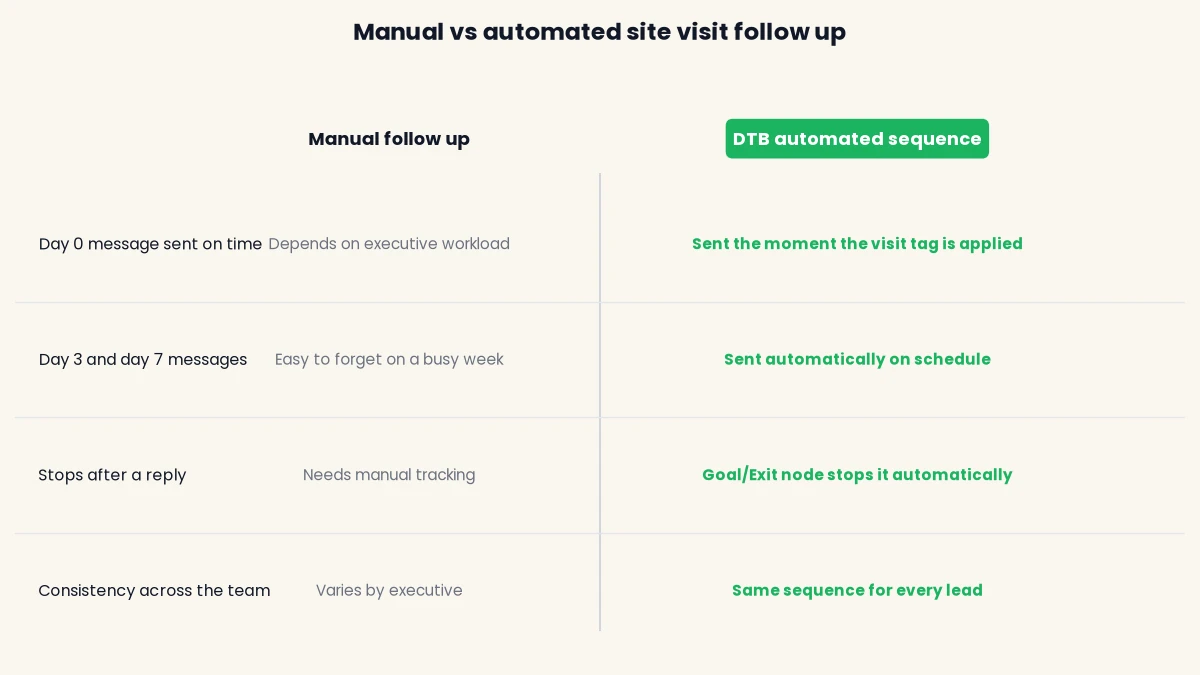
A four-message sequence sounds manageable until your team is hosting six site visits a day. Automating the cadence removes the risk of a busy executive forgetting the day-3 message entirely. DTB, a Business Solution Provider (BSP) built on Meta’s Cloud API, runs this kind of sequence from the same dashboard your team already uses for the inbox and contacts.
Build the segment
Tag every visitor “site-visited” as soon as their visit ends, along with their hot, warm, cold or nurture tag. DTB’s segments are rule-based and update automatically as contacts match the rule, so a segment built on the “site-visited” tag stays current without anyone maintaining a list by hand.
Set up the automation
DTB’s automation builder runs on a visual canvas, triggered when a contact enters a segment. Build the day 0-14 sequence as: segment entry, Send Template (the thank you), a Wait step, a Replied decision, then the next Send Template if there was no reply, repeating for each stage. A Goal/Exit node ends the sequence the moment the buyer replies, so a lead who is already talking to your team never receives an automated nudge on top of it.
Where the sales team takes over
The automation only handles the messaging. Once a buyer replies, or the Replied decision fires, the conversation lands in DTB’s shared team inbox for an executive to continue by hand, and the executive moves the lead’s deal card forward in the sales pipeline (CRM) directly, since automations do not update pipeline stages on their own. This keeps the judgement calls, like discussing a booking amount, with a person while the routine nudges run themselves.
Common mistakes that cost you the lead
- Waiting until the next day. A buyer who does not hear from you within a few hours assumes another project is more responsive, even if that is not true.
- Sending the same message to every visitor. A hot lead who asked about booking and a cold visitor who barely spoke need different messages, not the same thank you note.
- Stopping after one message. Most buyers need more than one nudge to respond, especially while they are still comparing two or three projects.
- Labelling a promotional message as utility. Adding a discount or urgency line to a follow up template pushes it into the marketing category, and Meta’s review corrects the mismatch.
- No opt-out on later messages. A day-14 reactivation message needs a clear way to stop further messages, or it starts to feel like spam to a buyer who has moved on.
- Letting the sequence run past a reply. An automation without an exit rule keeps messaging a buyer who is already mid-conversation with your executive, which reads as careless.
Book a free demo and DTB’s team will help you set up the segment, tags and automation for your own site visit follow up sequence.
How DTB helps real estate teams follow up on WhatsApp
DTB is an official Meta Tech Provider, so every site visit follow up message for real estate goes out through the same WhatsApp Business Platform Meta itself runs, not a workaround. For a property sales team, the parts you will use directly are:
- Segments: rule-based groups that update automatically, so a “site-visited” or “hot lead” tag keeps the right contacts in the right cadence without manual list-building.
- Tags: apply hot, warm, cold or nurture manually at the end of a visit, or set a rule so the tag applies itself.
- Automations: a visual canvas with Send Template, Wait, a Replied decision and a Goal/Exit node, so the day 0-14 sequence runs without anyone remembering to send it.
- Team inbox: every reply lands in a shared inbox grouped by Open, Expired, Snoozed and Resolved, so no reply gets missed once a buyer responds.
- Sales pipeline (CRM): a Kanban board where the executive moves the lead’s deal card forward once the conversation is underway.
Conclusion
Get your site visit follow up message for real estate right, and the buyer who walked out of your sample flat still feels like your lead a week later, not someone another project reached first. Send the first message within two hours, keep the cadence running for two weeks, and segment by intent so a hot lead gets a phone call while a cold one gets a slower nurture track. See our WhatsApp Business app vs API guide if you are still deciding which setup to run this on, our comparison of WhatsApp Business API providers in India if you are choosing a platform, or our 50+ real estate WhatsApp message templates for ready wording, and our six-workflow WhatsApp automation guide for real estate for the rest of the lead journey beyond the site visit. Start with DTB at ₹1,499/month and set up your first sequence this week.
Frequently asked questions
How soon after a site visit should I send a WhatsApp follow up message?
Send it within two hours of the visit, ideally the same evening. The property is freshest in the buyer’s mind right after they leave, and a same-day message reads as attentive rather than automatic.
Is a post-site-visit WhatsApp message a marketing or utility template?
A simple thank you or feedback question is a utility template, since it follows up on a visit the buyer already made and contains no offer. The moment you add a discount or urgency line, it becomes a marketing template.
How many follow up messages should I send after a site visit?
Four touches over about two weeks works for most Indian real estate sales cycles: day 0-1, day 3, day 7 and day 14. Stop the sequence the moment the buyer replies, and slow down rather than stop entirely if there is no response by day 7.
What should I do if the buyer does not reply to the first follow up?
Continue to the day 3 message with something concrete, like a payment plan or floor plan, rather than repeating the same thank you. Silence after one message usually means the buyer is still comparing projects, not that they have lost interest.
Do I need opt-in before sending a WhatsApp follow up after a site visit?
Yes. Meta requires opt-in before messaging anyone on WhatsApp, and a site visit is a valid place to collect it, for example through a sign-in register at the sales office that clearly states the buyer is agreeing to WhatsApp updates. A phone number collected only for a security check does not count.
How do I tell if a lead is hot, warm or cold after a site visit?
Go by what they asked during the visit. Questions about booking amount, loan support or a second visit signal a hot lead. General interest without specific questions is warm, and a visit with no clear reaction is cold.
Should site visit follow up go through WhatsApp, email or both?
WhatsApp works best for short, immediate nudges like the day-0 thank you and the day-3 decision prompt, since buyers read it quickly. Email works better for detailed material like brochures, floor plans and payment schedules that a buyer wants to save and forward to family.
Can I automate WhatsApp follow up for real estate without a developer?
Yes. DTB’s automation builder is a visual canvas, no code required, where you set the trigger, the wait time between messages and the reply-based exit rule directly in the dashboard.