
WhatsApp automation for real estate means the first reply, the visit reminder and the follow-up go out on their own, so no enquiry waits for an executive to finish a site visit. The trick is not sending more messages. It is sending the right one at the right moment and stopping the instant a human takes over.
Quick answer: automate the repetitive steps (instant reply, qualification questions, brochure answers, reminders and follow-up nudges) and keep negotiation, legal questions and hot-lead calls with a person. On DTB, the automation builder handles timed sequences, the chatbot flows handle back-and-forth questions, and the sales pipeline tracks each deal. This guide gives you six workflows to build, with the trigger, the steps and the exit rule for each. Start with DTB at ₹1,499/month.
Key takeaways
- Automate steps that repeat for every lead. Keep judgement calls, pricing talks and legal questions with a person.
- Outside the 24-hour window that opens when a buyer messages you, only approved templates can be sent, and only to people who opted in.
- Every sequence needs an exit rule, so a buyer who replies never gets another automated nudge.
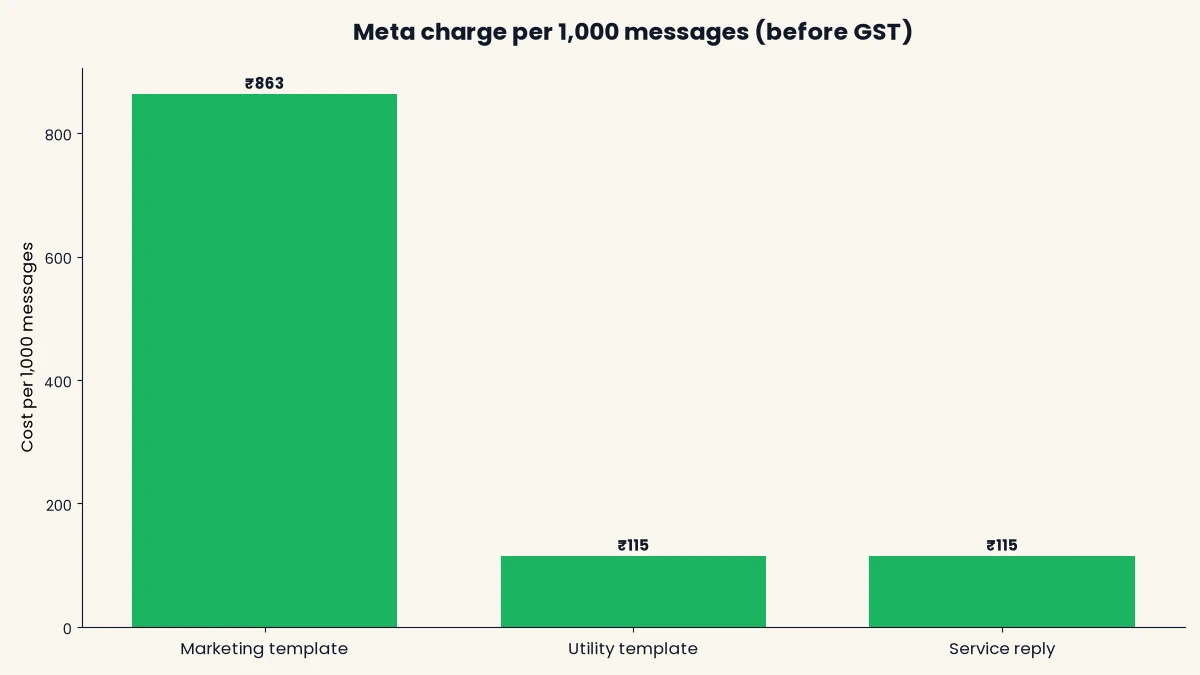
- Marketing templates cost roughly 7.5 times a utility template, so sequence length is a real cost decision.
- DTB’s automation, chatbot flows and pipeline are on the Pro plan (₹1,499/month). Basic (₹500/month) does not include them.
Published 25 September 2026 by the Digital Toolbox team. Meta’s opt-in and messaging rules checked the same day; see the cost section for the rates used.
In this guide
- What WhatsApp automation for real estate covers
- Three rules before you automate
- Six workflows to build
- A follow-up schedule to start from
- Handing over to a human
- What automation costs
- Common mistakes
- Where DTB automation stops
- How DTB helps
- FAQ
What WhatsApp automation for real estate covers
WhatsApp automation for real estate is any message or action that runs without a person triggering it: an instant reply to a new lead, a chatbot that answers brochure questions, a reminder before a site visit, or a follow-up sequence after it. It sits on the WhatsApp Business API, which a provider such as DTB (a Business Solution Provider, or BSP) connects to a dashboard.
Three layers do the work, and it helps to keep them separate in your head.
- Automations: timed sequences on a canvas. A contact enters, a template goes out, the system waits, checks whether they replied, and sends the next step or exits.
- Chatbot flows and the AI chatbot: the back-and-forth. A buyer replies with a keyword or a question and gets menus, buttons or an answer drawn from your brochure.
- The pipeline: a Kanban board where each enquiry becomes a deal with a stage and a value, so a director can see what the automation produced.
Automation is not a way to skip the conversation. It removes the waiting and the typing that come before the conversation, so your executives spend their time on buyers who are ready to talk.
What is worth automating and what is not
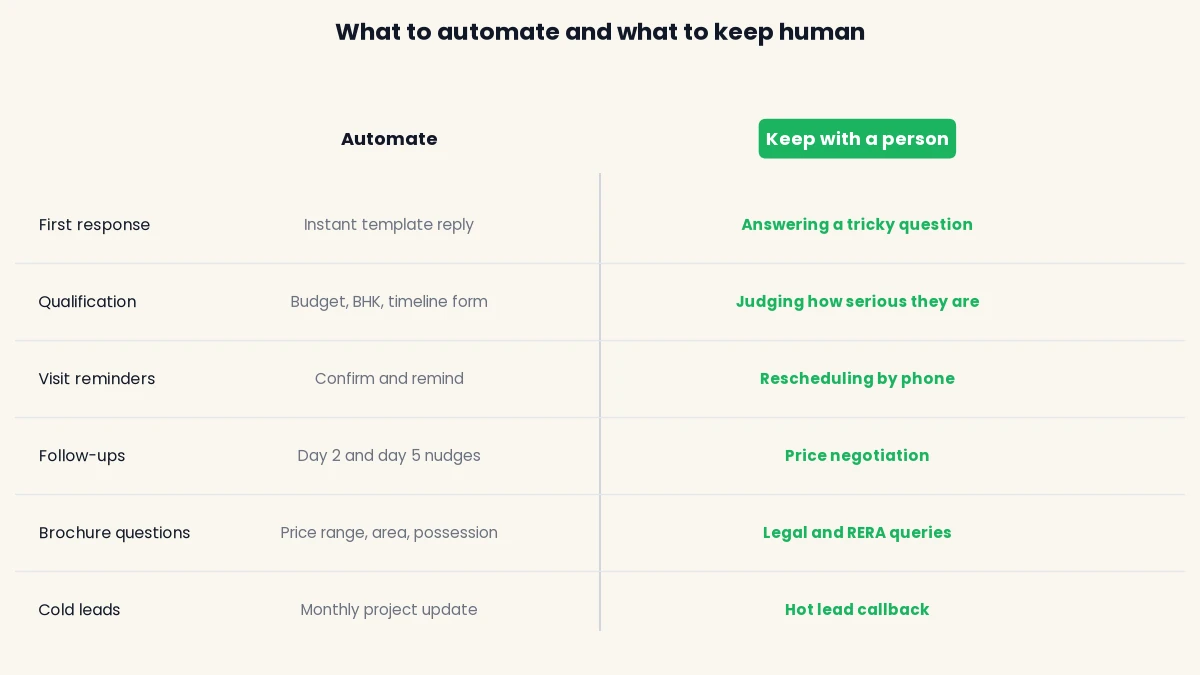
A step is worth automating if it is identical for most leads and delay hurts you. That covers the first reply, qualification questions, brochure answers, visit confirmations and reminders, and the first two or three follow-ups. It is not worth automating anything where the answer depends on the buyer’s situation: price negotiation, loan and legal queries, and complaints. Hand those to a person early, and tell the buyer you are doing so.
Three rules before you automate
Three rules from Meta decide what your automation may do, and they apply to every provider. Get them wrong and the number pays for it through blocks and a lower quality rating.
Rule 1: only message people who opted in
You may contact people on WhatsApp only if they gave you their number and opted in to hear from you. The WhatsApp Business Messaging Policy says you may contact people only if they have given you their mobile number and you have received opt-in permission confirming they want subsequent messages from you. A Facebook lead form with a clear WhatsApp consent line counts. A bought database does not. Our guide on how to avoid getting your WhatsApp number blocked covers what happens when opt-in is missing.
Rule 2: templates outside the 24-hour window, free-form inside it
When a buyer messages you, a 24-hour customer service window opens, and inside it you can reply in free-form text. Outside it, or when you message first, you must use a pre-approved template. That is why the first automated reply to a Facebook lead is always a template: the buyer has not messaged you yet.
Templates are reviewed by Meta, which can take up to 24 hours, and a common reason for rejection is a category that does not match the content, for example promotional wording in a utility template. Expect to write your templates a day before you need them. The 50+ real estate WhatsApp message templates post gives you ready wording for most of the steps below.
Rule 3: bots must have a job and a way out
Since 15 January 2026 Meta has banned general-purpose AI chatbots on WhatsApp. Support automation, lead qualification and scoped business assistants remain allowed. A bot that answers questions about your project from your own brochure is the allowed kind. Give it a defined scope, and give the buyer an easy route to a person. Build a human handoff into every workflow below for exactly this reason.
Six workflows to build
Each workflow below names the trigger, the steps, the exit rule and the DTB feature that runs it. Build them in order: the first three cover a new lead’s first day, and the last three cover the weeks after.
Workflow 1: instant reply to a new lead
Trigger: a lead form is submitted. DTB’s Facebook Lead Ads integration imports lead ad submissions as contacts automatically, so the contact appears without anyone copying a spreadsheet.
Steps: the contact enters a segment for new enquiries (segments update themselves as contacts match their rules), and an automation that starts on segment entry sends an approved template straight away. The template thanks them by name, names the project and asks one easy question, such as “Would you like the brochure or a site visit?”
Exit rule: once they reply, they leave this automation and move to the qualification flow. Use the Replied decision in the automation so a reply never triggers a second template.
Human handoff: none yet. This step only opens the conversation.
Workflow 2: qualify and tag the lead
Trigger: the buyer replies with a keyword such as VISIT or BROCHURE. DTB’s chatbot flows are triggered by keywords, with a “contains” match on any of several trigger keywords per flow.
Steps: the flow asks three or four questions using Buttons and List messages: configuration (2 BHK or 3 BHK), budget range, timeline, and whether they are buying to live in or to invest. An Update Attribute node stores each answer on the contact, a Set Tag node labels them hot, warm or browsing, and a Condition node branches on the answers. For a hot lead, an Assign User node routes the chat to an executive and a Create Deal node adds the deal to the pipeline with a stage, title and value.
Exit rule: a hot lead goes to a person the moment the flow ends. A warm or browsing lead continues to the follow-up sequence in workflow 5.
Alternative: if you want a longer form, WhatsApp Flows are multi-screen forms buyers fill in inside the chat, with dropdowns, radio buttons and a date picker, and answers mapped back to contact data. Use a WhatsApp Flow when four quick buttons are not enough.
Workflow 3: answer brochure questions out of hours
Trigger: a buyer messages when your team is offline. DTB’s AI chatbot has four trigger modes: always on, outside business hours, no human reply yet, and keyword match. For this workflow, choose outside business hours, or no human reply yet if you want it to step in only when the team is slow.
Steps: upload your brochure PDF, price sheet and project webpage to the bot’s knowledge base, which accepts PDFs, CSVs, typed notes and scraped website URLs. Write the bot’s instructions to cover price range, carpet area, possession date, amenities and the visit process, and tell it to say “let me connect you with our team” for anything else, including negotiation and legal questions.
Exit rule: the bot stops answering once a human replies (this is what the no human reply yet mode is for), and the chat is assigned to an executive in the morning.
Check what the bot actually says before it goes live. Ask it ten real questions from past buyers, and fix the knowledge base wherever it guesses.
Workflow 4: visit reminders and no-show recovery
Trigger: a visit is booked, and the buyer is tagged, for example “visit-booked”.
Steps: send a confirmation template with the date, time, location and the site contact’s name. Then send a reminder. DTB’s automation builder waits for a set duration, and it does not list a trigger tied to a date field. So there are two honest ways to time the reminder. If visits are usually booked a fixed number of days ahead, use a Wait step of that length. Otherwise, apply a “visit-tomorrow” tag each evening and send a campaign to that tag, scheduled for the morning with Send later. Give the reminder two quick-reply buttons: confirm or reschedule.
No-show recovery: if the visit does not happen, tag the buyer “no-show”. A short sequence then sends a friendly “we missed you, would you like a new slot?” template after a wait of a day. Use the Replied decision to stop it if they answer.
Exit rule: the buyer confirms, reschedules or replies, and the executive takes over from the shared inbox.
Workflow 5: post-visit nurture
Trigger: the visit is marked done, and the buyer is tagged “visited”.
Steps: this is where most bookings are won or lost, because buyers compare projects for weeks and most developers go quiet after the visit. Send a thank-you the same evening, wait, send a question about which unit they liked, wait, send the payment plan, wait, and send a final check-in. After every message a Replied decision checks whether the buyer answered, and a Goal/Exit node exits the contact once the goal is reached.
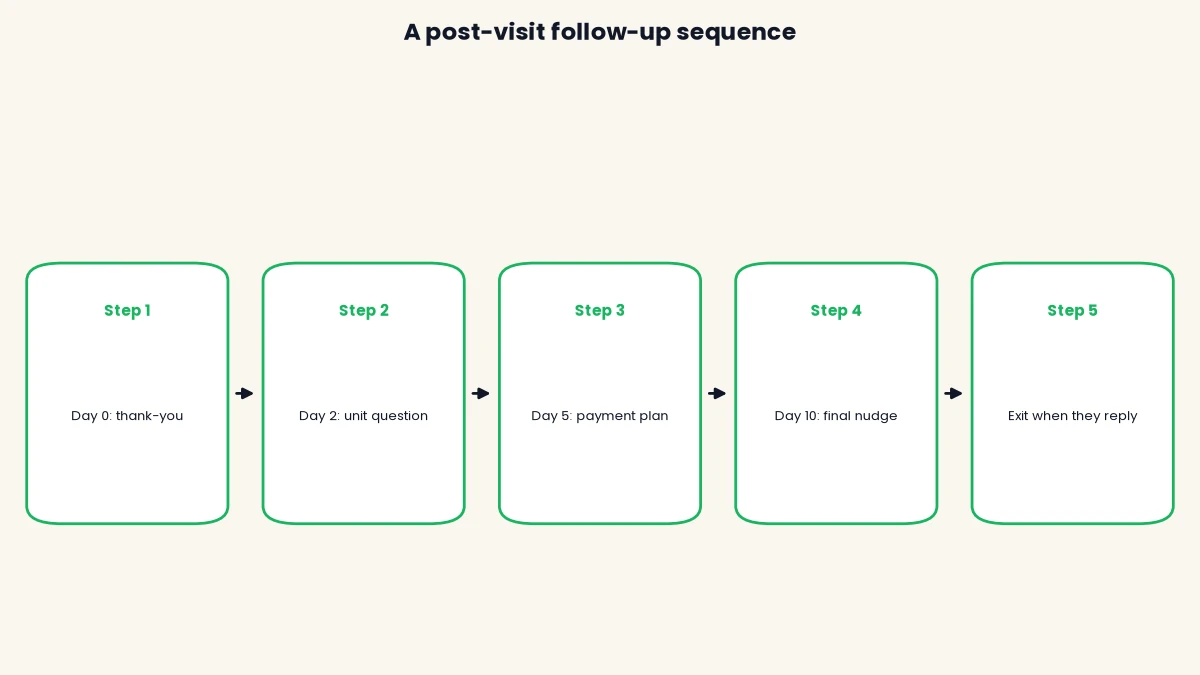
Exit rule: a reply, a booking or an opt-out. Add a Remove Tag step so the buyer no longer counts as “visited, awaiting follow-up”, and let the executive move the deal in the pipeline.
Workflow 6: reactivate cold leads and announce launches
Trigger: a scheduled campaign to a segment or tag, such as “cold” or “interested in 3 BHK”. DTB campaigns can target a tag or segment and be sent immediately or scheduled with Send later.
Steps: send a short project update to buyers who went quiet: a new tower, a price revision, a possession milestone. Use a marketing template, and only to people who opted in to hear about projects. Ask a single question they can answer with one word, and treat any reply as a re-opened lead that goes back to workflow 2.
Watch the limits: Meta caps how many unique customers you can start conversations with in a rolling 24 hours. According to Meta’s messaging limits documentation, a new business portfolio starts at 250 and can scale to 2,000, 10,000, 100,000 and then unlimited. A launch message to 5,000 buyers may need to go out in batches over several days.
A follow-up schedule to start from
The timings below are a suggested starting point, not a benchmark. Adjust them to your sales cycle, and test them against how quickly your buyers reply. Ticket size and project stage change how long a buyer needs to think.
| When | Message | Likely template category | Stops if |
|---|---|---|---|
| Within minutes of the enquiry | Thank-you and one question | Utility, if it only confirms the enquiry | Buyer replies |
| Day before the visit | Reminder with confirm and reschedule buttons | Utility | Buyer confirms or replies |
| Same evening as the visit | Thank-you for visiting | Marketing or utility, Meta decides | Buyer replies |
| Day 2 after the visit | Which unit did you like? | Marketing | Buyer replies |
| Day 5 after the visit | Payment plan and offer | Marketing | Buyer replies or books |
| Day 10 after the visit | Final check-in with an easy opt-out | Marketing | Any reply, then end the sequence |
Whichever category you choose, Meta makes the final call at review, so submit the wording that matches what the message does. If a message contains an offer or a call to buy, treat it as marketing.
Handing over to a human
A good automation is only as good as its handoff. The buyer should never wonder whether they are talking to a bot, and an executive should never open a chat without knowing what was already said.
How handoff works in DTB
DTB’s chatbot flows have Assign User and Assign Team nodes and an Update Chat Status node, so a flow can route a hot lead to the right executive and mark the chat as open. The shared team inbox groups conversations into Open, Expired, Snoozed, Resolved and All, and shows a count of expired conversations (chats past the 24-hour window), which tells you where a buyer went quiet.
The AI chatbot’s “no human reply yet” mode adds a second guard: it answers only if nobody on your team has responded to that contact, so the bot never talks over an executive. Contacts also have a Notes tab, where the executive can log calls and meetings so the next person sees the history.
When to hand over
- The buyer asks about price negotiation, loans or legal terms.
- The lead scores hot: a clear budget, a timeline of a few weeks and a visit request.
- The buyer writes something the bot does not understand twice in a row.
- The buyer asks for a person, in any words.
What automation costs
Automation costs DTB’s platform fee plus Meta’s per-message charges, which DTB passes through at no markup. The cost per message depends on category, and the gap is large. The rates used here are ₹0.8631 for a marketing message and ₹0.115 for a utility message, with service replies inside the 24-hour window at ₹0.115 after 1,000 free a month per business phone number from 1 October 2026, all before 18% GST. Meta publishes its INR rate card on the WhatsApp Business Platform pricing page, and these rates have been changing, so check the current card before you budget.
The cost of one follow-up sequence
If all four messages of the post-visit sequence went out as marketing templates, one buyer would cost 4 × ₹0.8631, about ₹3.45 before GST. If the buyer replies after the second message and the sequence stops, you have sent two messages and spent about ₹1.73. The exit rule is therefore a cost control as well as good manners. For a full monthly budget with lead volumes, see the worked example in our guide to WhatsApp Business API pricing in India.
| Sequence | Messages sent | Meta cost per buyer (all marketing) |
|---|---|---|
| Buyer replies after message 2 | 2 | About ₹1.73 |
| Buyer never replies | 4 | About ₹3.45 |
| Same 4 messages, 1,000 buyers, no replies | 4,000 | About ₹3,452 |
Common mistakes
- Automating without opt-in. A sequence to a bought list is a fast route to blocks and a poor quality rating.
- No exit rule. A buyer who has already spoken to your executive receiving a “just checking in” template looks careless.
- Sending marketing in a utility template. Meta rejects mismatched categories, and the template is delayed by days.
- Letting the bot handle negotiation. Price and legal talks belong with a person, and the bot should say so.
- Too many messages. Four well-timed messages beat eight. More sends means more cost and more blocks.
- Never testing the flow. Run every automation and chatbot flow on your own number, including the reply-and-exit path, before real leads see it.
- Forgetting to update the bot’s knowledge. When a price or possession date changes, the bot keeps quoting the old one until you upload the new brochure.
Book a free demo and we will build the lead-to-visit automation on your own project with you.
Where DTB automation stops
Be clear about the limits before you plan around the tool. DTB’s automation trigger sources are a segment (when a contact is added) or Welcome, and the Wait step pauses for a duration, so there is no listed trigger tied to a visit date. Reminders need the fixed-wait or scheduled-campaign approach in workflow 4.
Other limits to plan for: automation, chatbot flows, WhatsApp Flows and the pipeline are on the Pro plan, not Basic. A workspace allows up to 3 sub-users, which matters for a large sales team. DTB’s integrations panel lists Facebook Lead Ads, Zapier, n8n, Google Sheets, OpenAI and Razorpay, and does not list direct connections to property portals, so portal leads would come in through Zapier, n8n or a CSV import. And no provider can promise a number will never be restricted, because Meta makes that decision.
How DTB helps
DTB is an official Meta Tech Provider, and it keeps the whole workflow in one workspace. For a property sales team, these are the parts you will use:
- Automations: Send Template, Wait, Replied, Read and Delivered decisions, tags and a Goal/Exit node, triggered when a contact enters a segment.
- Chatbot flows: buttons, lists, conditions, contact attributes, tags, Assign User and Assign Team, and Create Deal.
- AI chatbot: a knowledge base built from your PDFs and website, with four trigger modes including outside business hours.
- Lead import: Facebook Lead Ads submissions arrive as contacts.
- Pipeline: a Kanban board with deal values and expected close dates.
- Pricing: zero markup on Meta’s charges, plus a flat ₹1,499 a month on Pro.
Conclusion
WhatsApp automation for real estate works when it is narrow: an instant reply, a few qualifying questions, a reminder and a short follow-up sequence, each with an exit rule and a clear route to a person. Start with workflows 1 and 5, since the first reply and the post-visit follow-up are where most developers lose buyers. Check the DTB use cases for how the same pattern applies to other industries, then start with DTB at ₹1,499/month and test each workflow on your own number first.
Frequently asked questions
Is WhatsApp automation allowed for real estate marketing in India?
Yes, on the official WhatsApp Business API, provided the person opted in to receive messages. Meta’s policy lets you contact people only if they gave you their number and opt-in permission. Check your state’s RERA rules for anything a project message must carry.
What can I automate on WhatsApp for real estate?
You can automate the first reply, qualification questions, brochure answers, visit confirmations and reminders, and follow-up sequences. Keep price negotiation, legal and loan questions with a person. DTB covers these with automations, chatbot flows and an AI chatbot on the Pro plan.
Can a chatbot qualify real estate leads on WhatsApp?
Yes. Lead qualification is an allowed use of chatbots under Meta’s rules. In DTB, a chatbot flow can ask configuration, budget and timeline with buttons and lists, store the answers on the contact, tag the lead and create a deal in the pipeline.
How many follow-up messages should I send after a site visit?
Three or four is a sensible starting point: a thank-you the same evening, then a couple of nudges over about ten days. Stop the sequence as soon as the buyer replies. Adjust the number to your sales cycle, since a longer buying cycle may justify a longer gap between messages.
Can I send WhatsApp messages to leads from 99acres or MagicBricks?
Only if the buyer opted in to WhatsApp messages. DTB does not list a direct portal integration, so portal leads would come in through Zapier, n8n or a CSV import. Test that route on a few real leads before relying on it.
What is the difference between WhatsApp automation and a chatbot?
Automation runs timed sequences after a trigger, such as a reminder or a follow-up. A chatbot handles the two-way conversation, answering questions and asking qualifying ones. Most real estate setups use both, with a person taking over for hot leads.
How much does WhatsApp automation cost for a real estate business?
You pay DTB’s platform fee (Pro is ₹1,499 a month) plus Meta’s per-message charges at no markup. A four-message marketing sequence costs about ₹3.45 per buyer at the rates used in this guide, before GST, and less if the buyer replies early.