A WhatsApp broadcast for real estate can put a new launch or a price drop in front of thousands of buyers in minutes, but send it the wrong way and you risk a blocked number, an angry channel partner list, or a RERA compliance problem. This guide covers what actually counts as a broadcast, the opt-in and disclosure rules that apply before you send, which message type to use for which use case, and how to segment your audience so it reads as relevant, not spam.
Quick answer: A real estate WhatsApp broadcast is a one-to-many message sent to opted-in contacts, either from a personal or Business app broadcast list (capped at 256 saved contacts) or through the WhatsApp Business API using an approved template (no fixed contact cap). Every promotional broadcast needs the recipient’s opt-in, must carry the project’s RERA registration number if it promotes a specific project, and must use a Marketing-category template if it lands outside an open 24-hour conversation window.
Key takeaways
- The 256-contact broadcast list in the WhatsApp Business app only reaches people who have your number saved. The Business API has no such cap and does not need to be saved as a contact.
- Opt-in comes first. Meta can restrict a number for messaging people who never agreed to hear from the business, regardless of how relevant the offer is.
- RERA requires the project’s registration number on every promotional communication about that project, WhatsApp included.
- Segmenting by project, budget and funnel stage cuts opt-outs, because a channel partner update and a first-time buyer’s price alert should never be the same broadcast.
Published 28 September 2026 by the Digital Toolbox team. Meta’s opt-in and broadcast documentation, and India’s RERA Act, checked the same day.
In this guide
- What counts as a broadcast
- Before you send: opt-in and RERA rules
- What to broadcast: real estate use cases
- Marketing template or free-form: which one to use
- Segmenting your audience
- Sample broadcast messages
- Reading your broadcast numbers
- Common mistakes
- How DTB helps
- FAQ
What counts as a WhatsApp broadcast for real estate
A WhatsApp broadcast is one message sent out to many contacts at once, each of whom receives it as a private, individual chat rather than a group message. For a real estate business this covers project launches, price updates, new inventory alerts and festival offers sent to a prospect database, a channel partner list, or existing buyers.
There are two ways to send one, and they behave very differently. The personal WhatsApp app and the WhatsApp Business app both support broadcast lists, but Meta’s own Help Centre documentation on broadcast lists caps each list at 256 contacts, and a message only reaches a contact who has your number saved in their phone. Build a list of 256 hot leads and half might never see the message, silently, with no error shown. The WhatsApp Business API removes both limits: there is no fixed cap on how many opted-in contacts a broadcast can reach, and the recipient does not need to have saved your number, because delivery runs through an approved message template instead of the personal-contacts mechanism.
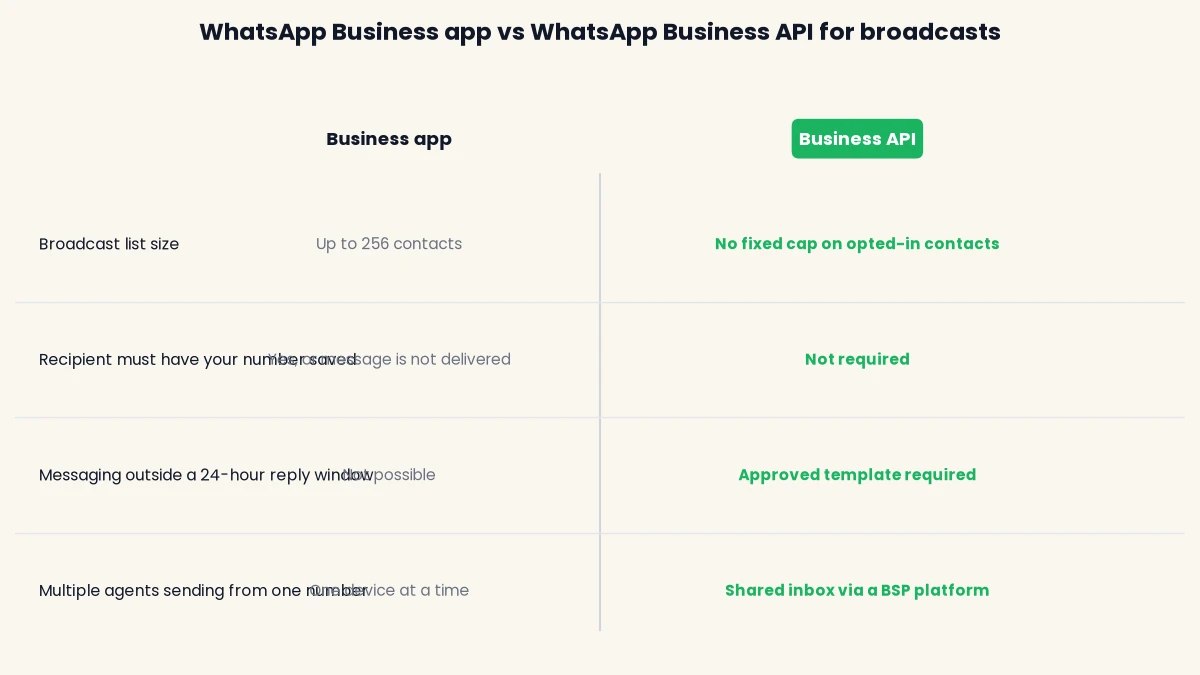
For a builder or broker sending to a few dozen warm leads a week, the Business app’s broadcast list may be enough. Once a project launch list, a channel partner network or a full buyer database runs into the thousands, the Business API is the only practical option. Our guide to WhatsApp Business app vs WhatsApp Business API covers the rest of the differences, including team access and automation. If you haven’t picked a BSP yet, our roundup of the best WhatsApp Business API providers in India is a good place to start.
Before you send: opt-in and RERA rules for real estate broadcasts
Two sets of rules apply to every promotional WhatsApp broadcast a real estate business sends in India: Meta’s platform rules, and RERA’s advertising rules. Neither is optional, and neither is something a BSP can override on your behalf.
Meta requires opt-in before you broadcast
Per Meta’s developer documentation on WhatsApp opt-in, a business must get a person’s clear consent before sending them business-initiated messages, and that opt-in must name the business the person is agreeing to hear from. A general marketing opt-in collected on your website or at a site visit now satisfies this even if it does not mention WhatsApp by name, as long as it meets Meta’s other requirements and local law. What it does not cover is a purchased database, a scraped list from a property portal, or a list bought from a channel partner without each contact’s own consent. Meta rate-limits and can restrict numbers whose quality drops from sustained spam reports, and an unsolicited real estate broadcast to a cold, bought list is one of the fastest ways to trigger that.
RERA requires the project’s registration number
Under the Real Estate (Regulation and Development) Act, 2016, every advertisement for a registered project must display the project’s RERA registration number and the regulatory authority’s website address. This is a real estate-specific rule that applies regardless of the channel, so it covers a WhatsApp broadcast the same way it covers a newspaper ad or a hoarding. Any promotional broadcast about a specific project, a price, or a possession date should carry that project’s RERA number and match what is officially registered for it. Confirm the exact wording your state’s RERA authority expects, since some states publish their own advertisement directions on top of the central Act.
Why a bought or channel-partner list is the highest-risk broadcast
Real estate businesses lean on channel partner networks and portal-sourced leads more than most industries, and that is exactly where opt-in gets skipped. A partner’s own contact list was never asked whether they want to hear from your business directly, and a portal lead who filled a form for one project did not automatically opt in to every future launch. Treat every external list as needing its own fresh consent before it goes into a broadcast, not as inherited from wherever it came from. Our guide on how to avoid getting your WhatsApp number blocked covers what happens to a number’s quality rating once this goes wrong.
What to broadcast: real estate WhatsApp broadcast use cases
Not every real estate update deserves a broadcast, and not every broadcast needs the same template category. This table maps the common use cases to the template type they need and who should receive them.
| Broadcast type | Template category | Typical audience | Example trigger |
|---|---|---|---|
| Pre-launch teaser | Marketing | Full database plus channel partners | 2 to 3 weeks before launch |
| Launch day price reveal | Marketing | Opted-in prospects tagged to that project | Launch morning |
| Price or inventory update | Marketing | Prospects tagged to that project or tower | Price revision, unit sold out |
| New listing or configuration drop | Marketing | Buyers tagged for that configuration or budget | New inventory released |
| Possession or construction milestone | Utility | Existing buyers of that project | Slab completed, possession date set |
| Festival or limited-period offer | Marketing | Full opted-in database | Diwali, year-end offer window |
| Channel partner commission update | Utility | Channel partner segment | Payout processed, scheme change |
Use cases that read as account or transaction updates rather than promotion, like a possession milestone or a commission payout, fit Meta’s Utility category. Anything selling, launching or discounting is Marketing, and that distinction decides which template you submit for approval, as covered next.
Marketing template or free-form: which one your broadcast needs
Which message format is allowed depends on whether an open conversation already exists with that contact, not on how the message reads. Meta’s 24-hour customer service window opens the moment a contact messages you, or replies to a template, and free-form messages are only allowed inside that window. A broadcast, by definition, is business-initiated to a large list at once, so most recipients will be outside that window and need an approved template.
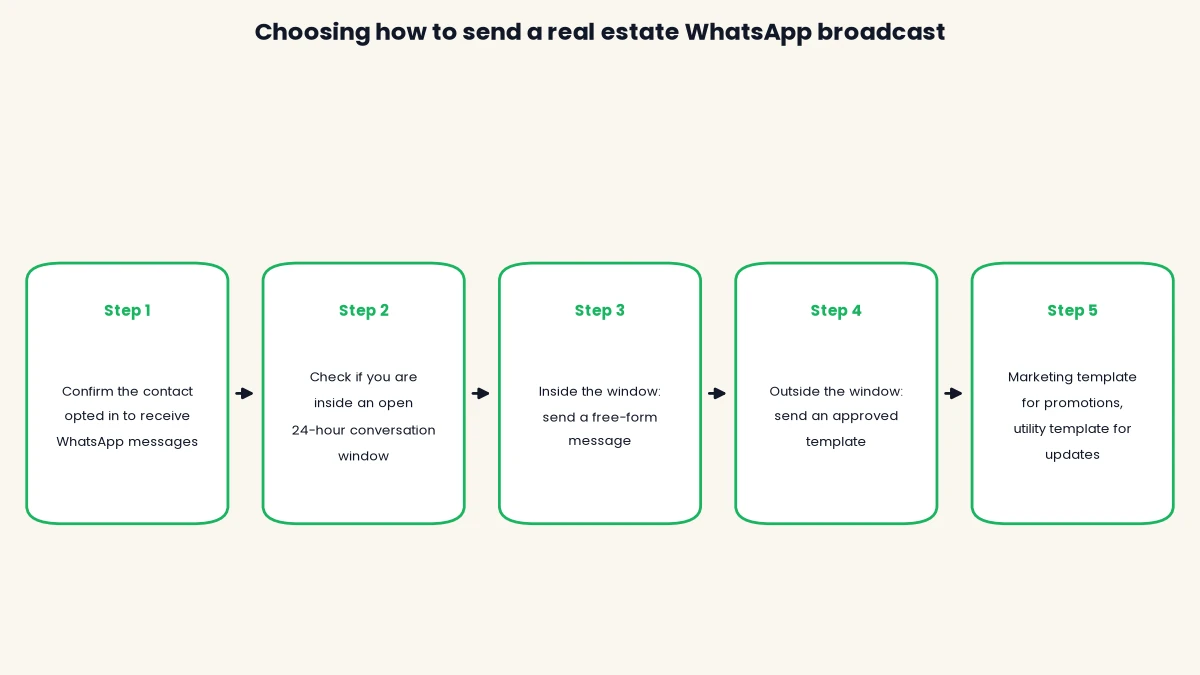
A template goes through Meta’s review before it can be used, which can take up to 24 hours, and gets rejected if its category does not match its content, such as promotional wording submitted as a Utility template. Build your launch and price-update templates in advance of the date you need them, with {{1}} style variables for the project name, unit type or price so one approved template can be reused across a campaign rather than resubmitting a near-identical one for every send.
Segmenting your audience so it doesn’t feel like spam
A single broadcast to your entire database is the fastest way to make a relevant offer feel like spam. A 2BHK buyer does not need your 4BHK penthouse price drop, and a channel partner does not need a consumer-facing festival offer. Segmenting by project, tower, budget band and funnel stage keeps each broadcast relevant to the person receiving it, which is also what keeps opt-outs and spam reports low.
DTB’s segments rebuild themselves automatically as contacts match a rule, with ALL (AND) or ANY (OR) logic and nested condition groups, so a segment like “tagged Tower B AND budget over 90 lakh AND not yet visited” stays current without manual list-pulling before every send. Tags work alongside segments for quicker one-off targeting, and can be set to apply automatically by a filter rule rather than by hand.
- By project or tower: so a launch or price update only reaches people who showed interest in that specific project.
- By budget band: so configuration-specific inventory drops do not go to buyers outside that price range.
- By funnel stage: new enquiry, site visit done, or negotiation, so a pre-launch teaser does not go to someone already close to booking.
- By source: channel partner, portal lead or walk-in, since a commission update and a consumer offer need different lists entirely.
Sample real estate WhatsApp broadcast messages
These are structural examples to adapt, not ready-to-submit templates. Replace the variables with your project’s actual details, and submit the finished version to Meta for approval before use.
- Pre-launch teaser (Marketing): “Hi {{1}}, something new is coming to {{2}}. Reply INTERESTED to get early access before the public launch.”
- Launch day price reveal (Marketing): “{{1}} is now open for bookings, starting at ₹{{2}}. RERA No. {{3}}. Reply VISIT to book a site visit slot.”
- Price or inventory update (Marketing): “An update on {{1}}: {{2}}. RERA No. {{3}}. Reply CALL BACK if you’d like our team to walk you through it.”
- Possession milestone (Utility): “Update on your unit at {{1}}: {{2}}. For documentation, contact your relationship manager.”
Keep each message short enough to read on a phone in a few seconds, lead with the specific project or update rather than a generic greeting, and always give a clear reply keyword or next step, since a broadcast with no obvious action gets read once and forgotten.
Reading your broadcast numbers
There is no single published benchmark for what a “good” real estate broadcast delivery or read rate looks like, so treat your own numbers as a trend to improve rather than comparing to an unverified figure quoted elsewhere. What matters is watching the same metrics broadcast over broadcast.
| Metric | What it tells you | Where to check it in DTB |
|---|---|---|
| Sent | How many contacts the broadcast was attempted to | Dashboard message activity chart |
| Delivered | How many actually reached a device | Dashboard delivery breakdown panel |
| Read | How many were opened, a proxy for real interest | Dashboard delivery breakdown panel |
| Failed | Invalid numbers, blocked contacts, or template issues | Dashboard delivery breakdown panel |
| Delivery rate and read rate | Trend across campaigns, by segment or project | Dashboard, viewable over 7, 30 or 90 days |
A falling delivery or read rate on the same segment over time is the earliest sign that a list needs pruning or that messaging has become too frequent, well before Meta’s own quality rating drops.
Common mistakes with real estate WhatsApp broadcasts
- Broadcasting to a purchased or scraped database. This is the single biggest driver of spam reports and a dropping quality rating, since none of those contacts opted in to hear from you. Only broadcast to contacts who gave consent to your business directly.
- Leaving out the RERA registration number. A promotional broadcast about a specific project without its registration number does not meet RERA’s advertisement rules, regardless of how the message performs. Build the number into the approved template itself so it can’t be forgotten.
- Sending one broadcast to every budget segment. A price reveal that is irrelevant to most of its recipients reads as noise, and noise is what gets a number blocked. Segment by project, tower or budget before every send.
- Treating every message as a broadcast, even inside an active conversation. If a contact messaged you in the last 24 hours, reply with a free-form message, not a template. Reserve templates for genuinely business-initiated sends outside that window.
- No clear way to opt out. A recipient who can’t easily stop future broadcasts is more likely to report the number as spam instead. State plainly how to stop messages, and action that request the same day.
Book a free demo to see how DTB’s campaign builder keeps a broadcast list segmented, template-locked and compliant before it sends.
How DTB helps
DTB is an official Meta Tech Provider, and its Campaigns feature is built around exactly this workflow. You choose your audience by uploading a CSV, targeting a segment, or targeting a tag, and the campaign then locks the message body to whichever approved template you select, so a broadcast can’t accidentally go out non-compliant. Templates that need media accept an image, video or document with a caption, interactive buttons can be added, and a live preview shows the message exactly as the recipient will see it before you send. Campaigns can go out immediately or be scheduled ahead of a launch date with Send later.
Bulk campaigns, templates and campaign reporting are available on DTB’s Basic plan at ₹500/month, so a broker or small developer does not need the full Pro plan just to run compliant broadcasts. Meta’s own per-conversation charges apply on top and are billed at zero markup. For the fuller picture of setting up WhatsApp for a real estate business, see our guide to WhatsApp Business API for real estate: setup and costs.
Conclusion
A WhatsApp broadcast for real estate works when it respects three things: real opt-in, the right template for the moment, and an audience narrow enough that the message feels relevant. Get the RERA number into your promotional templates, segment before you send, and watch your own delivery and read numbers rather than chasing an unsourced benchmark. For the workflows that follow a broadcast, from an instant reply to a post-visit nurture sequence, see our guide to WhatsApp automation for real estate. Start with DTB at ₹1,499/month, or begin on the ₹500 Basic plan if broadcasts are all you need today.
Frequently asked questions
Is WhatsApp broadcast for real estate legal in India?
Yes, as long as every recipient opted in to hear from your business and any promotional message about a specific project carries that project’s RERA registration number. Broadcasting to a bought or scraped list, or leaving out the RERA number, is what creates legal and platform risk, not the broadcast format itself.
How many contacts can I send a WhatsApp broadcast to?
A broadcast list in the personal or Business app is capped at 256 contacts, and only reaches those who have your number saved. The WhatsApp Business API has no fixed contact cap, and delivery does not depend on the recipient having saved your number.
Do I need Meta’s approval before sending a real estate broadcast?
You need an approved Marketing or Utility template if the recipient is outside an open 24-hour conversation window, which is true for most broadcast recipients. Template review can take up to 24 hours, so submit launch and price-update templates ahead of the date you need them.
Can I broadcast to leads who haven’t opted in?
No. Meta requires clear consent before a business sends promotional messages, and messaging contacts who never agreed to hear from your business risks the number’s quality rating and eventual restriction, regardless of how relevant the offer is.
Do I need to include the RERA number in every WhatsApp broadcast?
Any promotional broadcast about a specific registered project should carry that project’s RERA registration number, matching the Act’s requirement that advertisements display it regardless of channel. A general company update or a possession-status message tied to an existing buyer is a different case, so check your state RERA authority’s exact wording if unsure.
What’s the difference between a WhatsApp broadcast and a WhatsApp group for real estate?
A broadcast sends the same message individually to each contact, who sees it as a private chat with no visibility of other recipients. A group is a shared chat where every member sees every other member’s number and messages, which is rarely appropriate for a prospect or buyer list.
How much does a WhatsApp broadcast cost in India?
Cost has two parts: your platform fee, and Meta’s own per-conversation charge, which is separate and set by Meta. On DTB, bulk campaigns are available from the ₹500/month Basic plan, with Meta’s charges added at zero markup.
How often can I broadcast without hurting my WhatsApp quality rating?
There’s no fixed safe number, since quality rating responds to how recipients react, not send frequency alone. A well-segmented, opted-in list that finds each message relevant can be messaged more often than a broad, unsegmented list sent the same generic offer.