WhatsApp Business API for real estate is how a property developer or broker stops losing enquiries in the gap between “I saw your ad” and “when can I visit the site?” A buyer who filled in a Facebook lead form at 9 pm is comparing three projects by morning, and a slow reply hands a rival the first conversation.
Quick answer: the free WhatsApp Business app works for one broker on one phone. Once a project has a sales team, ad leads and site visits to manage, you need the API through a provider such as DTB: a shared team inbox, an instant reply to every new lead, a booking form inside the chat, automatic follow-ups and a pipeline that tracks each deal. It costs a flat platform fee plus Meta’s per-message charges, and the example below shows the real rupee maths. Start with DTB at ₹1,499/month.
Key takeaways
- The API replaces “one person, one phone” with a shared inbox, automation and a deal pipeline, which is what a project sales team needs.
- Every lead needs proper opt-in. Meta requires it, and buying contact lists is the fastest way to get a number restricted.
- Budget by message type: marketing templates cost far more than utility ones, and service replies become chargeable after 1,000 free a month from 1 October 2026.
- DTB’s Pro plan (₹1,499/month) includes automation, WhatsApp Flows and the sales pipeline. The Basic plan (₹500/month) does not.
- Be realistic about limits: DTB allows 3 sub-users per workspace and does not list property-portal integrations.
Published 25 September 2026 by the Digital Toolbox team. Meta’s limits and opt-in rules checked the same day; see the cost section for the rates used.
In this guide
- Why property teams outgrow the Business app
- How to use the API for real estate, stage by stage
- Which real estate teams it fits
- Five message templates to start with
- Opt-in and compliance for property leads
- What it costs, with a worked example
- Setup checklist
- Common mistakes
- How DTB helps, and where it does not
- FAQ
Why property teams outgrow the Business app
A real estate sales team outgrows the WhatsApp Business app because the app is built around one owner answering chats from one phone. A project launch adds a marketing team, three or four sales executives, leads from Facebook and Instagram ads, and a site that needs visit slots managed every weekend.
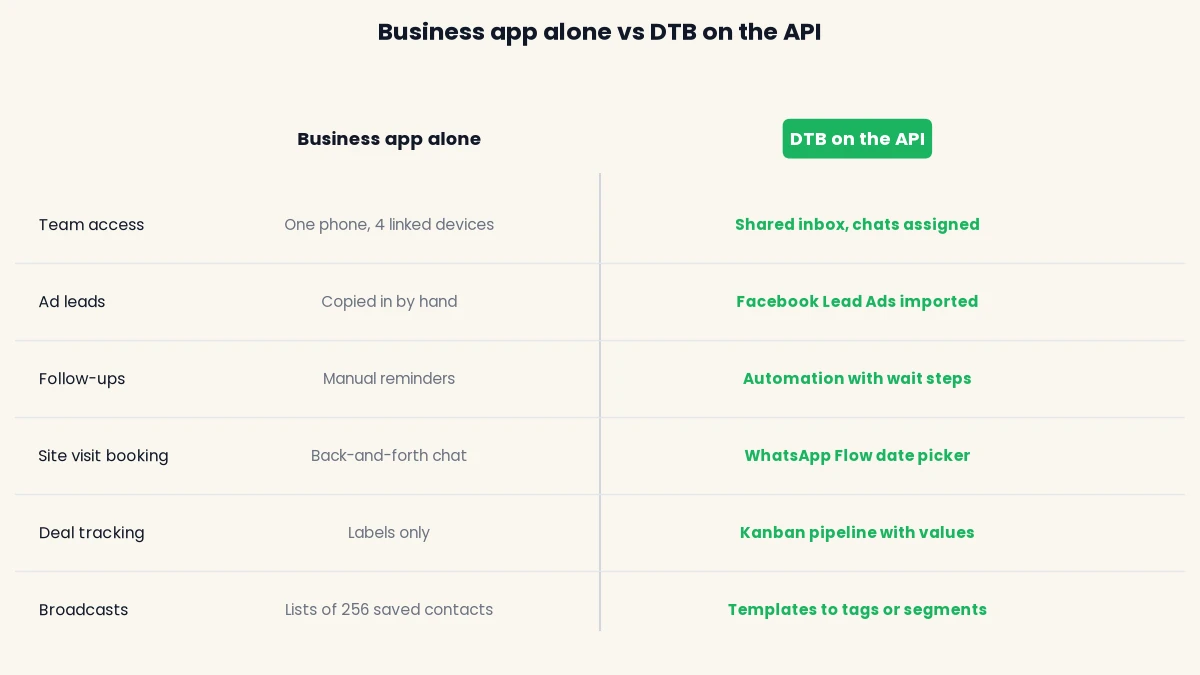
That is where the app starts to hurt. Enquiries sit on whichever executive’s phone they landed on. When that person is on leave or leaves the company, the buyer conversations leave with them. You cannot see who replied to whom, which lead went cold, or how many visits were booked this week. Broadcast lists only reach people who have saved your number and stop at 256 contacts. If you want the full comparison, our guide to WhatsApp Business API pricing in India covers what the API costs against the free app.
What the API changes for a sales team
The WhatsApp Business API is the version of WhatsApp that a provider (called a Business Solution Provider, or BSP) connects to a web dashboard, so many people can work on one number. It is the same WhatsApp your buyers already use. They notice nothing except faster replies.
- Shared inbox: every executive sees the same conversations, and chats can be assigned to a person or a team.
- Automation: the first reply, the visit reminder and the follow-up go out without anyone typing.
- Templates at scale: pre-approved messages sent to tagged or segmented audiences, not a hand-built list of 256.
- Pipeline: each enquiry becomes a deal with a stage and a value, so a director can see the funnel.
DTB also supports coexistence, so a broker can keep using the WhatsApp Business app on the same number while the API runs alongside it. That helps when a team is not ready to give up the phone on day one.
How to use the WhatsApp Business API for real estate, stage by stage
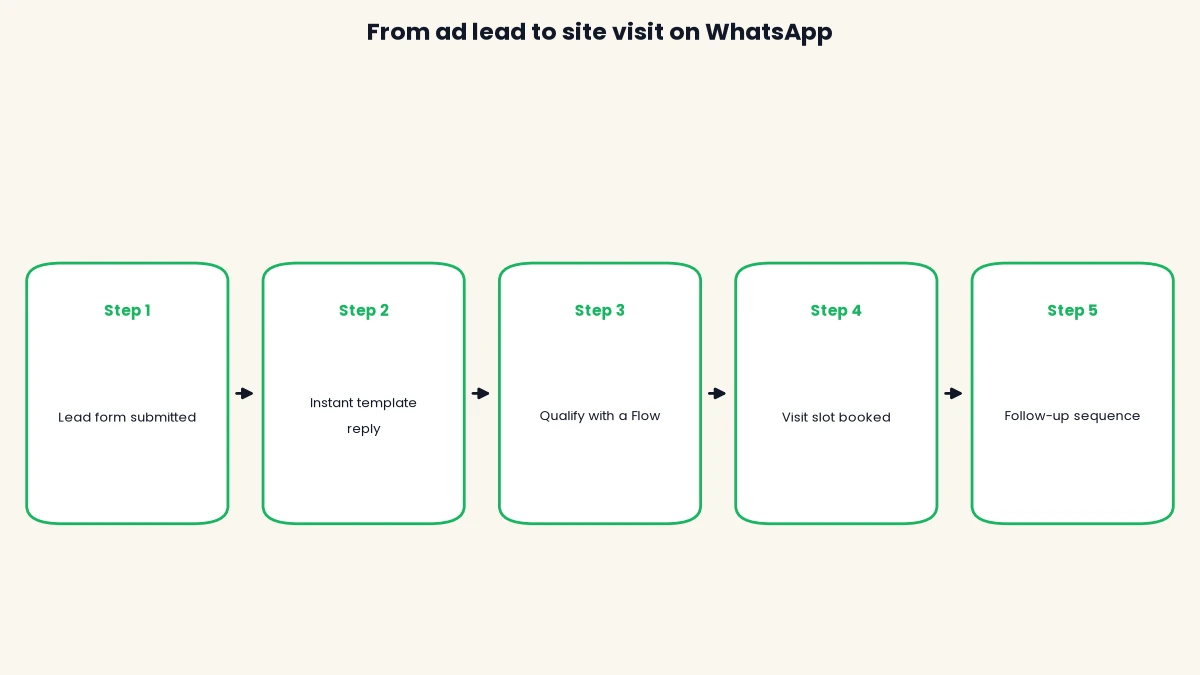
The API works best when you map it to the buyer’s journey: enquiry, qualification, information, site visit, follow-up, booking. Each stage below names the DTB feature that handles it, so you can see what is automatic and what still needs a human.
Stage 1: reply to every new lead within minutes
The first job is an instant, polite acknowledgement, because a new lead has usually enquired with several developers. DTB’s Facebook Lead Ads integration imports lead ad submissions as contacts automatically, so a form fill lands in your contact list without anyone copying it from a spreadsheet.
Business-initiated messages to a new lead must use a pre-approved template, because the 24-hour free-form reply window only opens once the buyer messages you. So the instant reply is a template: it thanks them by name, names the project and asks one easy question. In DTB you can group new enquiries into a segment (segments update themselves as contacts match your rules) and start an automation when a contact enters it, sending the template straight away.
Stage 2: qualify with a form, not ten messages
Qualification means learning the budget, the configuration (2 BHK or 3 BHK), the timeline and whether they are buying to live or to invest. Doing that by chat costs an executive fifteen minutes per lead, most of it waiting.
WhatsApp Flows are multi-screen forms that the buyer fills in inside the chat, without leaving WhatsApp. DTB’s Flow builder includes dropdowns, radio buttons, checkboxes, text inputs and a date picker, and it maps the answers back to contact data. Build one short flow that asks configuration, budget range and preferred visit date, and the answers become searchable fields on the contact (DTB supports up to 50 custom fields). Your executive then opens a chat that already says “3 BHK, ₹90 lakh to ₹1.2 crore, this month”.
Stage 3: answer brochure questions automatically
Most first questions repeat: price range, carpet area, possession date, nearby schools, payment plan. DTB’s AI chatbot can answer these from a knowledge base that accepts uploaded PDFs, typed notes and scraped website pages, so your brochure and price sheet become the source of its answers. You choose when it replies: always, only outside business hours, only if no human has replied yet, or only for certain keywords.
Keep the bot’s scope tight. Since 15 January 2026 Meta has banned general-purpose AI chatbots on WhatsApp, while lead qualification and scoped business assistants are allowed. A bot that answers questions about your project from your own documents is the allowed kind. Anything about final price negotiation or legal terms should go to a person, and the bot should say so.
Stage 4: book the site visit in the chat
The site visit is the point where an anonymous enquiry becomes a serious buyer, so it deserves its own flow. A WhatsApp Flow with a date picker and a time dropdown lets the buyer choose a slot in two taps instead of a five-message back-and-forth.
Once the slot is chosen, send a confirmation template with the date, time, location and the contact person’s name. A day before, send a reminder with two quick-reply buttons: confirm or reschedule. DTB’s templates support up to 3 interactive buttons and can carry an image, video or document header, so the confirmation can include a location map image or the project brochure as a PDF.
Stage 5: follow up after the visit
Most bookings are lost in the week after the visit, when the buyer is thinking and no one calls. DTB’s automation builder handles this with a Wait step, so you can send a thank-you template the same evening, wait two days, then send a follow-up that asks which unit they liked.
The automation can branch on whether a message was replied to, read or delivered, and it has a Goal/Exit node that exits a contact once the goal is reached. Use them: nothing feels worse to a buyer than an automated nudge arriving after they already spoke to your executive.
Stage 6: track every enquiry as a deal
DTB’s sales pipeline is a Kanban board with custom stages. For a project you might use New enquiry, Qualified, Visit booked, Visited, Negotiation and Booked. Each deal carries a title, stage, linked contact, deal value, currency, expected close date and notes, and the board shows the deal count and total value per stage. Deals can be created by hand or automatically from a chatbot flow through the Create Deal node.
The pipeline is included in the Pro plan. It gives a sales head the number they usually chase every Monday: how many leads are at each stage and what that is worth.
Which real estate teams it fits
The API fits any property business that handles enough enquiries for a shared inbox to matter, and it fits developers, brokers and NRI-focused teams differently. Use this table to see where you sit.
| Business type | Main use of WhatsApp | Fit with the API |
|---|---|---|
| Developer with a live project | Ad leads, qualification, site visit booking, launch and offer messages | Strong. Volume and team size make automation pay back. |
| Broker or agency with several agents | Shared inbox so no lead depends on one phone, plus follow-ups | Strong once you have 3 or more people answering buyers. |
| Solo broker | Personal chats with a small client list | The free Business app is usually enough. Consider coexistence later. |
| NRI-focused sales | Time-zone-friendly replies and document sharing | Good. Automation answers while your team is asleep in India. |
| Channel partner network | Sharing project updates and launch news with partners who opted in | Works if partners have opted in. Do not upload a bought list. |
What DTB does not list
DTB’s integrations panel covers Facebook Lead Ads, Zapier, n8n, Google Sheets, OpenAI and Razorpay. It does not list direct connections to property portals or a site-visit calendar. If your leads come from a portal, you would route them through Zapier or n8n into a contact, or import them from a CSV, and you should test that route before you commit.
Five message templates to start with
These five templates cover the journey from enquiry to launch, and each is short enough for Meta to approve. The variables in double curly brackets are filled in per contact. Meta reviews every template, usually within 24 hours, and a common reason for rejection is a category that does not match the content, such as promotional wording inside a utility template.
1. Instant response. Send this the moment a lead form is submitted. Submit it as utility only if it purely confirms their enquiry.
Hi {{1}}, thanks for your enquiry about {{2}}. We will share the brochure and price list here on WhatsApp shortly. To book a site visit, reply VISIT.
2. Site visit confirmation. Utility, sent after the buyer picks a slot.
Hi {{1}}, your visit to {{2}} is confirmed for {{3}} at {{4}}. Your contact at the site is {{5}}. Reply here if you need to reschedule.
3. Visit reminder with buttons. Utility, sent the day before, with two quick-reply buttons.
Hi {{1}}, a reminder that your visit to {{2}} is tomorrow at {{3}}. Location: {{4}}. Buttons: Confirm / Reschedule.
4. Post-visit follow-up. Send it the same evening. Marketing category is the safer choice if it asks them to consider a purchase.
Hi {{1}}, thank you for visiting {{2}} today. Which configuration did you like best? Reply with it and we will send the payment plan. If now is not the right time, reply LATER.
5. Launch or offer broadcast. Marketing category, sent only to people who opted in to hear about projects.
Hi {{1}}, {{2}} in {{3}} opens bookings on {{4}}. Reply BROCHURE for floor plans and the price list. Reply STOP to opt out.
For the full library, including payment reminders, construction updates, possession and Hindi versions, see our 50+ real estate WhatsApp message templates. This page focuses on how the pieces fit together, and that post is the copy-and-paste shelf.
Opt-in and compliance for property leads
You may message a person on WhatsApp only if they gave you their number and opted in to receive messages from you. That is Meta’s rule, not DTB’s, and it applies to every provider. The WhatsApp Business Messaging Policy states that you may contact people only if they have given you their mobile number and you have received opt-in permission confirming they want to hear from you.
Real estate is exposed because so many leads arrive from purchased databases, channel partners and old walk-in registers. Messaging people from a bought list produces blocks and reports, and Meta ties your quality rating and sending limits to how recipients react. Our guide on how to avoid getting your WhatsApp number blocked goes deeper on this.
Where opt-in comes from in a property funnel
- Facebook and Instagram lead forms: add a clear line that the buyer agrees to receive project updates on WhatsApp.
- Walk-ins and site registers: ask for WhatsApp consent on the visitor form and keep the record.
- WhatsApp Flows: DTB’s Flow builder has an opt-in checkbox component, so consent can be captured inside the chat itself.
- Opt-out: DTB has subscribe and unsubscribe nodes in chatbot flows. Honour every STOP request, on or off WhatsApp.
Messaging limits matter for launch broadcasts
Meta caps how many unique customers a business can start conversations with in a rolling 24 hours. According to Meta’s messaging limits documentation, a new business portfolio starts at 250 and can scale to 2,000, 10,000, 100,000 and then unlimited, with the limit shared by every number in the portfolio. Verifying your business is one route to 2,000. So if you plan a broadcast to 5,000 opted-in buyers on launch day, expect to send it over several days unless your limit is already high.
Two more rules to plan around. Meta says that within 72 hours of responding to someone who contacted you through a Click to WhatsApp ad, you can send any message to them at no charge, which suits property ads that open a chat directly. And check your state’s RERA rules for what a project message must carry, such as your registration number, before you approve any template.
What it costs, with a worked example
The cost of the WhatsApp Business API for real estate has two parts: DTB’s platform fee, and Meta’s per-message charges, which DTB passes through at no markup. DTB’s Pro plan is ₹1,499 a month (₹14,999 a year), and it is the plan a real estate team needs because automation, WhatsApp Flows and the sales pipeline are not in Basic (₹500 a month). Meta bills separately, and its charges depend on message type.
The rates used here are ₹0.8631 for a marketing message and ₹0.115 for a utility message, with service replies inside the 24-hour window at ₹0.115 after 1,000 free a month per business phone number from 1 October 2026, all before 18% GST. Meta publishes its INR rate card on the WhatsApp Business Platform pricing page, and these rates have been changing, so check the current card before you budget.
The assumptions behind the example
These are illustrative assumptions, not customer data. Change them to match your own funnel.
| Message | Assumption per month | Meta rate |
|---|---|---|
| Instant reply (utility) | 1 per lead | ₹0.115 |
| Visit confirmation and reminder (utility) | 2 per visit, with 1 visit for every 5 leads | ₹0.115 |
| Follow-ups (marketing) | 2 per lead, to opted-in leads only | ₹0.8631 |
| Free-form replies in the 24-hour window (service) | 8 per lead, one phone number, first 1,000 free | ₹0.115 |
Every utility message is charged in this example, to stay on the cautious side, even though Meta lists utility templates sent inside an open customer service window as free.
Monthly cost at three lead volumes
| Leads a month | Meta charges | DTB Pro | Total before GST | Cost per lead |
|---|---|---|---|---|
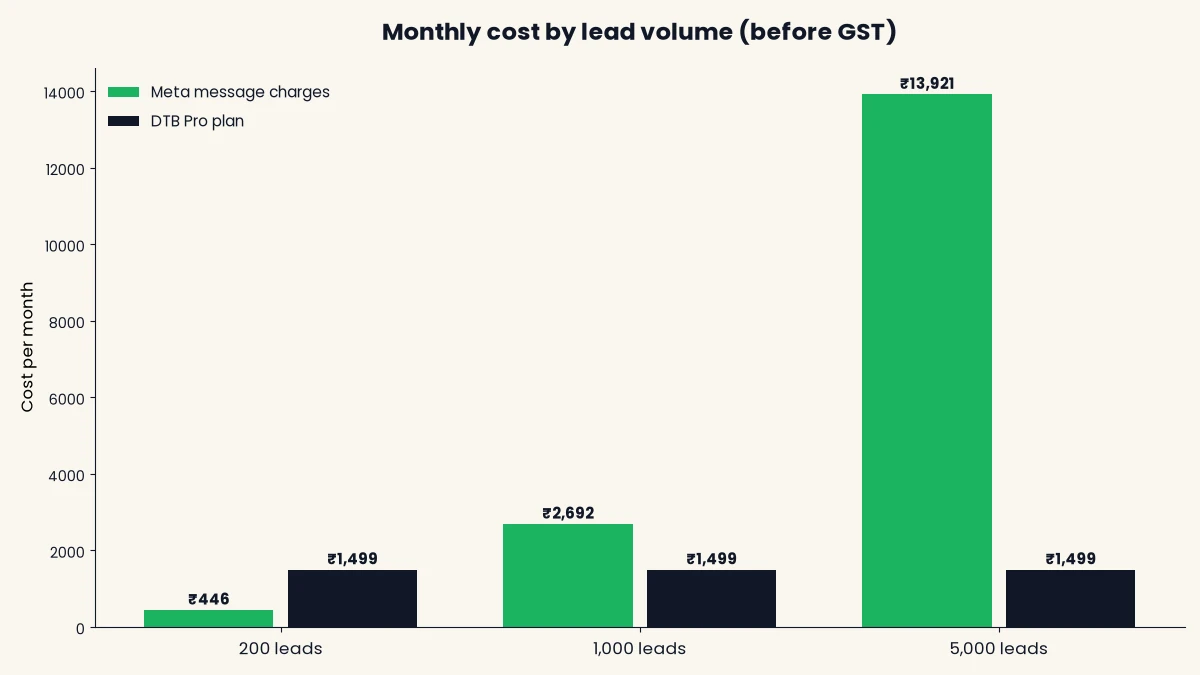
| 200 (one small project) | ₹446 | ₹1,499 | ₹1,945 | ₹9.73 |
| 1,000 (an active launch) | ₹2,692 | ₹1,499 | ₹4,191 | ₹4.19 |
| 5,000 (a large developer) | ₹13,921 | ₹1,499 | ₹15,420 | ₹3.08 |
The flat fee is why cost per lead falls as volume rises. The marketing follow-ups are the largest line at scale: at 5,000 leads they account for ₹8,631 of the ₹13,921 Meta total. That is why it pays to send follow-ups only to leads who have not replied and to use the Replied decision and the Goal/Exit node to stop the sequence once they do.
Set these numbers against what the ad already cost you per lead. For a wider breakdown of the fee structure, see WhatsApp Business API pricing in India.
Setup checklist
Setup takes five steps, and per DTB’s team the typical time from signup to a first message is about 15 minutes for the connection itself. Templates and flows take longer because they need Meta’s review and your own writing.
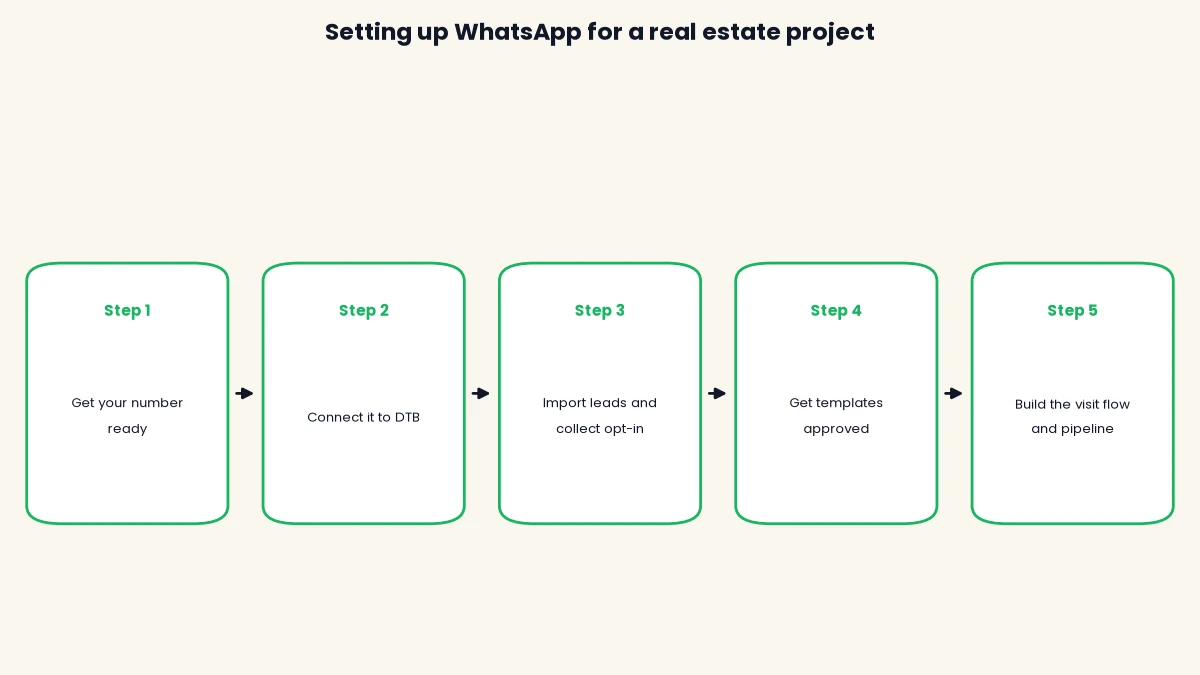
- Get your number ready. Decide which number buyers will message. Use a dedicated number for the API, or keep your existing WhatsApp Business app number and run both through coexistence.
- Connect it to DTB. Choose Connect with Facebook, log in, and connect either a Cloud API number or your existing Business app number. Fill in your business profile: photo, about text, address and website.
- Import leads and collect opt-in. Connect Facebook Lead Ads so form submissions become contacts, add a WhatsApp consent line to every lead form, and set up segments and tags for new enquiries and visited buyers.
- Get your templates approved. Submit the instant reply, visit confirmation, reminder, follow-up and launch templates to Meta from DTB’s template builder, choosing the right category for each.
- Build the visit flow and pipeline. Create the WhatsApp Flow for qualification and slot booking, the automation for reminders and follow-ups, and the pipeline stages. Then test each with your own number before real leads see it.
If you are new to the API, check DTB’s use cases for other industries that run the same pattern, and give yourself one dry run with your own team before the launch weekend.
Common mistakes
- Messaging bought or inherited lists. Old databases have no opt-in, so recipients block and report you. Only message people who agreed.
- Using marketing wording in utility templates. Meta rejects templates whose category does not match the content.
- Sending follow-ups after the buyer has replied. Use the Replied decision and a Goal/Exit node so an automated nudge never lands after a human conversation.
- Launching a broadcast beyond your limit. A new portfolio starts at 250 unique customers in 24 hours. Plan the send in batches.
- Letting the bot answer price and legal questions. Keep the bot to project information and hand real negotiation to a person.
- Sending at the wrong time. Schedule campaigns for hours when buyers expect to hear from you. DTB campaigns can be sent immediately or scheduled with Send later.
- Skipping the dry run. Test every flow, template and automation on your own number before the launch weekend.
Book a free demo and we will walk through the lead-to-visit flow on your own project.
How DTB helps, and where it does not
DTB is an official Meta Tech Provider, and it puts the whole real estate workflow in one workspace. Here is what each part does for a sales team:
- Lead import: Facebook Lead Ads submissions arrive as contacts automatically.
- Qualification and booking: WhatsApp Flows collect budget, configuration and a visit slot inside the chat.
- Automation: Send Template, Wait and Goal/Exit nodes run reminders and follow-ups.
- Team inbox: chats can be assigned to a user or a team.
- Pipeline: a Kanban board with deal values and expected close dates, on the Pro plan.
- Pricing: zero markup on Meta’s charges, so you pay Meta’s rate for messages plus a flat ₹1,499 a month for Pro.
Be clear-eyed about the limits. A workspace allows up to 3 sub-users, which matters if your project sales team is larger. Property portals and site-visit calendars are not in the integrations list. And DTB cannot promise a number will never be restricted, since Meta makes that decision. What DTB can do is make good practice easy: opt-in checkboxes, unsubscribe nodes and template categories chosen up front.
Conclusion
The WhatsApp Business API for real estate gives a property sales team what a single phone cannot: a fast first reply, a booking form inside the chat, follow-ups that stop when the buyer replies, and a pipeline that shows what each stage is worth. The cost is a flat fee plus Meta’s charges, and the example above shows it can come to a few rupees per lead. Get opt-in right, keep the bot to project information, and build the visit flow first. Start with DTB at ₹1,499/month or book a free demo to see it on your own leads.
Frequently asked questions
Is the WhatsApp Business API legal for real estate marketing in India?
Yes, the API is Meta’s official product and is allowed for businesses, including real estate. The condition is opt-in: you may message only people who gave you their number and agreed to hear from you. Check your state’s RERA rules for what property messages must include.
How much does the WhatsApp Business API cost for a real estate developer?
You pay a platform fee plus Meta’s per-message charges. On DTB, the Pro plan is ₹1,499 a month with no markup on Meta’s rates, and Meta’s charges depend on message volume and type. In the worked example above, 1,000 leads a month comes to about ₹4,191 before GST.
Can I send project brochures and floor plans on WhatsApp?
Yes. DTB’s templates accept an image, video or document header, so a brochure PDF or floor plan can go with a template. Inside an open 24-hour window you can also answer a buyer’s question with the brochure directly.
Can I keep using my WhatsApp Business app number?
Yes, through coexistence. DTB lets you connect an existing Business app number and keep using the app on the same number. Coexistence has trade-offs, so check them before you switch.
How do I follow up with site visitors automatically?
Use an automation with a Wait step. Send a thank-you template the same evening, wait a couple of days, then send a follow-up, and use the Replied decision and a Goal/Exit node so the sequence stops once the buyer replies. This needs DTB’s Pro plan.
Can I broadcast a new project launch to my whole database?
Only to people who opted in, and only up to your messaging limit. A new business portfolio starts at 250 unique customers in 24 hours and scales as your quality and volume grow. Messaging a bought list risks blocks and a lower quality rating.
Does DTB connect to property portals like 99acres or MagicBricks?
Direct portal integrations are not listed in DTB’s integrations panel. You can route portal leads in through Zapier or n8n, or import them from a CSV. Test that route with a few real leads before a launch.
How many team members can use one DTB workspace?
A workspace allows up to 3 sub-users. If your project sales team is larger, plan around that limit, for example by assigning chats to teams, and ask DTB about your setup before you commit.