
Your team answers customers on the WhatsApp Business app from a phone, and now someone wants automation, templates or a shared inbox through the API. Before you connect the two, check the WhatsApp coexistence limitations, because keeping both does not mean keeping every feature. Coexistence lets one number run the Business app and the WhatsApp Business API together, but a few features switch off, and Meta puts a fixed speed cap on the number.
Quick answer: WhatsApp coexistence lets your existing Business app number connect to the API while you keep answering from your phone. The trade-offs, per Meta and Business Solution Providers (BSPs): a fixed 20 messages a second throughput, no Official Business Account (green tick), broadcast lists disabled in the app, some 1:1 chat features turned off, group chats that do not sync, and an app you must keep opening roughly every two weeks so the link stays alive.
Key takeaways
- Coexistence is a good first step for a business with one or two people replying from a phone. It is a poor fit for a multi-agent support team or very large broadcasts.
- The 20 messages a second cap is rarely your real bottleneck. Meta’s messaging limit tier (250 unique customers a day for a new portfolio) usually bites first.
- Open the Business app at least once every two weeks, and do not uninstall it, or the connection can drop.
- Coexistence and full migration are both official paths. Ask your provider how a later move works before you start.
Updated 25 September 2026 by the Digital Toolbox team. Meta’s coexistence and messaging-limit documentation checked the same day.
In this guide
- What is WhatsApp coexistence?
- What works in the app vs the API?
- WhatsApp coexistence limitations to know
- Is 20 messages a second enough?
- Coexistence vs full migration
- How to set up coexistence with DTB
- How DTB helps
- FAQ
What is WhatsApp coexistence?
WhatsApp coexistence is a Meta feature that lets a single WhatsApp Business number stay active on the standalone Business app and on the Cloud API at the same time. Messages on either side sync to the other, so a reply typed on the phone shows up in the API dashboard, and a template sent through the API appears in the phone’s chat thread.
Before coexistence, moving to the API meant giving up the app on that number. Now a shop owner or clinic receptionist can keep replying from the phone they already use, while templates, broadcasts and automation run through the API. It is the reason many small Indian businesses can adopt the API without retraining their team.
What you need before you can use it
- A provider Meta has approved: Meta’s documentation says the onboarding partner must be a Solution Partner or a Tech Provider. DTB is an official Meta Tech Provider.
- A recent app: the business must use WhatsApp Business app version 2.24.17 or higher.
- A number already in use: coexistence is meant for businesses actively using the app today, not for a brand-new number.
What works in the app vs the API?
Once coexistence is active, the two sides split the work instead of duplicating every feature. This table shows what to expect on each side.
| Feature | WhatsApp Business app | WhatsApp Business API |
|---|---|---|
| Answering one-to-one chats | Yes, from the phone | Yes, from a dashboard or team inbox |
| New broadcast lists | Disabled once connected | Yes, to opted-in contacts via approved templates |
| Templates and automation | No | Yes, this is the API’s core function |
| Several team members on one number | No, one phone | Yes, shared inbox across agents |
| Disappearing messages, view once, live location | Turned off for 1:1 chats after connecting | Not applicable |
| Group chats | Stay in the app | Do not sync to the API |
| Official Business Account (green tick) | Not supported on a coexistence number | Not supported on a coexistence number |
| Sending speed | Normal manual typing | Fixed 20 messages a second for the number |
WhatsApp coexistence limitations to know before you set it up
None of these is a dealbreaker for most small and mid-size Indian businesses, but each is worth checking against how your team actually works.
- Throughput is fixed at 20 messages a second. Meta’s documentation describes a “fixed throughput of 20 mps” for numbers used on both platforms, which is far below typical Cloud API rates. The next section shows why this rarely matters.
- The app must be opened regularly and never uninstalled. Meta’s documentation lists “primary device inactive for approximately 14 days” as a reason the connection is dropped, and at least one BSP advises 13 days to be safe. Uninstalling the app also disconnects the account, per that BSP’s documentation. Open the app once a week and you will not have to think about it.
- No Official Business Account (green tick). BSP documentation states that the blue or green verified badge is not supported for coexistence accounts, with Meta Verified for Business as the alternative. If the tick matters more than keeping the app, choose full migration.
- Broadcast lists are disabled in the app. Meta says businesses cannot create new broadcast lists in the app after connecting. Broadcasts move to the API side, sent to opted-in contacts through approved templates.
- Some 1:1 chat features turn off. Meta lists disappearing messages, view once messages and live location as disabled for individual chats once the number is connected.
- Group chats do not sync. Groups remain in the app and never reach the API dashboard, so anything your team handles in a group stays on the phone.
- Chat history syncs for a limited window. Up to 180 days of one-to-one history can sync, the partner has 24 hours to complete the sync after onboarding, and media older than 14 days may not come across.
- Linked devices are reset. A BSP’s documentation notes that companion apps are unlinked after onboarding, with only WhatsApp for Windows and WearOS able to be linked again. If your team uses several linked devices today, plan for this.
Availability is also limited by country. Coexistence has been reported as unavailable for numbers registered in Nigeria and South Africa, and numbers registered in India are supported. Confirm the current list with your provider before you plan around it.
Is 20 messages a second enough?
For most businesses, yes: 20 messages a second is 1,200 a minute, so a 10,000-message broadcast would take about eight minutes to send. The cap only hurts a business sending very large campaigns at speed.
A tighter limit usually applies first. According to Meta’s messaging limits documentation, a new business portfolio can start conversations with 250 unique customers in a rolling 24 hours, scaling to 2,000, 10,000, 100,000 and then unlimited. The limit is shared by every number in the portfolio. So a first broadcast to 5,000 people is held back by the daily tier long before the speed cap matters, and you should plan the send in batches. Our guide on how to avoid getting your WhatsApp number blocked explains how quality and opt-in affect these tiers.
Coexistence vs full migration: which should you choose?
Both are official paths onto the WhatsApp Business API, and the right one depends on how your team answers customers today. Coexistence keeps the app. Full migration moves the number to the API and lifts the coexistence limits.
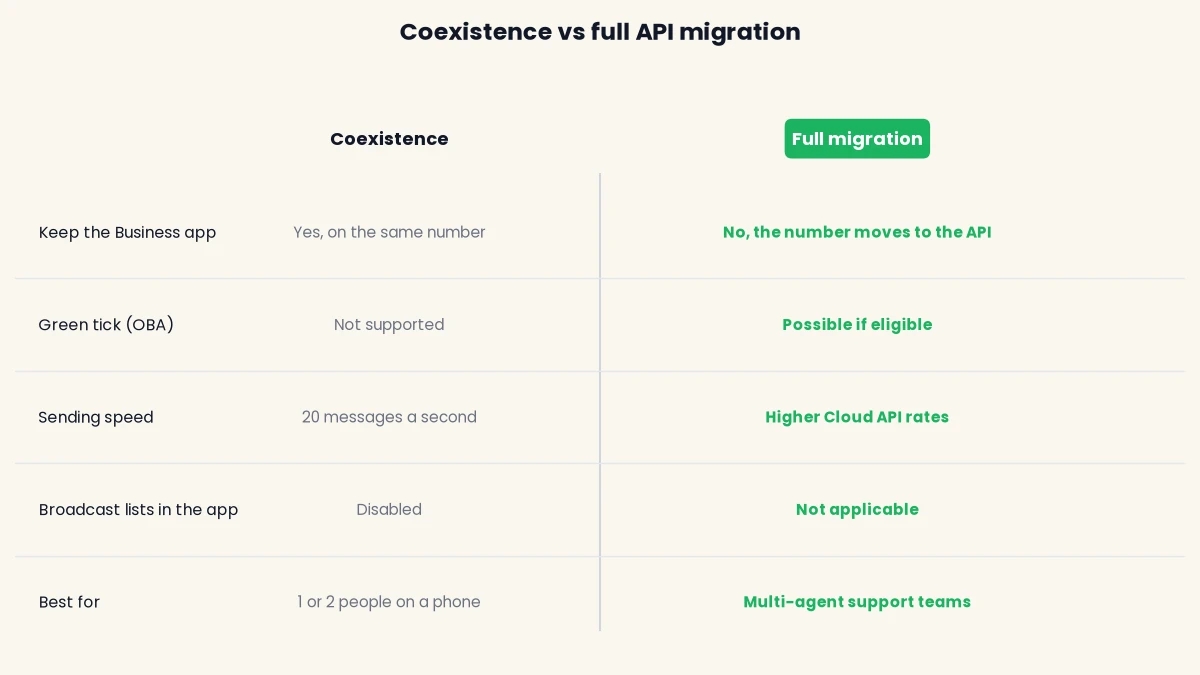
- Choose coexistence if: one or two people currently reply from a phone, you want automation or broadcasts without changing that habit, you do not need the green tick now, and your sending volume fits comfortably inside the limits above.
- Choose full API migration if: you run or plan a multi-agent support team that needs a proper shared inbox, you want Official Business Account status, or you rely on group chats and linked devices you would rather not lose track of.
Ask your provider how a later move from coexistence to full migration would work for your number before you start, so the first choice does not box you in. If you are still deciding whether the API is worth it at all, our guide to WhatsApp Business API pricing in India shows what it costs.
How to set up coexistence with DTB
Setup takes five steps, and per DTB’s team the typical time from signup to a first message is about 15 minutes.
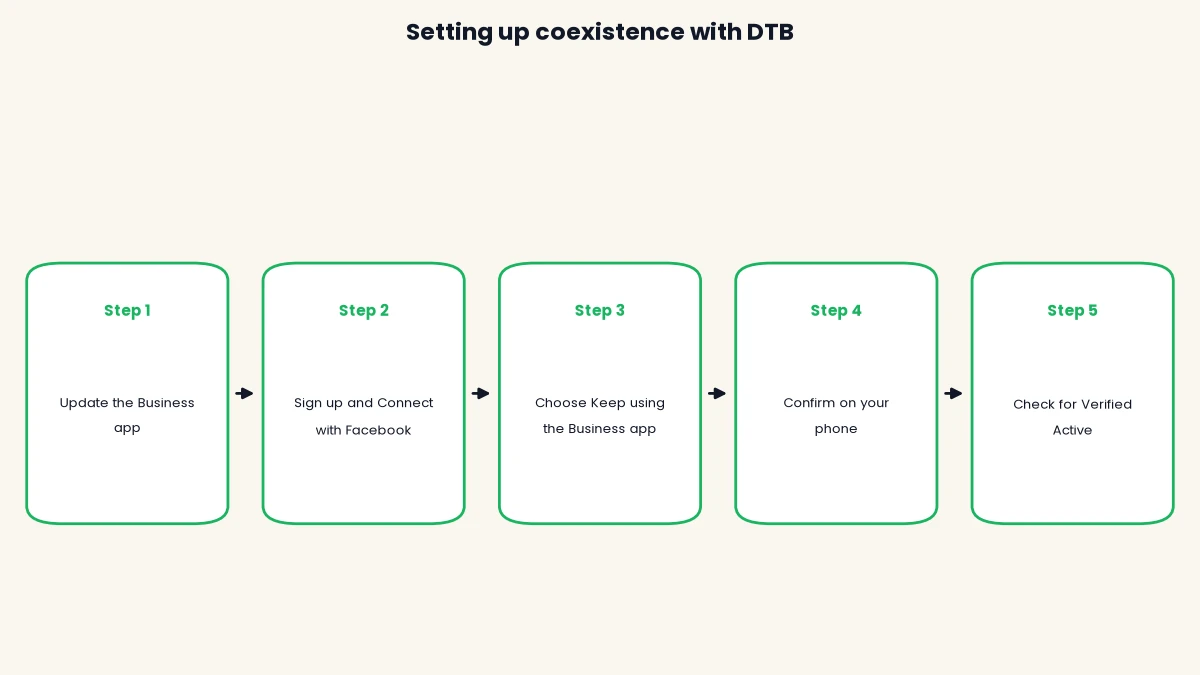
- Update the WhatsApp Business app. Make sure the app on the phone that holds your business number is on version 2.24.17 or higher.
- Sign up and choose Connect with Facebook. Create your account at app.digitaltoolbox.in and start the Connect with Facebook option, which links your WhatsApp Business account without copying any credentials.
- Choose Keep using the Business app. Pick the coexistence option rather than connecting a dedicated Cloud API number, so the app stays active on the same number.
- Confirm on your phone. Follow Meta’s prompts, which include approving the connection in the app and choosing whether to bring your existing chat history across.
- Check for Verified Active. Once the account is connected, the connection status in DTB shows Verified Active, and templates, automation and the team inbox are ready to use.
After setup, open the Business app at least once a week so the connection never lapses. Book a free demo and see the coexistence connection on your own number before you commit.
How DTB helps
DTB is an official Meta Tech Provider, which is the kind of partner Meta requires for coexistence onboarding. Coexistence is one of two connection options in DTB’s setup screen, alongside connecting a dedicated Cloud API number, so it is a choice you make when you connect, not a separate plan.
Once connected, DTB gives you what the app lacks: a shared team inbox where chats can be assigned to a user or team, bulk campaigns to segments or tags, template management with approval tracking, and on the Pro plan (₹1,499 a month) automations, chatbot flows and a sales pipeline. Meta’s per-message charges are separate, and DTB adds no markup on them. Be aware that a DTB workspace allows up to 3 sub-users, which suits a small team and is worth checking if you plan to grow fast. For industry examples, see our use cases page.
Conclusion
Knowing the WhatsApp coexistence limitations upfront means no surprises after you connect, and it is not a reason to avoid coexistence. For a small team that lives on a phone, it is the lowest-friction way onto the API. Keep the app open weekly, plan broadcasts around Meta’s daily tiers, and move to full migration when your team, volume or need for the green tick outgrows it. Start with DTB at ₹1,499/month and keep the app your team already knows.
Frequently asked questions
What is WhatsApp coexistence?
WhatsApp coexistence lets a single WhatsApp Business number run the Business app and the WhatsApp Business API at the same time. Messages sync between both sides, so you can reply from your phone while templates and automation run through the API.
What are the main limitations of WhatsApp coexistence?
The main limits are a fixed 20 messages a second throughput, no Official Business Account (green tick), broadcast lists disabled in the app, group chats that do not sync, and a connection that can drop if the app is not opened for about two weeks.
Can I use the WhatsApp Business app and API on the same number?
Yes, through coexistence. You keep answering one-to-one chats from the app while templates, automation and a team inbox run through the API, without changing your number.
Does WhatsApp coexistence support the green tick?
No. BSP documentation states that Official Business Account status is not supported for coexistence accounts, and Meta Verified for Business is the alternative. If you need the green tick, migrate fully to the API instead.
What happens if I do not open the WhatsApp Business app for two weeks?
The connection can be dropped. Meta’s documentation lists about 14 days of primary device inactivity as a disconnection reason, and some providers advise 13 days. Opening the app once a week avoids the risk.
Is WhatsApp coexistence available in India?
Yes. Coexistence is reported to be supported for numbers registered in India, and unavailable for numbers registered in Nigeria and South Africa. Confirm the current list with your provider before you connect.
Does coexistence cost extra?
On DTB, coexistence is a connection option, not a separate plan, so you pay the plan fee (Basic is ₹500 a month, Pro is ₹1,499 a month) plus Meta’s per-message charges at no markup. Automation, chatbot flows and the sales pipeline need the Pro plan.
Can I switch from coexistence to full API migration later?
Both coexistence and full migration are official paths, so a later move is a normal plan when your team or volume grows. How the switch works depends on your number and provider, so ask before you start.